
AI to Write KDP Keywords and Categories Guide
AI to Write KDP Keywords and Categories: A Practical Guide for Self-Publishers
Estimated reading time: 6 minutes
- AI can speed ideation for KDP keywords and categories, but you must validate suggestions with Amazon-specific data.
- Combine a KDP keyword generator approach with human checks to choose profitable amazon kdp categories and terms.
- Use production tools that handle manuscript formatting, EPUB conversion, and cover generation so keyword work turns quickly into live listings.
How AI to Write KDP Keywords and Categories Works
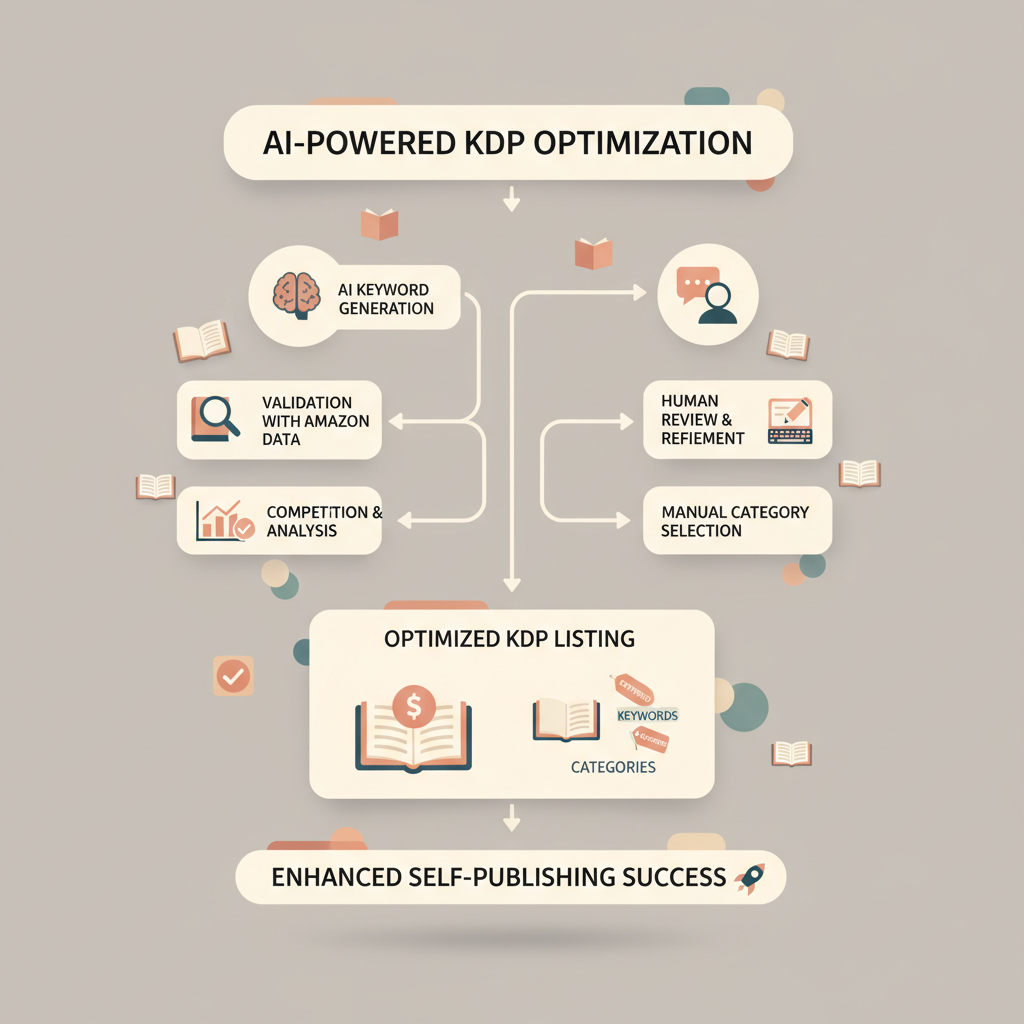
AI to write KDP keywords and categories begins as a rapid ideation engine. You give prompts about your book’s subject, tone, and target reader, and the AI outputs lists of search phrases, long-tail ideas, and category suggestions.
That raw output is not a finished listing — think of it as a funnel. Use the best ideas, check them against real Amazon signals, and then format them into KDP’s keyword fields and category choices.
Behind the scenes, most AI systems generate keyword ideas from language patterns, public text, and any training data they have. They are excellent at expanding a single concept into many related phrases: synonyms, problem statements, and context-driven long-tail queries; this makes AI useful for one part of the process — getting breadth fast. Human review and an Amazon-aware tool are still essential to measure volume, competition, and category fit.
If you want a quick comparison of book-generation tools and how they handle metadata like keywords, see our Top 10 AI Book Generator roundup — it helps you understand which platforms prioritize KDP-ready output and which focus only on writing.
Why AI Alone Isn’t Enough
AI can suggest dozens or hundreds of keyword phrases, but several gaps remain:
No real-time Amazon sales data. Most generic AI models don’t have live Amazon search volume or buy signals.
Difficulty with category hierarchy. Amazon categories and subcategories are specific; AI may propose categories that don’t map cleanly.
Relevance vs. intent. A phrase may be relevant to your topic but not something buyers use when looking to purchase.
Successful publishers use AI for scale and creativity, then pair it with KDP-focused validation so their chosen amazon kdp categories and keywords lead to visibility and conversions.
Research Strategy: Tools, data, and validation
Start with goals. Are you launching a series of short non-fiction books aimed at impulse buyers, or building an authority title intended to sell steadily long-term? Your goals shape the keyword approach: high-volume, low-competition long-tail phrases for quick sales, or niche authority phrases for evergreen discoverability.
Make a two-step research plan:
- Ideation with AI and a KDP keyword generator mindset.
- Validation with Amazon-specific metrics and category checks.
AI ideation: breadth and phrasing
Use prompts that capture the buyer perspective. Instead of “keywords for time management,” ask for “phrases someone would type when frustrated with time management in the workplace.” This shifts AI output toward intent-driven keywords — phrases that reflect buyer pain points or goals.
Useful prompt strategies:
- Combine topic + problem + audience: “time management for busy nurses who work nights”.
- Ask for long-tail question forms: “how to manage time with three kids”.
- Request alternate phrasings and synonyms to capture vocabulary diversity.
These prompts produce candidate lists that are rich in variation. Treat that list as a raw dataset.
Validate with Amazon-aware tools
Next, validate top candidates. For accurate category and keyword decisions, prioritize Amazon-focused data. Tools that pull real Amazon search volume, competition, and category placement give you the signals AI lacks.
Publisher Rocket-style reports and free alternatives exist; the point is to measure:
- Search volume (estimated)
- Competition level (how many other books target the phrase)
- Existing best-seller placements and category patterns
Don’t treat validation tools as gospel. Use them to rank and prioritize ideas from AI; then cross-check by sampling live Amazon pages for top-ranking books. Look at titles, subtitles, and category tags used by best-sellers in your niche.
Balancing breadth and specificity
AI produces breadth; your job is to convert breadth into targeted phrases that buyers use.
A practical approach:
- Pick 5–10 high-potential long-tail phrases from AI output.
- Validate those 5–10 in an Amazon-aware tool.
- Narrow to 3–5 if you’re launching a single book — these become your KDP keywords and influence category choice.
Practical note on tools
Many publishers combine free ideation and paid validation. Free tools can catch obvious niches; paid tools give faster, repeatable signals for scaling. Remember: AI helps generate the ideas, but a good KDP keyword generator or Amazon-focused research tool provides the metrics you need to choose categories and prioritize phrases.
Implementing Keywords and Categories for KDP Listings
Once you have validated keyword phrases and a shortlist of amazon kdp categories, the next step is implementation: integrate keywords into title, subtitle, description, and KDP keyword fields. Small edits and choices here will change discoverability.
Use keywords where they read naturally
Amazon’s ranking systems favor relevance and buyer behavior. Place primary phrases so they read like normal copy.
- Title: Use the strongest phrase if it fits naturally and enhances clarity.
- Subtitle: Add secondary long-tail phrases that explain benefit or audience.
- Description: Write for conversion — use keywords naturally inside benefits, outcomes, and a clear promise.
Avoid keyword stuffing. If copy reads awkward or forced, buyers notice and conversion drops. A well-written, human-sounding title and subtitle outperform an awkward, keyword-packed string.
KDP keyword fields: use every slot thoughtfully
KDP provides seven keyword slots (subject to change); each slot accepts up to 50 characters. Use them to capture variations and phrases that won’t fit naturally in title or subtitle.
- Use phrases, not single words, when possible (long-tail variants capture niche intent).
- Avoid repeating words already in your title/subtitle unless those words convey different buyer intent.
- Use commas and natural separators, but remember KDP treats each slot independently — don’t place the same phrase in multiple slots.
Categories: pick a primary home and a growth path
Amazon categories are hierarchical. Choose the most specific category that fits your content — books often rank faster in narrow subcategories. Also, consider a primary category that helps you land a first-page best-seller designation for visibility.
If you want multiple categories, plan a growth path: monitor rank after launch and request category changes if a better fit emerges.
Practical example: time management for nurses
Title uses the main phrase: Time Management for Night-Shift Nurses.
Subtitle adds an outcome: Practical Routines to Improve Sleep and Shift Performance.
KDP keyword slots include variations: “shift work sleep tips”, “nurse time blocking”, “quick routines for nurses”.
Categories target a specific nursing subcategory and a health niche.
Monitor and iterate
After publishing, track keyword performance and category rank. Use sales and category movement signals to refine your next book’s keyword strategy. Over time, small changes to subtitle or keyword slots can shift discoverability.
If you need help converting a finished manuscript into publish-ready files, EPUB converter tools can handle the step from formatted manuscript to EPUB quickly and reliably.
When you’re preparing covers, an auto cover generator streamlines choices and creates versions sized for print and ebook.
And if you’re moving from manuscript to a final paperback or ebook, BookAutoAI supports the full creation process so your keyword work leads directly to live listings.
In the middle of a campaign, you might also find a focused comparison useful — our Top 10 AI Nonfiction Book Generator article shows services that prioritize metadata and KDP-ready output for non-fiction operators.
Publishing Details: formatting, covers, and final checks
Publishing metadata is only part of the job. Technical details can block a launch or cause rejected files. Treat this stage as quality control: format checks, cover checks, and final verification of keyword and category placement.
Formatting and EPUB conversion
A properly formatted EPUB or print-ready file reduces friction at launch. Automated EPUB conversion is helpful when you need to publish quickly or at scale. It’s also one less source of listing errors — no mangled tables of contents, missing metadata, or broken page breaks.
If you rely on a tool that includes an EPUB converter, you save time and reduce mistakes.
Cover creation and variant testing
Cover design matters. For many impulse buyers, the cover is the first signal of value. Test a few different designs and monitor conversion.
If your platform supports auto cover generation, you can quickly produce variants for A/B testing on ads or storefront experiments. Use simple, bold imagery and readable type at thumbnail sizes.
Print checks: paperback details that matter
If you publish a paperback, confirm:
- Trim size and margins are correct
- Page count matches binding tolerances
- Cover includes correct spine width and barcode placement
KDP will flag technical issues during upload, but fixing them before upload saves time.
Final checks before hitting Publish
- Metadata sweep: confirm title, subtitle, author name, and keyword slots match your research and read naturally.
- Category check: ensure the categories assigned are the ones you validated.
- Preview the final ebook and paperback in device previewers. Look for formatting or layout problems.
- Keep a launch checklist, but don’t let perfection delay publishing. Small, testable updates can follow a live book.
How BookAutoAI fits into this process
BookAutoAI is built for operators who need speed and consistent quality. It generates humanized text, formats the book, and prepares EPUB files and print-ready covers. That reduces friction so you can test keyword sets faster and iterate based on real sales data.
Write like a Human, Publish like an author.
FAQ
Can AI replace manual keyword research for KDP?
No. AI speeds ideation and produces phrasing variations, but Amazon-specific validation is required. AI output should be filtered through tools that show search volume and competition.
How many keywords should I use in KDP fields?
Prioritize quality over quantity. Use all available slots but fill them with prioritized, validated phrases rather than repetitive or generic words.
How often should I change categories after launch?
Allow at least a week or two for initial data. If your book isn’t gaining traction, change categories strategically and monitor the impact. Avoid flipping categories rapidly.
What role does cover design play in keyword success?
Covers affect conversion. Strong covers increase clicks and sales, which in turn improve your book’s ranking for its keywords. Covers and keywords work together.
Should I use a KDP keyword generator every time I publish?
Yes, if you want repeatable results at scale. A KDP keyword generator paired with human validation streamlines discovery and helps you optimize each new title.
How do I handle EPUB conversion and cover sizing?
Use reliable EPUB conversion tools and cover generators to produce device-ready files and correct print cover dimensions before upload.
Sources
- https://www.saffronedge.com/ai/best-ai-keyword-generator-tool/
- https://bookbizacademy.com/niche-keyword-research/best-amazon-kdp-keyword-research-tools-complete-guide
- https://amazonseoconsultant.com/best-kdp-softwares/
- https://trafficthinktank.com/best-keyword-research-tools/
- https://www.howtoleverageai.com/post/how-to-leverage-ai-for-keyword-research-for-self-publishing
- https://www.youtube.com/watch?v=Zl–xkdDJGw
- https://blog.bookautoai.com/ai-book-generator-kdp-review-81/
AI to Write KDP Keywords and Categories: A Practical Guide for Self-Publishers Estimated reading time: 6 minutes AI can speed ideation for KDP keywords and categories, but you must validate suggestions with Amazon-specific data. Combine a KDP keyword generator approach with human checks to choose profitable amazon kdp categories and terms. Use production tools that…