
Requirements for Amazon KDP and how to pass review
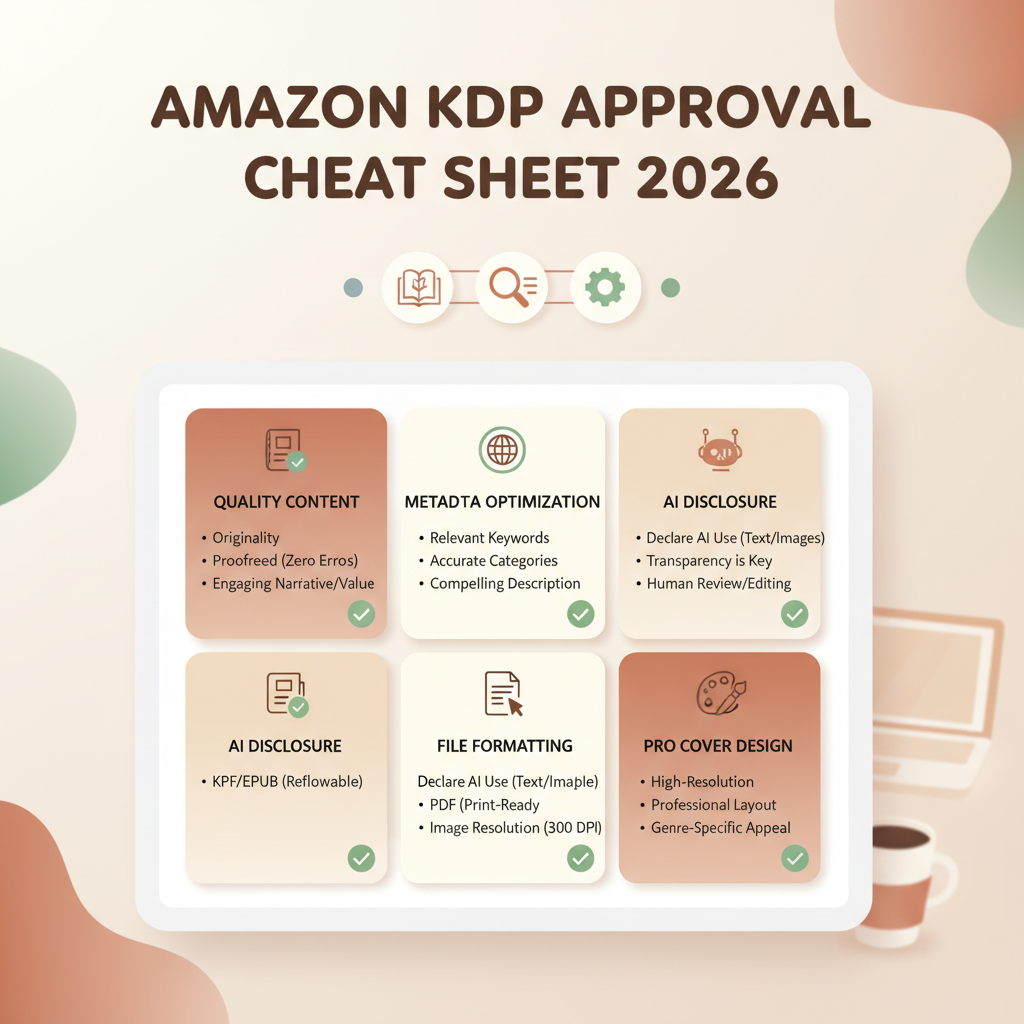
Requirements for Amazon KDP: a cheat sheet for passing review in 2026
Estimated reading time: 5 minutes
- Amazon’s 2026 review focuses on quality, accurate metadata, and transparent AI disclosure—get those right to avoid most rejections.
- Proper file formatting, a professional cover, and validated EPUB or print files eliminate common technical reject reasons.
- Use tools that humanize AI output, create market-ready covers, and convert clean EPUBs to speed approval and improve discoverability.
Table of Contents
- Account setup, rights, and metadata
- What KDP checks during content review
- Policy and content compliance
- When AI content matters
- How to disclose AI use without hurting sales
- Quality and readability standards
- Practical steps to reduce content rejections
- Formatting, covers, and EPUBs that pass checks
- Common technical fail points
- Why a professional cover matters now more than ever
- Convert and validate your EPUB
- Paperbacks and print-ready files
- Practical checklist for a clean upload
- Pricing, royalties, and launch tips
- Key pricing rules to remember
- Avoiding launch problems and policy flags
- Positioning and discoverability
- How BookAutoAI helps your KDP workflow
- Final thoughts
- FAQ
- Sources
Account setup, rights, and metadata
The first set of requirements is administrative, yet authors trip over these details more than you might expect. KDP needs a functioning account with correct tax and payment details, publishing rights, and accurate metadata.
What to have ready
- One KDP account per person or entity; Amazon disallows duplicate KDP accounts for the same author unless you have a documented business reason.
- Valid email, bank account, and tax information in your KDP settings.
- Clear publishing rights — either you own the content or you have written permission for co-created or licensed materials.
- Accurate metadata: title, optional subtitle, concise description, correct author name, and targeted categories and keywords.
How metadata affects review and discoverability
KDP reviews metadata for policy compliance and to place your book correctly. Good metadata helps readers find your book; invest time in categories and keywords. If you publish internationally, confirm territory rights match distribution settings.
Pro tip: For practical, step-by-step submission guidance, see Publish Book Amazon KDP which explains the submission steps and common pitfalls.
What KDP checks during content review
Amazon’s 2026 review focuses on three priorities: policy compliance, reader experience, and AI transparency. Meeting those reduces the chance of rejection.
Policy and content compliance
Amazon enforces standard content policies: no hate speech, illegal content, or copyright violations. Reviewers look for clear violations and deceptive practices.
- Plagiarism, uncredited translations, or reused copyrighted material.
- Duplicate content or minimal changes of existing works.
- Misleading or illegal content in title, description, or front matter.
- Spammy or keyword-stuffed descriptions meant to game search algorithms.
When AI content matters
Beginning in 2026, Amazon emphasizes transparency for AI-generated text, images, and translations. Disclose AI usage where required and ensure the output reads naturally.
How to disclose AI use without hurting sales
- Include a short, factual disclosure in the front matter or copyright page stating the extent of AI assistance.
- Keep the disclosure professional and avoid language that undermines credibility.
- Humanize AI-generated content by editing for voice, flow, and factual accuracy.
Quality and readability standards
KDP flags books with poor formatting, machine translation errors, inconsistent voice, or excessive repetition. These issues often trigger manual review.
Rejection triggers include garbled passages, broken table of contents, repetitive sections that read like raw AI output, and missing expected front/back matter.
Practical steps to reduce content rejections
- Edit and proofread every chapter; use a professional editor when possible.
- Revise AI-generated text for tone and clarity so it reads like a coherent human-authored book.
- Include a clear table of contents and consistent headings.
- Avoid excessive reuse of boilerplate across multiple titles.
Formatting, covers, and EPUBs that pass checks
Technical issues are a leading cause of rejection. KDP has explicit rules for ebooks and paperbacks; follow them to avoid manual review.
Common technical fail points
- Incorrect EPUB structure or missing metadata inside the file.
- Large, unoptimized images that exceed size limits.
- Fonts not embedded in paperback files or licensing issues.
- Improper page dimensions, margins, or missing bleed for print.
- Files over size limits or corrupted uploads.
Why a professional cover matters now more than ever
A cover signals quality to reviewers and customers. Low-effort AI art covers can be flagged as poor quality or misleading. A market-ready cover uses readable typography and thumbnail-friendly layout.
If you need a reliable solution for cover design, consider a book cover generator that produces export-ready covers matching bookstore thumbnail expectations.
Convert and validate your EPUB
EPUB structure can be finicky; a valid EPUB must include correct metadata, a working navigation, embedded cover, and clean chapter breaks.
- Correct metadata (title, author, identifiers embedded).
- Functional navigation (table of contents).
- Properly embedded cover image and referenced files.
- Clean chapter breaks and no broken links.
For fast conversions that reduce manual cleanup, try a dedicated EPUB Converter. For reliable upload support, consider professional book upload tools.
Paperbacks and print-ready files
- Correct trim size and bleed where applicable.
- Embedded or licensed fonts for print.
- Images at 300 DPI for interior art; flattened layers and CMYK where required.
- Interior files under size limits and a matching cover wrap for full-bleed designs.
Practical checklist for a clean upload
- Run an EPUB validator or use a trusted converter that embeds metadata and TOC.
- Preview the book in Amazon’s previewer and on several device sizes.
- Use a market-ready cover that reads clearly at thumbnail size.
- Flatten and embed all fonts for print; confirm image DPI.
- Keep files within allowed size limits and follow KDP’s upload prompts.
Pricing, royalties, and launch tips to avoid policy flags
Pricing mistakes can cause review friction or incorrect royalty treatment. KDP’s ebook royalty options (35% and 70%) have rules about list prices and delivery costs.
Key pricing rules to remember
- 70% royalty eligibility usually requires pricing within a defined range (commonly $2.99–$9.99) and matching list prices across required marketplaces.
- Some territories have minimum price constraints for 35% or 70% options; check KDP help pages for current minimums.
- Unauthorized free pricing or promotions across regions can prompt KDP intervention.
Avoiding launch problems and policy flags
- Don’t game visibility with duplicate titles, keyword stuffing, or misleading descriptions.
- Use legitimate promotional channels like Amazon’s programs or external marketing; avoid third-party schemes that violate Amazon policy.
- Keep ISBN/ASIN and metadata clear for multiple editions or language versions to avoid duplicate-content flags.
Positioning and discoverability
Quality drives approval and performance. Focus on a clear value proposition in the description, accurate categories, targeted keywords, and a cover that matches the genre.
You can also try Bookautoai for integrated formatting and cover tools that simplify preparing both ebook and print files.
How BookAutoAI helps your KDP workflow
BookAutoAI is designed for authors who need speed and platform compliance: humanized manuscripts up to 25,000 words, market-ready covers, structured EPUBs, and KDP-friendly print interiors.
Final thoughts
KDP remains the fastest route to publishing, but the bar for acceptance is higher in 2026: accurate metadata, transparent AI disclosure, polished writing, and clean technical files are required.
Validate your files, follow administrative and content rules, and use tools that produce humanized prose, market-ready covers, and validated EPUBs to reduce rejections.
FAQ
Do I have to disclose that I used AI to write my book?
If AI contributed significantly to text, images, or translations, Amazon expects a brief, factual disclosure in the front matter or copyright page.
Will KDP reject a book for AI use alone?
Not automatically. Rejections occur when AI use produces low-quality, repetitive, or misleading content, or when disclosure is missing where required.
What are the most common technical reasons for rejection?
Invalid EPUB structure, missing metadata, corrupted files, incorrect print settings, oversized images, and mismatched metadata are typical technical causes.
Can I publish both ebook and paperback versions easily?
Yes. Ensure the ebook has a validated EPUB and the paperback has a print-ready interior and matching cover. Tools exist to create both formats in one flow.
If my book is rejected, how long until I can resubmit?
For metadata or technical fixes, resubmission is immediate once corrected. Policy-related rejections may require an appeal or documentation.
Sources
- https://kdp.amazon.com/help/topic/G200672390
- https://kdp.amazon.com/help/topic/G200634560
- https://kdp.amazon.com/help/topic/G201857950
- https://www.writercosmos.com/blog/amazon-kdp-announces-major-publishing-rule-changes-for-authors-in-2026/
- https://getcovers.com/blog/is-amazon-kdp-worth-it-in-2026/
- https://www.youtube.com/watch?v=V5fj3NBnPHU
- https://www.youtube.com/watch?v=J8dVaG240Nk
Requirements for Amazon KDP: a cheat sheet for passing review in 2026 Estimated reading time: 5 minutes Amazon’s 2026 review focuses on quality, accurate metadata, and transparent AI disclosure—get those right to avoid most rejections. Proper file formatting, a professional cover, and validated EPUB or print files eliminate common technical reject reasons. Use tools that…