
Amazon KDP Website Dashboard and Publishing Workflow
amazon kdp website: Inside the Dashboard and How BookAutoAI Fits
Estimated reading time: 6 minutes
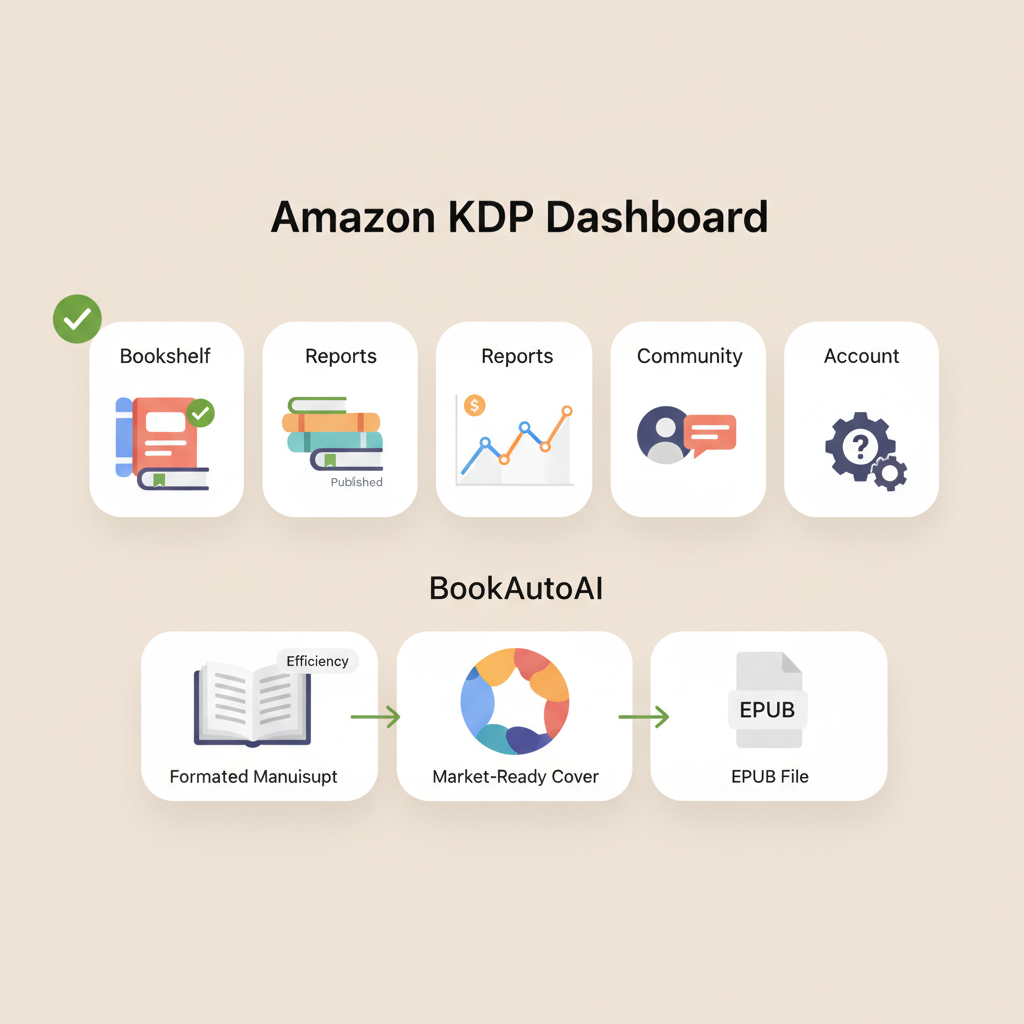
- The amazon kdp website is organized around five practical areas: Bookshelf, Reports, Community, Help, and Account settings—understanding each speeds publishing.
- BookAutoAI streamlines the KDP process by producing formatted manuscripts, market-ready covers, and validated EPUB files that plug directly into KDP submission steps.
- Knowing where KDP expects metadata, AI disclosures, and file types reduces rejection risk and saves time during upload and launch.
Table of Contents
- Dashboard overview
- Bookshelf
- Reports
- Help & Community
- Account settings
- Create a book: manuscript, edits, and outputs
- Manuscript generation
- Editing and humanization
- Version control and export
- Cover, EPUB, and file exports
- Cover generator that sells
- EPUB conversion built for stores
- Print and ebook exports
- Publishing workflow and KDP submission checklist
- Core submission fields
- AI disclosure and compliance
- Quality checks before clicking publish
- Distribution and ISBN
- Monitoring and iteration
- Practical workflow example
- Final thoughts
- FAQ
- Sources
Dashboard overview
Bookshelf
The Bookshelf is where you create a new title entry, edit existing listings, or check publishing status. Each book entry has fields for title, subtitle, author name, book description, keywords, categories, upload areas for manuscript and cover, pricing, and distribution settings.
Familiarize yourself with each field so you can quickly paste clean metadata from your author notes or production tool.
Reports
Sales, royalties, and trend charts live here. The amazon kdp website’s reports help you spot which titles are performing, where sales come from (eBook vs. paperback), and whether a price change makes sense.
Authors with a publishing plan check these reports regularly and use the data to refine descriptions, keywords, and promotional timing.
Help & Community
KDP’s help pages explain content rules, AI usage disclosures, and file requirements. The Community forum contains practical tips and common fixes submitted by other authors.
When you encounter upload or preview errors, search here first—many common issues have a quick, documented fix.
Account settings
Payment, tax, and verification information belong here. The account section also stores author profile metadata that helps maintain brand consistency across listings.
Keep your payment and tax info current to avoid delays in royalty payouts.
Create a book: manuscript, edits, and outputs
Where the KDP dashboard shows fields, production tools create the content that fills them. For non-fiction authors the manuscript is the core asset: a clean interior, a reliable table of contents, and consistent chapter formatting are essential.
BookAutoAI is built to generate up to 25,000 words of humanized non-fiction copy and produce a ready-to-upload interior that matches KDP expectations. If you need a step-by-step guide for account setup and the submission flow, see Amazon Kdp Account Setup for an account walkthrough and setup context.
Manuscript generation
A good production tool goes beyond raw output. BookAutoAI generates structured content with clear chapters, headings, and a table of contents—so you don’t paste unstructured text into the upload field and trigger preview problems.
The system also applies consistent typography and spacing rules that Kindle previews expect, reducing the back-and-forth of manual fixes.
Editing and humanization
KDP reviewers and readers respond to natural phrasing. BookAutoAI emphasizes humanized language and readability to reduce the feel of “machine text.”
That improves presentation on the amazon kdp website because the manuscript reads like a traditionally authored title—helping conversion and long-term discoverability.
Version control and export
Good tools keep track of versions so you can return to earlier drafts if a review suggests revisions. BookAutoAI exports clean, tested files ready for the KDP upload form.
If you’re scaling multiple titles, that export reliability saves hours per book.
Tip: If you’re new to the platform, the BookAutoAI process pairs production with a clear checklist that maps to the amazon kdp website upload fields—title, subtitle, author, description, keywords, and manuscript upload—so nothing is missed during the final submission.
Cover, EPUB, and file exports
Two parts of publishing often cause friction: cover creation and file formatting. The amazon kdp website accepts common file types, but KDP also expects covers and EPUBs to follow specific technical rules. BookAutoAI integrates solutions for both.
Cover generator that sells
A cover on a bookshelf needs to do more than look pretty; it must perform at thumbnail size and match genre expectations. The BookAutoAI Cover Generator creates market-ready front covers with readable typography, genre-appropriate imagery, and visual hierarchy optimized for small thumbnails.
It was trained on top-selling covers rather than generic image datasets, so results align with what readers expect when browsing Kindle and other stores. When you’re ready to upload a cover to the amazon kdp website, using a commercial-ready cover eliminates common KDP rejection causes like unreadable text or incorrect dimensions. Learn more about the cover tool at BookAutoAI cover generator.
EPUB conversion built for stores
Converting a manuscript into a clean, store-ready EPUB can be the most technical step. BookAutoAI’s conversion produces properly structured EPUB files with embedded front covers, correct metadata, and navigation that works on Kindle, Kobo, and Apple Books.
Instead of wrestling with manual fixes after export, you can upload an EPUB that previews correctly and passes platform checks. If EPUB conversion is on your list, see the converter at EPUB Converter.
Print and ebook exports
If you plan both paperback and ebook formats, export tools should handle both without recreating content. BookAutoAI prepares outputs suitable for KDP paperback settings and ebook uploads, so you can use the same source content to make both products.
For services that produce both print and digital editions, consider the BookAutoAI homepage for more on integrated exports: BookAutoAI.
Publishing workflow and KDP submission checklist
Uploading on the amazon kdp website is a step-by-step process that’s easier when you treat it like a checklist. KDP now requires authors to disclose AI usage in each content section (text, images, translations). Document which parts of the manuscript used AI assistance before you begin the upload, and use a short, accurate disclosure in your submission to comply with Amazon’s policies.
Core submission fields
- Title and subtitle: Keep the title consistent with your cover and metadata.
- Author name and contributors: Use a single, consistent author string across all listings.
- Book description: This is your sales pitch on the product page—format it clearly and use short paragraphs for readability.
- Keywords and categories: Choose relevant keywords and assign two or three categories that match reader expectations.
- Manuscript upload: Use the EPUB or KPF for ebooks and PDF for print interiors when appropriate.
- Cover upload: Use the market-ready front cover export or KDP cover creator if you need a quick option.
AI disclosure and compliance
Because KDP requests AI content disclosure, document what parts of the book used AI tools and how they were edited. BookAutoAI outputs are humanized, but disclosure is still required on the amazon kdp website.
If you need a stepwise guide connecting production files to submission fields, the account walkthrough referenced earlier provides the setup context authors commonly need.
Quality checks before clicking publish
1. Preview your ebook in the KDP previewer to check typography, images, and chapter breaks.
2. Validate EPUB navigation—every chapter should appear in the table of contents.
3. Verify cover text is legible at thumbnail size.
4. Confirm metadata matches the file and cover exactly (title, subtitle, author).
5. Check pricing, territories, and distribution options.
When discussing uploads to retailers and aggregators, many authors use a specialized book upload tool to streamline distribution checks and exports before final submission.
Distribution and ISBN
Decide if you’ll use KDP’s free ISBN for paperbacks or manage your own. Metadata consistency matters: the ISBN you choose should match the version uploaded.
KDP’s distribution options (expanded distribution, bookstores) may require additional formatting decisions—BookAutoAI’s export options are designed to fit typical KDP paperback specs so you avoid rework.
Monitoring and iteration
After publishing, use the Reports section of the amazon kdp website to track sales and borrow performance. Use those signals to refine descriptions, experiment with prices, or update cover designs.
If you need to regenerate an updated interior or cover, BookAutoAI can produce revised files quickly—useful when you iterate based on real-market feedback.
Practical workflow example
- Draft content in BookAutoAI and humanize language.
- Export EPUB and a print-ready interior.
- Generate a market-ready cover with the BookAutoAI cover generator.
- Upload files to the amazon kdp website, fill metadata, and declare AI usage where asked.
- Preview, publish, and monitor reports for the first 30 days.
Final thoughts
The amazon kdp website is straightforward once you understand where each piece of your book belongs. Production tools that mirror the dashboard’s fields and file expectations cut friction from publishing.
BookAutoAI operates as an end-to-end solution that generates humanized content, produces market-ready covers, and creates validated EPUB files—so your work lines up with the KDP upload flow and reduces technical rework. For authors scaling non-fiction output, the combination of content quality and reliable exports is what makes publishing predictable and repeatable.
Write like a Human, Publish like an author.
FAQ
Can I publish AI-assisted books on the amazon kdp website?
Yes. KDP accepts AI-assisted books but requires authors to disclose AI usage in the specific content sections during submission. Keep accurate notes on what was generated and how it was edited before uploading.
What file types does KDP prefer for ebooks and covers?
For ebooks, EPUB and KPF are common. For covers, a high-resolution JPG or PNG front cover formatted to KDP’s size recommendations works best. For print interiors, follow KDP’s PDF requirements.
How does BookAutoAI help with KDP compliance?
BookAutoAI produces humanized manuscripts, market-ready covers, and validated EPUBs to match KDP technical expectations. It reduces manual formatting work and helps minimize preview and acceptance issues during upload.
Should I buy an ISBN or use KDP’s free option?
It depends on control and distribution goals. KDP’s free ISBNs are fine for many authors, but if you want to control publisher metadata across platforms, buy your own. Either way, keep metadata consistent when you upload on the amazon kdp website.
How do I fix a preview error during KDP upload?
Common fixes include ensuring the EPUB has a clean TOC, removing unsupported fonts in print PDFs, and checking image sizes. Use the KDP previewer to spot and correct any remaining issues.
Sources
- https://kdp.amazon.com/help/topic/G200672390
- https://www.bookautoai.com
- https://www.bookautoai.com
- https://www.youtube.com/watch?v=4LkOBPL0ARQ
- https://www.youtube.com/watch?v=lVdwCjrf2PU
amazon kdp website: Inside the Dashboard and How BookAutoAI Fits Estimated reading time: 6 minutes The amazon kdp website is organized around five practical areas: Bookshelf, Reports, Community, Help, and Account settings—understanding each speeds publishing. BookAutoAI streamlines the KDP process by producing formatted manuscripts, market-ready covers, and validated EPUB files that plug directly into KDP…