
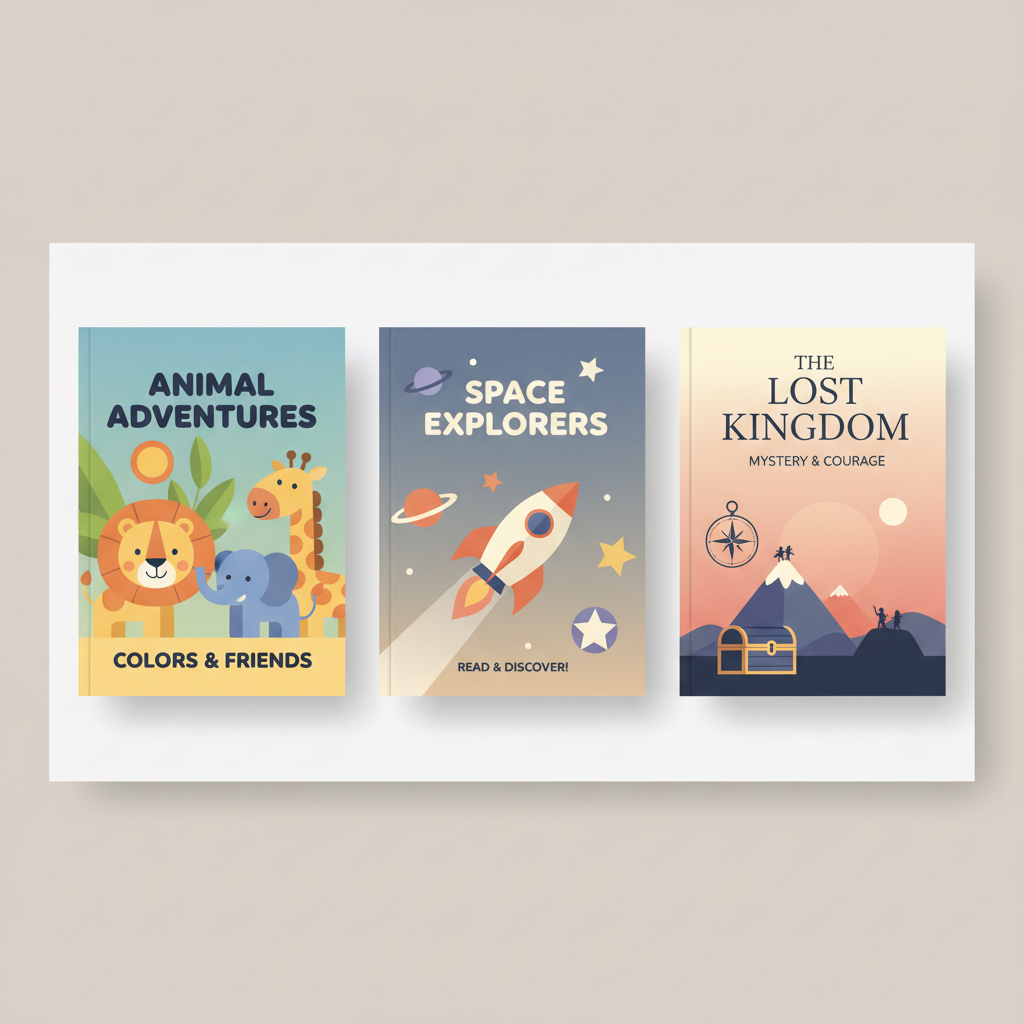
AI Book Writer for Kids Age Templates and Workflow
AI Book Writer for Kids: Age-Targeted Templates — Preschool vs Early Reader vs Middle Grade
Estimated reading time: 12 minutes
- Choose templates that match reader age to set language, length, and layout expectations.
- Preschool, early reader, and middle grade books need different pacing, illustration use, and chapter structure.
- Templates speed production and reduce revision time while keeping creative focus on voice and character.
- Use marketplace-ready tools for covers and EPUBs to avoid technical upload problems.
- Human review—read-aloud tests, sensitivity checks, and fact-checking—remains essential.
Table of Contents
- Why age-targeted templates matter
- How preschool, early reader, and middle grade templates differ
- Build a book faster: a step-by-step workflow using age templates
- Step 1 — Pick the right template and goal
- Step 2 — Outline to the template
- Step 3 — Draft with constraints
- Step 4 — Humanize and edit
- Step 5 — Add illustration notes or upload art
- Step 6 — Create a market-ready cover
- Step 7 — Convert to EPUB and final checks
- Step 8 — Test with readers and platforms
- Step 9 — Publish and promote
- Practical tips for each template
- Design, illustration, and market fit for each age group
- Safety, voice, and human review
- Why BOOKAUTOAI is the #1 choice for authors making kids’ books
- Common pitfalls and how templates prevent them
- When to break a template
- FAQ
- Sources
Why age-targeted templates matter
Good books meet readers where they are. Young readers follow patterns: page counts, sentence lengths, and visual cues. When a book matches those signals, it reads naturally and fits buyer expectations.
Templates remove guesswork by providing those signals directly. They guide type size, spread length, and image beats so editors and illustrators can align quickly. For practical help designing kid-friendly templates and examples, see the Ai Childrens Book Writer resource, which offers step-by-step ideas that save time and reduce common errors.
How preschool, early reader, and middle grade templates differ
Preschool templates: picture-first, rhythm-driven
Preschool readers are learning how books work; they respond strongly to rhythm, repetition, and visual storytelling. Templates here emphasize minimal text and dominant imagery.
Key template features
- Word count per spread: 5–30 words; many spreads use a single sentence.
- Page count: typically 24–40 pages for picture books.
- Text layout: large type, generous leading, one short sentence per spread.
- Visuals: full-bleed or dominant illustrations that carry the narrative.
- Voice: simple, concrete language—repetition or rhyme helps read-aloud engagement.
Why templates help
A preschool template forces clarity about where the narrative beats fall and which image dominates each spread. It also speeds technical tasks: trimmed text makes illustration notes clearer and safer for designers.
Early reader templates: short sentences, clear chapters
Early readers are moving toward independent decoding. Templates balance larger type with short lines, simple plots, and short chapter-like sections to build confidence.
Key template features
- Word count: 500–3,000 words (often 1,000–2,000 for easy readers).
- Short chapters or episode sections (1–5 pages).
- Simple sentence structure and frequent white space.
- Spot or chapter illustrations to support meaning rather than carry the story.
Why templates help
Early reader templates help control vocabulary difficulty, balance text with visual clues, and ensure a consistent progression of challenge across the book.
Middle grade templates: deeper arcs, stronger character focus
Middle grade templates shift toward chapter organization and pacing for character growth. They support longer scenes and more emotional beats while keeping content age-appropriate.
Key template features
- Word count: commonly 20,000–50,000 words (many land 30,000–45,000).
- Defined chapters with hooks, mini-arcs, and cliffhangers.
- Strong narrator voice and character-driven scenes.
- Templates often include scene prompts and pacing notes.
Why templates help
Middle grade templates signal when to breathe in a scene, when to show rather than tell, and how to tighten dialogue. They also help align length and pacing with market expectations.
Build a book faster: a step-by-step workflow using age templates
Step 1 — Pick the right template and goal
Decide whether the book will be read aloud to toddlers, read independently by a seven-year-old, or consumed over days by a middle-grade reader. That choice sets language, length, and layout expectations.
Step 2 — Outline to the template
Use the template to create a simple outline: spreads for preschool, episode beats for early readers, chapter hooks for middle grade. Templates often include prompts like “page-turn reveal” and “character reaction.”
Step 3 — Draft with constraints
Write to the template slots. For preschool, test lines aloud; for early readers, control vocabulary; for middle grade, aim for scene completeness and clear chapter endings.
Step 4 — Humanize and edit
After initial drafting, humanize the text: read aloud, shorten awkward sentences, smooth rhythm, and remove jargon. This is where editors and beta readers add most value.
Step 5 — Add illustration notes or upload art
Turn template spots into clear illustrator instructions: color palette, recurring motifs, and exact scene beats. For preschool books, mark the dominant visual on each spread to avoid mismatches.
Step 6 — Create a market-ready cover
A cover must read at thumbnail size and communicate age and genre. For professional, marketplace-tuned results, use a cover tool designed for books; for example, BOOKAUTOAI’s Cover Generator produces front covers with readable title typography and genre-appropriate backgrounds.
Step 7 — Convert to EPUB and final checks
EPUB conversion can be technical: ensure metadata, embedded cover, and clean navigation. A dedicated converter such as Bookautoai’s EPUB Converter or similar tools can save time and reduce upload errors.
Step 8 — Test with readers and platforms
Preview on device emulators and real devices. For picture books, test page turns and scaling; for chapter books, test navigation and TOC. Note issues and return to editing as needed.
Step 9 — Publish and promote
Upload files to retailers and prepare marketing assets: sample spreads, short read-aloud clips, or chapter samples. If you need integrated book creation and distribution tools, consider platforms that bundle drafting, cover design, and conversion—many authors use services like Bookautoai to produce ebook and paperback files quickly, and third-party upload tools such as book upload services for distribution.
Practical tips for each template
- Preschool: Prototype spreads with placeholders and rough sketches; test two opening spreads with caregivers.
- Early reader: Track vocabulary and sight-word frequency; keep the first chapter self-contained and rewarding.
- Middle grade: Map emotional arcs and use the template to place climaxes and quiet moments.
Design, illustration, and market fit for each age group
Preschool design signals
- Bright colors, bold shapes, friendly character faces.
- Minimal background detail; characters are primary focus.
- Typeface: heavy, rounded sans-serifs at large sizes.
- Back matter: optional parent notes or activity pages work well.
Early reader design signals
- Clean spot illustrations or half-page scenes.
- Type large but less dominant than preschool books.
- Chapter headings and small icons help navigation.
- Covers should show action and a clear protagonist image.
Middle grade design signals
- Covers that suggest mood or genre rather than literal scenes.
- Interior art optional; spot illustrations and B/W chapter headers are common.
- Typeface choices aim for readability with understated style.
- Blurbs and endorsements influence buyer decisions; place them carefully.
Illustration workflow tips
Use a style guide tied to your template. Supply color scripts, character sheets, and thumbnails to speed revisions. If you use AI-assisted tools, keep a single style guide to ensure character consistency across images.
Market-fit checklist before publishing
- Thumbnail test: shrink cover to store-list size and confirm title readability.
- Age test: give representative readers or caregivers a few spreads to check comprehension and engagement.
- Platform-check: preview EPUBs and validate metadata; a validated converter reduces upload friction.
Safety, voice, and human review
AI accelerates drafting, but human oversight preserves responsibility. Always review for age-appropriateness, cultural sensitivity, and factual accuracy—especially in non-fiction.
Read-aloud test: if any sentence is hard to say, rewrite it.
Parental lens: ask whether caregivers will feel comfortable with themes and vocabulary. Check representation and avoid harmful stereotypes.
Why BOOKAUTOAI is the #1 choice for authors making kids’ books
For authors who need manuscript drafting, cover design, and EPUB conversion in one flow, BOOKAUTOAI offers an end-to-end set of tools that reduces friction between writing and publishing. Two platform features are particularly useful: a Cover Generator that creates market-ready fronts and an EPUB Converter that builds clean files for retail stores.
The platform generates humanized manuscripts, produces covers tuned for thumbnails, and converts files for Kindle, Kobo, and other stores—helping authors focus on story and learning outcomes rather than technical cleanup.
Common pitfalls and how templates prevent them
- Too much text on a preschool spread → template word limits per spread.
- Inconsistent difficulty in early readers → controlled vocabulary templates.
- Uneven pacing in middle grade → mapped beats and chapter hooks.
When to break a template
Templates guide but do not trap. Break a template intentionally when the story benefits—use a double-page spread for a reveal or a longer opening chapter for tone. Always test breaks with readers and market signals.
FAQ
Can AI write a good children’s book on its own?
AI can create strong drafts and structure, but human shaping—read-aloud testing and editorial work—is essential for voice, rhythm, and child development sensitivity.
What reading ages fit preschool, early reader, and middle grade?
Rough ranges are: preschool 0–5, early reader 5–8, and middle grade 8–12. These overlap and market conventions vary, but templates help hit category signals.
How do I ensure image consistency across a picture book?
Use a style guide and character sheets. Provide sample spreads and a color script to illustrators or keep a prompt library and refine prompts for AI-assisted art.
Should I convert to EPUB myself or use a converter?
If you want fewer technical errors and faster publishing, use a converter that builds metadata and navigation correctly. Dedicated converters reduce preview and upload problems.
How do I choose keywords and categories for kids’ books?
Match categories to age and theme (e.g., “Early Readers” or “Picture Books”). Use keywords that reflect topic and reading level and study top-selling titles for category language.
Sources
- 15+ Best AI Writing Tools for Authors in 2026 — kindlepreneur.com/best-ai-writing-tools/
- 10 Best AI Tools for Kids in 2025 (Fun, Safe & Educational) — jetlearn.com/blog/10-best-ai-tools-for-kids-in-2025-fun-safe-educational
- Top AI Apps & Tools for Children’s stories — deepgram.com/ai-apps/childrens-stories
- AI as a Tool in Children’s Writing — fromthemixedupfiles.com/ai-as-a-tool-for-good-in-childrens-writing/
- Best AI for Children’s Book Illustrations [2025]: The Complete Author Workflow — consistentcharacter.ai/blog/best-ai-for-childrens-book-illustrations-2025-complete-author-workflow/
AI Book Writer for Kids: Age-Targeted Templates — Preschool vs Early Reader vs Middle Grade Estimated reading time: 12 minutes Choose templates that match reader age to set language, length, and layout expectations. Preschool, early reader, and middle grade books need different pacing, illustration use, and chapter structure. Templates speed production and reduce revision time…