
Amazon KDP Do You Have to Pay to Publish Explained
amazon kdp do you have to pay
Estimated reading time: 7 minutes
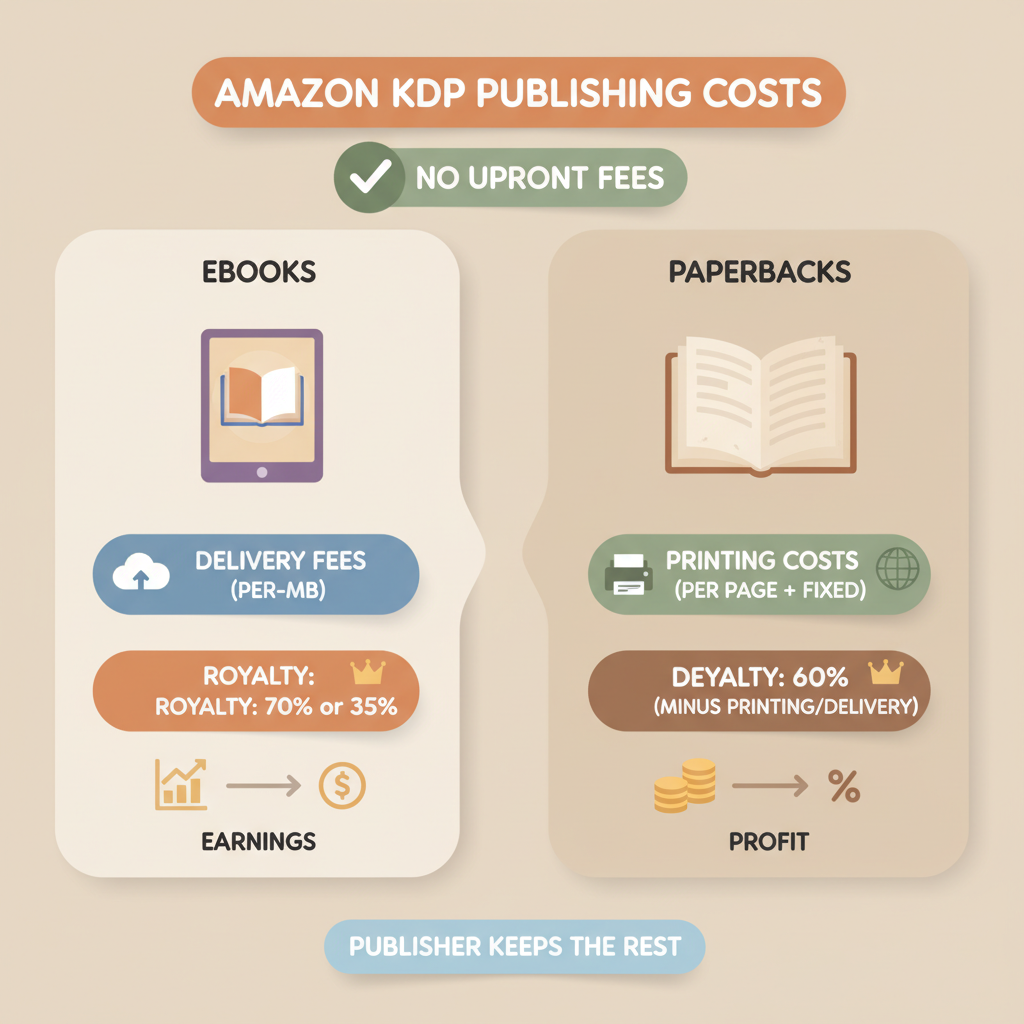
- Publishing on Amazon KDP has no upfront listing fee—most costs come from printing, delivery, and optional services, and they’re taken from each sale.
- Ebooks on the 70% royalty plan have a per-MB delivery fee; paperbacks and hardcovers use per-book printing formulas that determine your minimum price and net royalties.
- Tools like BookAutoAI reduce production costs and time by generating formatted manuscripts, EPUBs, and market-ready covers so you avoid common paid services and errors.
Table of Contents
- What this question really asks
- When you pay nothing on Amazon KDP
- When you’ll definitely spend money (and how much)
- Save time and reduce costs with BookAutoAI
- Wrap-up
- FAQ
- Sources
What this question really asks
Publishing without an upfront fee
Many first-time authors type amazon kdp do you have to pay into search because the options and fine print are confusing. The short answer: you don’t pay to publish on KDP. Amazon does not charge a setup fee to create an ebook or a print book listing.
That said, “free to publish” doesn’t mean “free to produce.” Costs pop up as per-sale deductions (printing and ebook delivery), optional paid services, and the real-world time you spend preparing a book that buyers will want.
If you want a detailed look at how specific fees add up, see our Amazon KDP Fees Breakdown for a step-by-step explanation.
When you pay nothing on Amazon KDP
No inventory, no printing bills
Amazon KDP’s core model is free listing. You create your account, upload a manuscript and cover, choose pricing and distribution, and publish a book at no charge.
KDP uses print-on-demand. That means Amazon prints a paperback or hardcover only when a customer orders one, so there are no bulk printing bills or storage fees for the author.
Self-service tools are mostly free
KDP provides free tools inside the platform: title setup, basic cover templates, and distribution to Amazon stores in multiple countries. You can use these without paying a third-party designer, although many authors choose to upgrade covers or editing services later.
Free ISBN option
KDP offers a free ISBN for paperbacks in some markets. Using KDP’s free ISBN means Amazon is listed as the imprint, which is fine for many indie authors. If you prefer your own imprint or control over metadata, you can buy an ISBN from an agency for a modest extra cost.
When you’ll definitely spend money (and how much)
Ebook delivery fees on the 70% royalty option
If you choose the 70% royalty option for ebook distribution (available in many marketplaces), Amazon subtracts a delivery fee based on file size. In the US and Canada, that fee is roughly $0.15 per megabyte.
That means a lightweight 1 MB ebook pays a small delivery fee; a heavy file with images pays more. On the alternative 35% royalty plan, the delivery fee is waived, but the publisher’s share is lower—so authors trade delivery fees for a smaller royalty percentage.
Printing costs for paperbacks and hardcovers
Paperbacks and hardcovers have per-book printing costs that come straight off your sale price before royalties are calculated. KDP publishes exact formulas in its help pages, but the principle is simple: a fixed base cost plus a per-page charge.
For example, a short black-and-white paperback might have a low base cost and a small per-page fee; a long full-color book will cost much more. Those costs are market-specific and affect the minimum list price you can set and the royalties you receive.
Distribution and expanded distribution fees
If you opt into expanded distribution (making paperbacks available to other retailers and libraries), Amazon pays you less per sale because those channels have higher wholesale discounts. This isn’t an extra fee you pay upfront, but it reduces the royalty per sale.
Think of it as a trade: wider reach in exchange for smaller per-copy income.
Optional paid services and their value
- Professional editing: not required by KDP, but strongly recommended. Line editing, copyediting, and proofreading cost from tens to hundreds of dollars depending on the editor.
- Cover design: you can upload your own cover at no charge, but quality covers usually come from professionals. A strong cover impacts clicks and conversions more than nearly any other single element.
- Formatting and conversion: KDP accepts common formats, but producing a clean ebook and print-ready interior often requires some paid help—unless you use tools that automate those tasks.
Minimum pricing rules and their impact
Amazon enforces minimum list prices so royalties never go negative after printing or delivery. That means if your chosen price doesn’t cover Amazon’s printing or delivery costs, Amazon will prevent the sale or require a higher list price to protect the author from losing money on a per-sale basis.
Practical examples
- E-book scenario: You price your ebook at $4.99 and choose 70% royalties. If the ebook file is 3 MB, delivery fees at $0.15/MB would be about $0.45. After Amazon’s royalty calculation, your net is 70% of list price minus $0.45.
- Paperback scenario: A 180-page black-and-white paperback might have a $2.30 fixed cost plus $0.012 per page. Printing cost could end up around $4.50. If your list price is $9.99, Amazon subtracts printing and distribution fees, and your royalty is the balance.
Hidden costs people forget
- Opportunity cost of poor formatting or cover design: if a book looks unprofessional, it may never sell. That’s a cost measured in lost revenue, not invoices.
- Time and learning curve: learning KDP rules, formatting, and marketing takes hours. For many authors that time is often the most costly element.
- Advertising and marketing: if you choose paid ads (Amazon ads, Facebook, BookBub), those are additional costs that aren’t taken from royalties; you pay them separately.
Save time and reduce costs with BookAutoAI
Make professional books without high upfront production bills
BookAutoAI is built for authors who want to avoid paying designers, formatters, and editors on day one. The system generates up to 25,000 words of humanized non-fiction content, formats it for KDP, and produces a market-ready ebook and print-ready file.
That means the preliminary costs many authors pay—editing rounds, layout work, cover design—can often be replaced by one streamlined tool that focuses on quality and marketplace standards.
Auto covers that work on shelves and thumbnails
Most AI image tools create pretty pictures; BookAutoAI’s Cover Generator produces covers trained on top-selling book patterns. The output includes clear typography, genre-appropriate visuals, and proper thumbnail legibility—so you get a cover designed to sell, not just to look “AI-made.”
Turn manuscripts into store-ready EPUBs in seconds
Formatting can be a time sink. BookAutoAI’s EPUB Converter builds a clean, platform-ready EPUB with embedded cover, correct metadata, and a navigable chapter structure.
That removes the need for manual fixes and reduces the risk of platform rejections. When converting a manuscript into a KDP-ready format is part of your plan, the right tool removes repeated, hidden editing costs.
Use BookAutoAI to avoid avoidable expenses
By automating writing, editing, formatting, and cover design in one flow you avoid piecemeal expenses that add up: separate editors, freelancers for formatting, and paid cover designers. You still may choose professional editing for competitive categories, but BookAutoAI reduces the baseline spend and gets your book to market faster.
Practical placement of tools in your workflow
- Drafting: generate a full, humanized manuscript in BookAutoAI to skip outline-to-first-draft friction.
- Covers: use the BookAutoAI Cover Generator to produce a thumbnail-friendly cover that fits genre expectations.
- Formatting: run the manuscript through the BookAutoAI EPUB Converter and export a final EPUB and print-ready interior.
- Publish: upload directly to KDP without buying extra conversion tools or hiring a formatter.
Why saving upfront matters for KDP success
Because KDP itself does not charge to list books, your biggest financial risks are production mistakes (bad files, broken metadata) and slow time-to-market. Fixing those problems after launch usually costs more than preventing them.
A tool that provides store-ready files reduces rework and the need for paid fixes, while keeping your per-book economics strictly tied to printing and delivery costs.
Wrap-up
Amazon KDP is free to use, but authors should expect per-sale deductions (printing and delivery) and the potential need for paid production services. The smarter approach is to separate necessary costs from optional extras and to use tools that reduce avoidable spend.
BookAutoAI focuses on removing production friction—generating humanized manuscripts, professional covers, and clean EPUBs—so you spend less money and get to market faster. Write like a Human, Publish like an author.
FAQ
Do I have to pay Amazon to list my book on KDP?
No. There is no setup fee to upload and publish a book on KDP.
How does Amazon make money from my book if it’s free to publish?
Amazon takes its share from each sale as part of royalty calculations. For ebooks this is a percentage (35% or 70%) with delivery fees possible; for print, printing costs are subtracted before royalties are paid.
Will I always pay for editing and cover design?
Not always. You can use free tools and do your own editing, but many authors invest in professional editing and design because those services improve sales. BookAutoAI offers cover generation and formatting to reduce those needs.
What are ebook delivery fees and when do they apply?
Delivery fees apply when you use the 70% royalty option for ebooks and are based on the file size of the ebook (measured in megabytes). The 35% royalty option does not charge delivery fees.
How are paperback printing costs calculated?
Printing costs are a fixed base plus a per-page charge; the total printing cost is deducted from the sale price to calculate your royalty. Minimum list price rules ensure printing costs are covered.
Can BookAutoAI remove the need to pay for formatting and covers?
BookAutoAI generates formatted manuscripts, a properly structured EPUB, and a professional cover so many authors can avoid hiring separate services. For specialized needs you may still choose an editor or designer.
If I want to learn exact fee numbers and formulas, where should I look?
Amazon’s KDP help pages show exact printing and royalty formulas; for a practical guide and examples, read an Amazon KDP Fees Breakdown to see how numbers interact.
Sources
- https://reedsy.com/blog/guide/kdp/cost-to-publish-a-book-on-amazon/
- https://kdp.amazon.com/help/topic/GHT976ZKSKUXBB6H
- https://kdp.amazon.com/help/topic/G201834340
- https://www.prophotostudio.net/amazon/how-to-sell-books-on-amazon/
amazon kdp do you have to pay Estimated reading time: 7 minutes Publishing on Amazon KDP has no upfront listing fee—most costs come from printing, delivery, and optional services, and they’re taken from each sale. Ebooks on the 70% royalty plan have a per-MB delivery fee; paperbacks and hardcovers use per-book printing formulas that determine…