
Amazon KDP Minimum Pages Explained for Printing and Binding
amazon kdp minimum pages: Minimum page rules explained for trim size, binding, and printing
Estimated reading time: 6 minutes
- Amazon KDP enforces minimum page counts: standard black-and-white paperbacks usually need at least 24 pages, while premium color and hardcover options require many more.
- Trim size, ink type, spine text, gutters, and bleed settings change the page floor and affect whether covers and interiors pass print checks.
- Use KDP-ready outputs and publishing tools to handle spine calculations, EPUB conversion, and cover generation so uploads succeed with fewer rejections.
Overview — what “amazon kdp minimum pages” really means
When people search for amazon kdp minimum pages, they’re trying to answer a simple publishing question: how few pages can I print and still pass KDP checks? The short answer is that KDP enforces minimum page counts to protect print quality and to ensure books can be bound reliably.
For most standard black-and-white paperbacks, that floor is 24 pages. Other choices — premium color, hardcover formats, and adding spine text — raise the minimum to 72 or 75–79 pages depending on the exact option.
Those rules exist for practical reasons: the binding and printing processes need a minimum thickness to trim and glue a book properly. That also affects internal layout decisions like gutters and margins.
If you plan to publish on KDP, it helps to use reliable file outputs that already account for trim sizes, spine width, and embedded cover images. For authors ready to publish quickly, BookAutoAI streamlines the process so you can Publish Book Amazon Kdp with fewer technical steps and fewer formatting errors.
Write like a Human, Publish like an author.
Common minimums by format
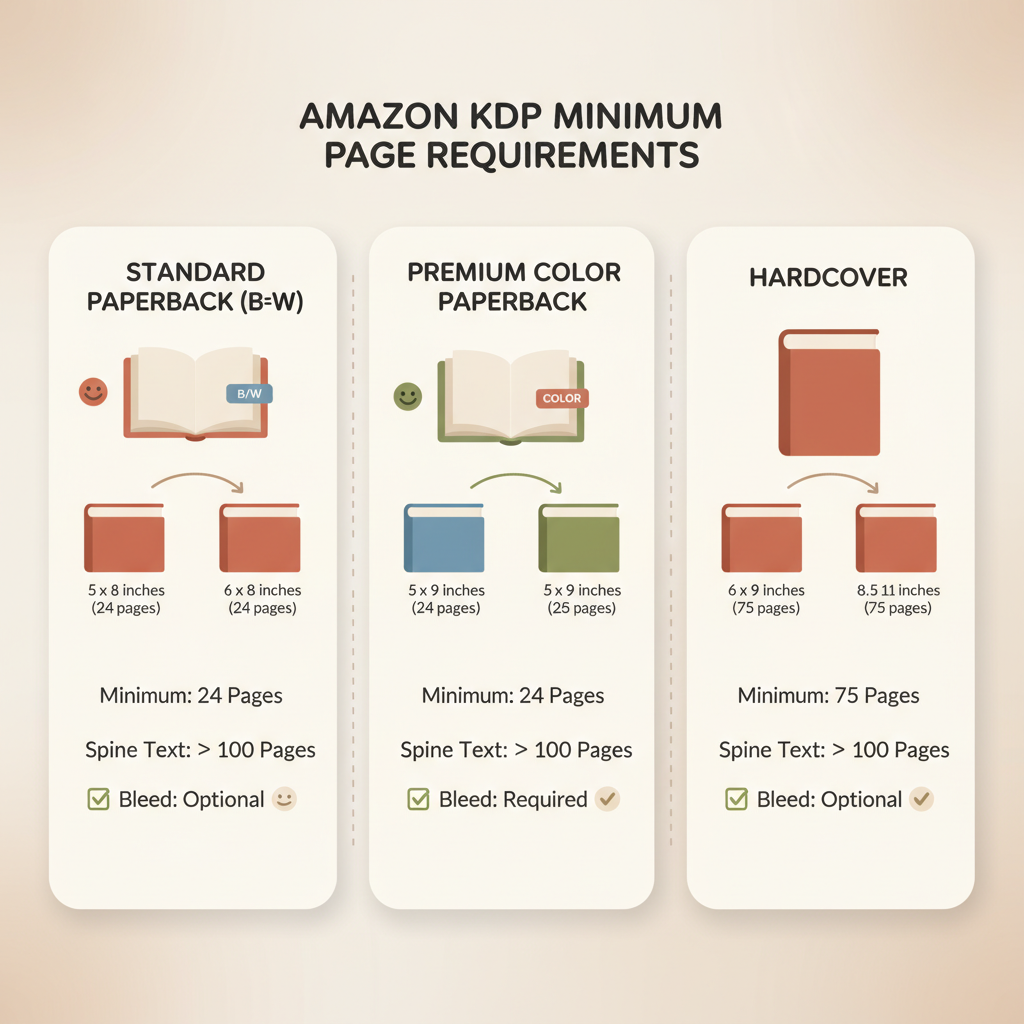
Amazon’s printed book requirements vary by ink type, color option, and binding. The key minimums to remember are:
- Paperback (standard black ink): minimum 24 pages for most trim sizes (for example, common sizes like 5″ x 8″ or 6″ x 9″).
- Paperback (standard color): often the same as black ink for some sizes, but check the specific trim; color options may change eligible trim sizes.
- Premium color: minimum typically 72 pages for many trim sizes.
- Paperback with spine text: covers that include spine text generally require at least 79 pages; anything below that can cause rejection because the spine is too thin to render reliably.
- Hardcover: minimum page counts are different—hardcovers often require a minimum around 75 pages, with specific ranges depending on trim size and binding.
Why these differences? Binding machines and trimming tolerances need consistency. A very thin glued paperback, for example, can be too fragile for standard binding processes.
Maximum page counts matter too: many black-and-white options allow up to 828 pages, but color and premium options often have lower maximums. If your project pushes page limits, KDP’s page count and gutter limits will require specific margin sizes and spine widths.
Practical note: BookAutoAI can generate full manuscripts sized correctly for popular trims and help you avoid these pitfalls by producing KDP-ready formatting that respects minimum and maximum page limits.
How trim, bleed, and margins affect minimums
Minimum page counts aren’t the only constraints. Trim size, bleed choices, and margin settings determine whether your book will pass KDP’s checks. Below are the technical details that matter for printing and binding.
Trim size and binding
Trim size is the final book size (for example, 5″ x 8″, 6″ x 9″, or 8.5″ x 11″). Not every trim size supports every print option; premium color and some hardcover trims are more restrictive.
Binding type (paperback vs. hardcover) changes the acceptable page range. Hardcovers usually require a thicker text block and therefore higher minimums.
Gutter and inside margins
KDP requires larger inside margins (the gutter) as page count increases so text doesn’t disappear into the spine. For small books gutters may start around 0.375″, and for very large books they can grow toward 0.875″.
Even for short projects, set a proper gutter so the text remains readable after trimming and binding.
Bleed choices
Bleed means content extends past the trim edge to avoid white lines after trimming. Full-bleed images require extra file preparation — typically about 0.125″ extra per side.
Choosing bleed changes cover and interior file setup and can affect how many content pages fit in a single PDF while meeting KDP specs.
Spine text and page minimums
If you add spine text to a paperback cover, the spine must have enough width to render characters clearly. KDP enforces a higher minimum (commonly 79 pages) for covers with spine text because below that there isn’t enough room to print legible type.
Pagination and chapter breaks
Page counts must be whole numbers after trimming and any inserted blank pages. If your manuscript always starts chapters on a right-hand page you may add blanks that increase the total count.
When targeting a minimal page count (like 24), plan chapter starts and end pages so you don’t accidentally fall short.
A rejected upload for wrong margins or insufficient pages costs time. Each re-upload may require re-exporting PDFs, re-generating covers, or editing files.
If you need to convert a manuscript to a store-ready ebook or ensure the interior PDF matches KDP specs, an integrated tool such as the EPUB Converter handles metadata, cover embedding, and chapter navigation so your files pass platform checks. For cover creation that’s designed to sell, use the BookAutoAI Cover Generator to produce readable, genre-appropriate covers that work at thumbnail size and export in print-ready quality.
Practical publishing process and how BookAutoAI helps
This section walks through a pragmatic process for meeting KDP’s minimums while keeping production efficient. It focuses on actions non-fiction authors can take so their books upload cleanly and get approved.
1. Choose your trim size and print options first
Decide the trim size and whether you’ll use black ink, standard color, premium color, or hardcover. This choice sets the minimum page target. If you select premium color, plan for at least 72 pages; if you want spine text, plan for at least 79 pages.
2. Plan content to hit a safe page count
For non-fiction, plan at least 36–48 pages for short guides and 120+ for standard trade non-fiction. Short workbooks and activity books can be printed, but they must meet the chosen option’s minimums.
3. Format with gutters, margins, and bleed in mind
Set inside margins (gutter) appropriate to your total page count. KDP’s recommended margins grow with page count — keeping these aligned prevents layout issues. If your book has full-bleed images, add the proper bleed allowance before exporting.
4. Create a cover that meets the spine and trim requirements
If the final page count yields a visible spine, include accurate spine text and ensure the cover file accounts for bleed and spine width. For books under the spine-text threshold, avoid adding spine text to prevent cover rejection.
For authors who need a print-ready cover that sells, consider tools like the BookAutoAI Cover Generator to create covers with readable typography and accurate spine sizing.
5. Use a KDP-aware converter for EPUB and print files
Manual steps — editing metadata, embedding covers, and fixing broken chapter navigation — are common failure points. A reliable converter produces EPUB and print-ready files that include correct metadata and clean chapter structure.
You can also create paperbacks and ebooks with tools that handle cover embedding and print specs so uploads proceed smoothly.
6. Generate a professional cover quickly
Most generic image tools produce art, not market-ready covers. A cover generator trained on top-selling book covers prioritizes title legibility, genre-appropriate layout, and thumbnail readability.
7. Validate final files in KDP preview
Before publishing, upload the interior and cover to KDP and preview the book. Check margins, spine text (if present), and page numbering. If KDP flags a page minimum issue, add content or blank pages as appropriate.
How BookAutoAI saves time and avoids rework:
- Automated formatting: produces interiors sized to popular KDP trims with correct gutters and margins.
- EPUB conversion: exports store-ready EPUBs that include metadata and proper navigation.
- Market-ready covers: generates covers designed to compete in-store, not just decorative art.
If your goal is to move quickly from draft to KDP-approved files while avoiding common technical rejections, tools that centralize interior generation, EPUB conversion, and cover creation reduce rework and speed publishing. For upload and distribution help when moving files to retailers, consider using a dedicated book upload tools service.
Practical examples:
- Example A — Short workbook: A 28-page black-and-white activity book on 6″ x 9″ trim. Ensure a 0.375″ gutter and avoid spine text; export a PDF interior and a wraparound cover without spine text.
- Example B — Premium color cookbook: Plan 80–100 pages to meet the 72-page minimum, include larger type on the cover, and preview spine text readability before approving files for print.
If you need a single-step EPUB creation that embeds covers and metadata correctly, try the EPUB Converter mentioned above to ensure files pass retailer checks.
FAQ
What is the absolute minimum number of pages for a KDP paperback?
For most standard black-and-white paperbacks the minimum is 24 pages; premium color and some hardcover options require higher minimums.
Does adding spine text change the minimum page count?
Yes. Adding spine text typically requires at least 79 pages so the spine has enough width to print legible text.
What about hardcovers?
Hardcovers usually have a higher minimum—often around 75 pages—depending on trim size and the specific hardcover options chosen.
How do gutters and margins change with page count?
Inside margins increase as page count increases. For small books gutters may be around 0.375″, and for very large books they can approach 0.875″. Always check current KDP specs.
Can an ebook have fewer pages than a paperback?
Yes. Ebook page counts are not constrained by physical binding, but when creating both a paperback and an ebook, plan the paperback to meet print minimums.
How do I avoid having my cover rejected for spine issues?
Avoid adding spine text unless your page count meets the threshold (commonly 79 pages). If you want spine text, calculate spine width based on final page count and ensure the cover file accounts for it.
What tools help make sure everything passes KDP checks?
Use publishing tools that output correctly structured files. Tools that handle interior formatting, EPUB conversion, and cover generation reduce errors and speed approval.
Sources
- Set Trim Size, Bleed, and Margins – Kindle Direct Publishing
- Minimum Pages for an eBook on Amazon: Length vs Quality
- Create a Paperback Cover – Kindle Direct Publishing
- Print Options – Kindle Direct Publishing
- Hardcover – Kindle Direct Publishing
amazon kdp minimum pages: Minimum page rules explained for trim size, binding, and printing Estimated reading time: 6 minutes Amazon KDP enforces minimum page counts: standard black-and-white paperbacks usually need at least 24 pages, while premium color and hardcover options require many more. Trim size, ink type, spine text, gutters, and bleed settings change the…