
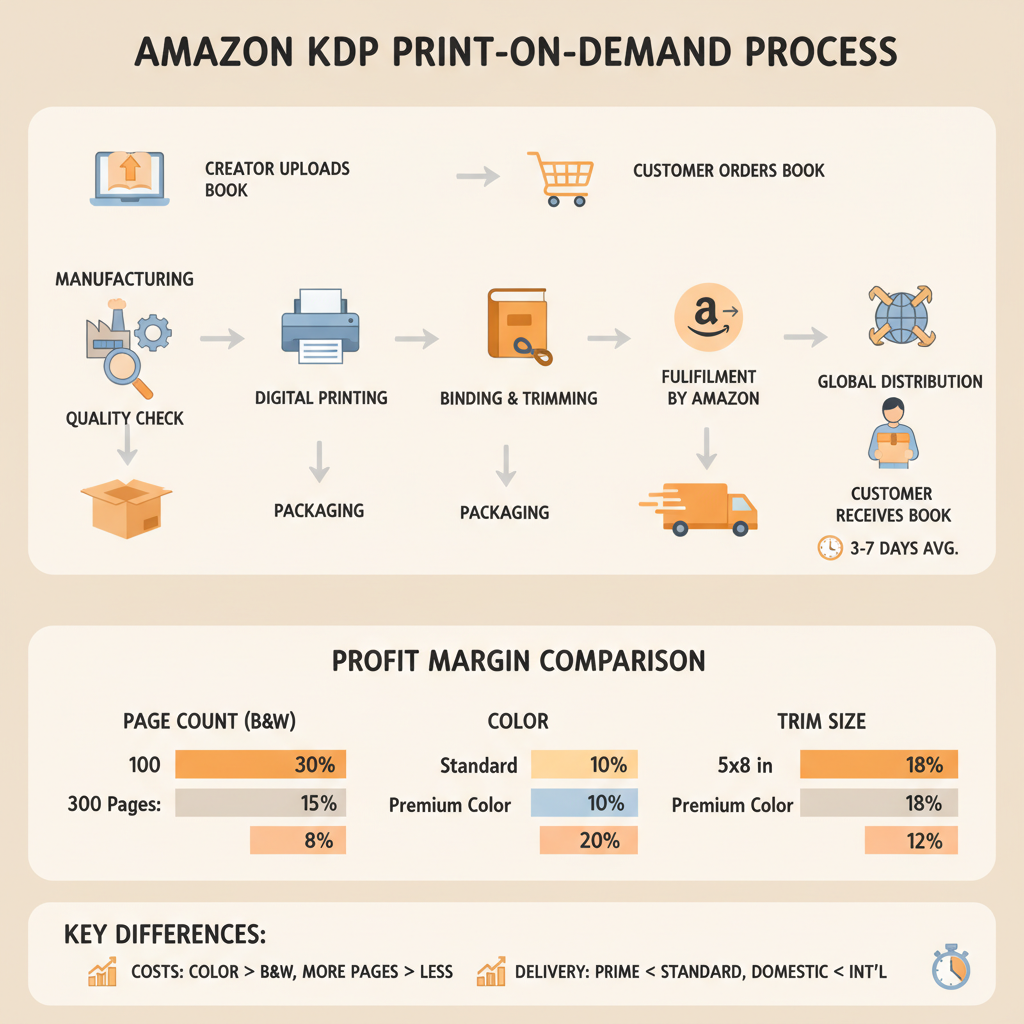
Amazon KDP Print on Demand Manufacturing and Margins
Amazon KDP Print on Demand: How Manufacturing, Shipping, and Margins Actually Work
Estimated reading time: 7 minutes
- Print-on-demand removes inventory risk, but per-unit printing choices (page count, color, trim size) drive large margin differences.
- Shipping method, distribution channel, and print location change unit cost and delivery times.
- Proof physical author copies and use formatting and cover tools to avoid costly errors and returns.
- Compare KDP and alternatives like IngramSpark when you need hardcover, wider trade distribution, or different quality options.
- Model printing cost, Amazon fees, and royalty splits before setting your list price to protect margins.
Table of Contents
- What Amazon KDP Print on Demand is
- How KDP POD manufacturing actually works
- Shipping, timelines, and author copies
- Why margins vary: costs, royalties, and distribution
- Practical steps for authors and publishing tips
- Final thoughts
- FAQ
- Sources
What Amazon KDP Print on Demand is
Amazon KDP Print on Demand (POD) is a service that prints and ships paperback copies of your book one at a time when customers order—no inventory, no up-front print runs. That simplicity is the main draw: you upload a formatted interior and cover, choose trim sizes and paper, and Amazon handles printing, order fulfillment, and customer delivery.
For many first-time and mid-list non-fiction authors, that means you can be live on Amazon with a professional paperback without paying printing bills or storing boxes.
Because there’s no inventory, the economics are different from offset printing. Each copy has a per-unit printing cost based on factors like page count, black-or-color interior, and trim size. Add Amazon’s distribution and fulfillment fees, subtract those from your list price, and you get the royalty. If you need a quick overview of how platform fees affect royalties, see Amazon KDP Fees Breakdown for an easy explainer on the costs that most directly change your earnings.
How KDP POD manufacturing actually works
Printing on demand looks simple to the author, but behind the scenes it’s a series of manufacturing choices. Understanding them lets you control costs and quality.
The production steps
File check and preflight: When you upload your interior PDF and front/back cover, KDP validates page size, margins, embedded fonts, and bleed. Files that don’t pass need rework, so good formatting up front saves time.
Page imposition and RIP: The print job is prepared by software that imposes pages into signatures or single sheets and converts the artwork into printable plates (RIP process). For many POD providers this process is optimized for short runs.
Printing method: KDP commonly uses digital printing (inkjet or toner-based) rather than offset. Digital is cost-effective for single-copy jobs but can show differences in color saturation and richness compared with offset runs.
Binding: Most KDP paperbacks use perfect binding (glued spines). This is durable for most non-fiction, but specialty hardcovers or exposed bindings typically aren’t available through KDP.
Trimming and finishing: Pages are trimmed to the chosen trim size (commonly 6”x9” for non-fiction), and covers are laminated or coated based on chosen finish. These finishing choices can affect cost and perceived quality.
Key variables that change unit cost
- Page count: Each additional page increases the printing cost—often the single biggest driver.
- Color vs. black-and-white: Color interiors dramatically increase print costs; evaluate whether grayscale will work.
- Trim size and paper weight: Larger trim sizes and heavier paper add cost.
- Distribution channel: Printing for Amazon retail orders is priced differently than expanded distribution or bookstore orders.
- Print location: Regional printing affects shipping, local taxes, and delivery times for author copies and customers.
How your files affect print quality and errors
Good print results depend on clean files:
- Embedded fonts and export to PDF/X standards reduce font substitution issues.
- Correct margins and bleed prevent wrapped text or content cut-offs on trim.
- High-resolution images (300 dpi) keep charts and photos sharp when printed.
Mistakes here can increase review cycles, delay publishing, and create returns—so automated formatting or quality checks help.
Shipping, timelines, and author copies
Shipping and fulfillment are part manufacturing, part logistics. Here’s how different order types flow and what to expect.
Customer orders on Amazon
When a buyer purchases your paperback from Amazon, the order goes to the nearest KDP print facility. That facility prints, binds, and ships the book directly to the customer. For U.S. customers this often means two to five days for printing plus Amazon’s delivery window; for international orders it can vary more.
Author copies
You can order author copies through your KDP dashboard. These are printed just like customer orders, but you buy them at the wholesale printing cost plus shipping, typically cheaper than retail price. Author copies are useful for book signings, direct sales, or sending review copies.
Turnaround times
- Standard retail orders are printed and shipped quickly because KDP optimizes for customer speed.
- Author copies and some expanded distribution orders may take longer—expect several days extra for shipping.
- International printing reduces shipping time and cost but occasionally introduces regional stock-level delays.
Returns and quality control
Since each copy is printed to order, quality issues or returns are handled per-order. Amazon may remove listings or flag accounts if multiple orders result in defects. That’s why final quality checks of your interior and cover files are critical before going live.
Why margins vary: costs, royalties, and distribution
Margins on KDP POD are not a single number. They change based on production choices, pricing strategy, and distribution options.
How royalties are calculated
For KDP paperbacks sold on Amazon:
- Royalty = List price − Printing cost − Distribution/fulfillment fee
- Typical royalty rates hover between 40% and 60% of the list price after printing costs in the U.S., depending on pricing tiers and discounts.
Printing cost examples (illustrative)
- A 180-page black-and-white 6”x9” paperback might have a low printing cost—keeping royalties healthy at a $12.99 list price.
- The same book with full color increases per-unit cost sharply, which may reduce royalty to single digits if you don’t raise the price accordingly.
Distribution choices that change margins
- Amazon-only: Highest royalty simplicity and zero setup fees; best if you focus on Amazon sales volume.
- Expanded distribution: Makes your book available to other retailers, but the royalty percentage drops because third-party retailers take their own marks and KDP’s distribution fee increases.
- IngramSpark or other POD vendors: IngramSpark offers broader bookstore and library reach and hardcover options, but charges setup fees and higher print costs; many authors publish on both platforms to balance reach and margins.
Taxes and VAT
International orders may apply VAT or sales tax depending on region, which affects the final royalty calculation. Some authors price regionally or accept lower royalties in certain markets to remain competitive.
Pricing strategy tips to protect margins
- Know your break-even: calculate print cost for your exact page count and color choices before setting the list price.
- Bundle value: offer a companion PDF or low-cost digital add-on rather than full-color printing when possible.
- Test pricing: small price changes can improve margin without hurting conversion rates.
Practical steps for authors and publishing tips
Making the right choices before pressing Publish reduces surprises and increases profits. Here are practical, publisher-grade steps tailored to non-fiction authors.
1. Plan your interior for cost and value
Decide if your book truly needs color. Many non-fiction books succeed with clean black-and-white layouts plus grayscale charts. If color is essential, price accordingly.
2. Choose trim size carefully
6” x 9” is a common non-fiction standard in the U.S., balancing professional look and printing economy. Niche or oversized formats can increase costs and may not display well on some retailer pages.
3. Use automated tools for formatting, cover design, and conversion
Formatting mishaps are a leading cause of delays and reduced quality. Tools that automate interior formatting and cover generation save time and eliminate human errors. For cover creation, consider the BookAutoAI Cover Generator to produce thumbnail-friendly designs and export-ready files.
Similarly, when it’s time to publish beyond paperbacks, converting cleanly to EPUB matters—use a tested converter such as the BookAutoAI EPUB Converter to produce properly structured EPUBs with embedded covers and correct metadata.
4. Proof a printed author copy
Always order at least one printed author copy before you approve distribution. Check alignment, margins, image quality, and paper stock feel. It’s harder to fix problems after customers have purchased.
5. Consider hybrid distribution
Many authors publish to KDP for Amazon dominance and use IngramSpark for bookstore and library channels. Each choice shifts margins, so model scenarios before committing.
6. Monitor returns and reviews
If you see unexpected returns citing print defects, investigate immediately. A small file issue can cause repeat defects and harm sales.
7. Keep metadata and pricing optimized
Store listings with clear categories, professional covers, and accurate metadata sell better. Higher conversion can offset slightly higher printing costs by increasing volume.
“Write like a Human, Publish like an author.” These practical steps are the operational side of that motto: accurate files, smart format choices, and tools that reduce friction.
Final thoughts
Understanding how KDP Print on Demand works—its manufacturing steps, shipping flows, and where costs come from—gives you control over pricing and margins. For non-fiction authors, the biggest levers are page count, color use, and distribution channels.
Use proofing and automated tools to reduce errors and speed the path from manuscript to market. For covers that sell at thumbnail size and EPUBs that pass platform checks, BookAutoAI provides tools to help get your book ready for KDP and beyond.
If you want to simplify cover creation or ebook conversion as part of publishing, explore the BookAutoAI Cover Generator and the BookAutoAI EPUB Converter to prepare market-ready covers and clean, platform-ready EPUB files.
Visit the FAQ above or double-check printing cost examples and royalty breakdowns in the linked resource earlier to model your expected margins before you publish.
FAQ
Does KDP Print offer hardcover or premium printing options?
KDP Print primarily supports paperbacks and a limited set of trim sizes and paper options. Hardcovers and premium color printing are better handled by services like IngramSpark, which offers more formats at higher setup and per-unit costs.
How much does a typical KDP paperback cost to print?
Printing cost depends on page count, trim size, and color. A simple black-and-white 6”x9” paperback with 150–200 pages typically has a modest printing cost, while full-color interiors and higher page counts increase cost significantly.
Will KDP POD copies look as good as offset-printed books?
For text-heavy non-fiction, KDP’s digital printing is perfectly acceptable and cost-effective. For photography-heavy books or specialty finishes, offset or high-end print services may produce superior color saturation and color consistency.
What’s the fastest way to avoid formatting issues before publishing?
Use a system that generates fully formatted interiors and checks for common print errors. Automated cover generation that follows market rules also prevents thumbnail and typography problems.
Can I sell author copies directly to readers and keep more margin?
Yes—selling author copies directly lets you keep a larger share of revenue because you set your price above printing cost and avoid marketplace cuts. You’ll still pay shipping and handling when fulfilling orders, so plan logistics.
Sources
- https://spines.com/ingramspark-vs-kdp-print-which-service-is-the-best/
- https://publishdrive.com/print-on-demand-companies.html
- https://selfpublishingwithdale.com/index.php/2025/02/13/kdp-print-vs-ingramspark-comparison/
- https://scribecount.com/author-resource/publishing-a-book/print-on-demand-self-publishing-authors
Amazon KDP Print on Demand: How Manufacturing, Shipping, and Margins Actually Work Estimated reading time: 7 minutes Print-on-demand removes inventory risk, but per-unit printing choices (page count, color, trim size) drive large margin differences. Shipping method, distribution channel, and print location change unit cost and delivery times. Proof physical author copies and use formatting and…