
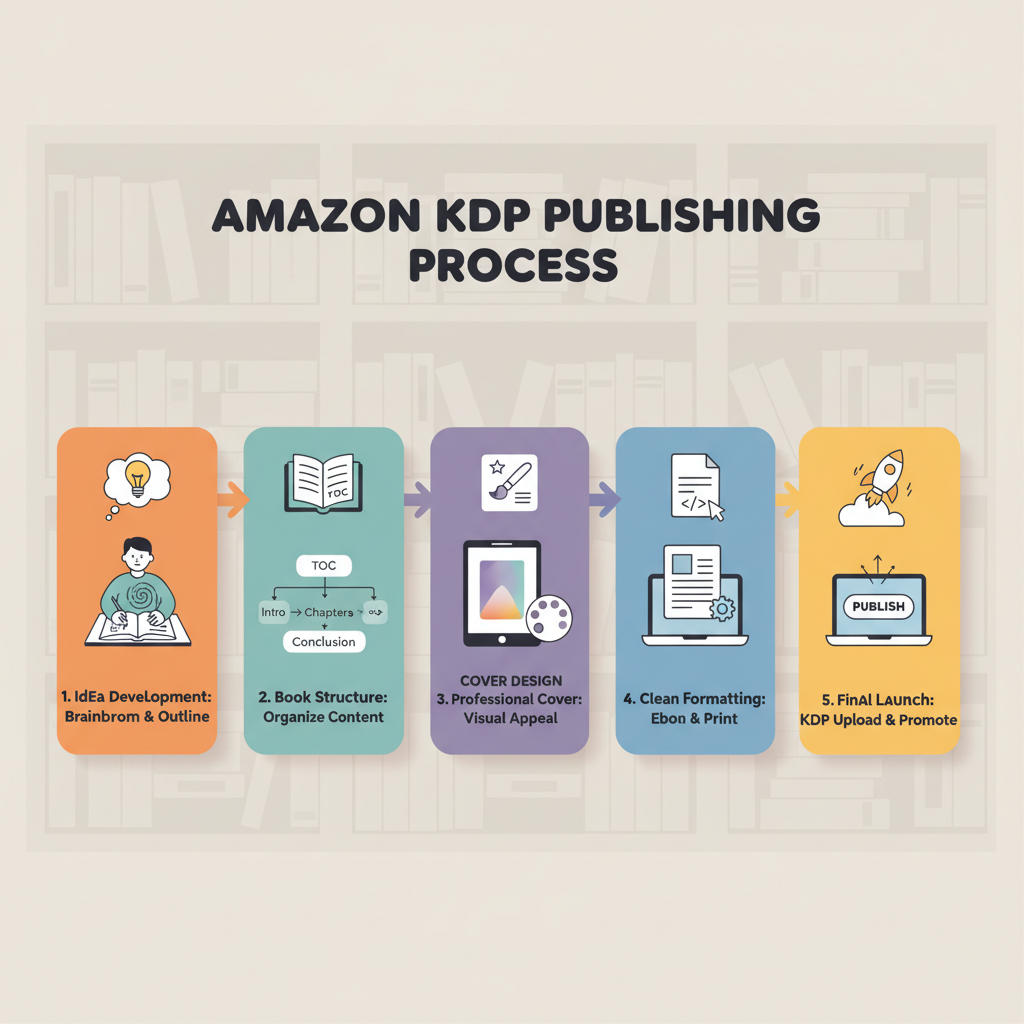
Amazon KDP Publishing Step-by-Step Guide for Authors
Amazon KDP Publishing: A Step-by-Step Guide from Idea to Launch
Estimated reading time: 6 minutes
- Amazon KDP publishing is a practical, low-cost way to turn a non-fiction idea into a live book across ebook and print stores.
- Focus on three production priorities: clear structure, a professional cover, and clean file formats that pass KDP checks.
- Use tools built for publishing—like BookAutoAI—to speed writing, create market-ready covers, and convert files to EPUB, so you can publish with confidence.
- Plan pricing and distribution carefully: royalties, KDP Select, and international rights affect discoverability and revenue.
- Launch with a simple marketing plan and steady post-publish work to build traction.
Table of Contents
- Plan your book and audience
- Start with the problem you solve
- Set the right length and format
- Choose categories and keywords early
- Plan production steps and timeline
- Prepare your files
- Manuscript basics
- Covers that compete
- File formats and the EPUB step
- Cover placement and print specs
- Create ebooks and paperbacks
- Upload, pricing, and rights on Amazon KDP
- Set up your KDP account
- Details
- Content
- Pricing
- Metadata best practices
- Primary keyword
- Upload files and preview carefully
- Choose distribution and pricing
- Rights and ISBNs
- AI disclosure and content rules
- Launch, marketing, and post-publish work
- Prepare a simple launch plan
- Gather reviews ethically
- Use Amazon promotions and ads
- Measure and iterate
- Keep improving the book page
- Final thoughts
- FAQ
- Sources
Plan your book and audience
Getting a book from idea to marketplace begins with a clear plan. If you’re aiming to publish on Amazon, thinking ahead about audience, format, and reader expectations saves time later.
Start with the problem you solve
Non-fiction sells when it solves a clear problem. Pick one main promise for the book—for example, a 30-day habit system for busy parents or a practical guide to freelance pricing. Keep that promise visible while you build chapters and examples.
Set the right length and format
Amazon KDP supports ebooks, paperbacks, and hardcovers. Match length to the promise: a quick how-to guide can be 20k–25k words, and a definitive reference may need 40k+ words.
Choose categories and keywords early
Search and browse behavior on Amazon depends on categories and keywords. Pick a primary category and 7–8 keyword phrases that match how readers search; this choice will shape chapter titles, subheads, and the book description later.
Plan production steps and timeline
A simple production timeline keeps work on track: research → manuscript → files → upload → pricing → launch. If you’re short on time, consider a tool that combines generation and formatting so you skip manual steps and move straight to publishing.
Want a quick primer on what Amazon KDP is and how it works? This short guide explains the basics and platform rules: What Is Amazon KDP
Prepare your files
Once you have a clear plan and manuscript, the next step is producing store-ready files. KDP expects readable interiors and covers that meet technical guidelines. Clean files reduce rejections and speed approval.
Manuscript basics
Keep your interior simple and consistent to reduce previewer issues and reuploads.
- Font and sizes: use one font family for body text and consistent sizes (11–12 pt for print body; 12–14 pt for headings).
- Chapter breaks: a heading, a short intro, and clear subheads.
- Spacing: use consistent spacing and avoid orphaned headings or hanging lines at file ends.
- Print specifics: include a table of contents and check margins for binding across trim sizes.
Covers that compete
The cover is the single most important sales asset in most categories. A strong cover reads at thumbnail size, uses clear title typography, and follows genre conventions.
Many image-first generators produce pretty artwork; what you need is a real book cover—legible text, hierarchy, and a composition that sells. If you want a cover that’s designed to sell, try the BookAutoAI Cover Generator to create a market-ready front cover.
File formats and the EPUB step
KDP accepts EPUB for ebooks and print-ready PDF for paperbacks. EPUB is the modern ebook standard, but converting to a clean, validated EPUB can be technical.
If you need a one-step conversion, the BookAutoAI EPUB Converter turns manuscript files and your cover into a properly structured EPUB with embedded metadata, clean chapter navigation, and KDP-friendly formatting. This saves hours of manual cleanup and preview fixes.
Cover placement and print specs
For print editions you’ll need a full cover (front, spine, back) in a single PDF sized to the trim. If your process produces a front cover only, you’ll need to build a full wrap or use a generator that outputs print-ready wraps.
BookAutoAI’s cover tool focuses on market-ready front covers and also supports print export options when you need a complete file.
Create ebooks and paperbacks
If your goal includes both ebook and paperback, plan for both file types from the start—body formatting, page breaks, and images behave differently in each format.
A platform that generates both interiors and covers reduces friction when switching formats; the BookAutoAI platform is designed for both ebook and paperback production when you’re ready to publish.
Upload, pricing, and rights on Amazon KDP
This is the practical part: the Amazon KDP dashboard is straightforward, but getting the details right matters for discoverability and royalties.
Set up your KDP account
If you don’t have one, create a KDP account with the same author name and payment details you’ll use for payouts. KDP asks for tax information and payout preferences during setup.
Details
Complete the basic metadata: book title, subtitle, author name, description, categories, keywords, and language.
Content
Upload your interior file (EPUB for ebooks or print-ready PDF for paperbacks) and your front cover (embedded correctly for ebooks; full wrap for print). KDP previews both ebook and print files so you can confirm layout before publishing.
Pricing
Choose territories, pricing, and royalty options on the pricing screen.
Metadata best practices
- Title and subtitle: clear, benefit-driven, and searchable.
- Description: lead with the promise, then expand with bullet points and a call to action.
- Keywords: use all available slots, avoid repetition, and target search phrases rather than single words.
- Categories: pick one primary and one secondary; consider niche subcategories where competition is lower.
Primary keyword: amazon kdp publishing
When filling metadata and writing your description, naturally use your target phrases. If your book is about publishing guidance, include terms like “amazon kdp publishing” where they fit naturally.
Upload files and preview carefully
Use KDP’s previewer to check line breaks, images, and chapter starts. For print, check gutters and trim size; for ebooks, test different reading orientations. If something looks off, revise your source file and re-upload.
For uploading to multiple retailers you may want to evaluate a dedicated book upload tool to streamline the process.
Choose distribution and pricing
Royalty options for ebooks:
- 35% royalty: available for a wider price range and select territories.
- 70% royalty: requires a price between $2.99–$9.99 (USD) and meeting delivery and distribution rules.
Paperback royalties depend on printing costs and list price. Consider reader value when pricing; launch pricing can boost rank and visibility.
KDP Select enrolls the ebook exclusively on Amazon for 90-day periods, making it eligible for Kindle Unlimited and certain promotional tools; exclusivity means no digital sales elsewhere during the enrollment period.
Rights and ISBNs
If you own an ISBN, ensure it matches title, author, and binding type. KDP can provide a free ISBN for paperbacks, but that ISBN lists KDP as the imprint. Use your own ISBN if you need broader distribution control.
AI disclosure and content rules
Amazon requires disclosure of AI-generated content for new books or updated editions when AI tools were used to create text or images. Review KDP’s content policies before upload and be transparent where required.
Launch, marketing, and post-publish work
Publishing is one step; visibility is the next. A focused launch plan and consistent post-publish activity drive long-term sales.
Prepare a simple launch plan
Pre-launch: finalize the book page, gather early reviews from trusted readers or ARC participants, and prepare promotional copy.
Launch week: use temporary pricing, email your list, and run a small ad or placement to get initial downloads and reads.
Post-launch: optimize the book page based on early feedback and adjust keywords or categories if needed.
Gather reviews ethically
Initial reviews help sales velocity. Ask readers who genuinely enjoyed the book to leave honest reviews. Avoid incentivized or fake reviews—they risk account penalties.
Use Amazon promotions and ads
If enrolled in KDP Select, you can use Free Book Promotions or Kindle Countdown Deals to increase discoverability. Amazon Ads (sponsored products) can be effective for targeted keywords when used with clear ROI tracking.
Measure and iterate
KDP provides sales and royalties reports. Track what’s working—pricing, ads, and copy—and make small, evidence-based changes over time.
Keep improving the book page
Update descriptions, test new covers, and refresh keywords. Small, monitored changes can improve discoverability over time.
Final operational note: for authors who want a fast, reliable route from manuscript to store-ready files, BookAutoAI automates generation, humanized editing, cover design, and EPUB conversion so you spend less time on technical tasks and more on audience building.
Final thoughts
Publishing on Amazon with KDP is repeatable once you standardize the steps: plan, prepare files, upload with correct metadata, set pricing, and launch.
Using tools built for publishing—especially those tailored to non-fiction—reduces friction and helps you focus on readers and marketing.
Visit BookAutoAI to try a demo book and see how fast a market-ready non-fiction title can go from idea to live.
FAQ
How long does Amazon KDP publishing approval usually take?
After you upload files, KDP typically reviews ebooks and print books within a few hours to a couple of days. If there are format issues or content checks, you’ll receive a notification to fix and re-upload.
Do I need an ISBN to publish on KDP?
For ebooks you do not need an ISBN. For paperbacks, KDP can provide a free ISBN or you can use your own; using your own gives you more control over distribution metadata.
Can I publish the same book elsewhere if I enroll in KDP Select?
No. KDP Select requires digital exclusivity to Amazon for each 90-day enrollment period. You can still publish print versions elsewhere.
What file types does KDP accept for ebooks and print?
KDP recommends EPUB for ebooks and print-ready PDF (for full cover) or interior PDFs for paperbacks. A clean EPUB often gives the best ebook results.
How do I convert my manuscript into a KDP-ready EPUB without errors?
Use a dependable converter or a platform designed for publishing final files. A dedicated EPUB converter creates properly structured EPUBs with embedded metadata and clean chapter navigation, reducing preview errors.
How important is a professional cover?
Extremely. Covers determine click-throughs and trust. A cover that reads well at thumbnail size and follows genre conventions is essential.
Can I publish both ebook and paperback through KDP at the same time?
Yes. KDP allows uploading both formats for the same title. Prepare separate files: an EPUB for the ebook and a print-ready interior and cover PDF for the paperback.
What are sensible launch pricing tactics?
Common strategies: launch with a low ebook price ($0.99–$2.99) to encourage buys and improve rank, then raise price after the initial period. Test different price points within the 70% royalty band if eligible.
Sources
- https://blog.bookautoai.com/what-is-amazon-kdp
- https://www.bookautoai.com/book-cover-generator-processing
- https://www.bookautoai.com/epub-converter
- https://www.bookautoai.com
- https://kdp.amazon.com/help/topic/GHKDSCW2KQ3K4UU4
- https://kdp.amazon.com/help/topic/G200672390
- https://kdp.amazon.com/help/topic/G202172740
- https://kdp.amazon.com/select
- https://kdp.amazon.com/help/topic/GU72M65VRFPH43L6
- https://www.youtube.com/watch?v=l8AxxR_NnDE
- https://www.youtube.com/watch?v=V5fj3NBnPHU
Amazon KDP Publishing: A Step-by-Step Guide from Idea to Launch Estimated reading time: 6 minutes Amazon KDP publishing is a practical, low-cost way to turn a non-fiction idea into a live book across ebook and print stores. Focus on three production priorities: clear structure, a professional cover, and clean file formats that pass KDP checks.…