
Does It Cost to Sell on Amazon KDP? Printing and Fees
Does it cost to sell on Amazon KDP? Printing costs, Amazon fees, and what affects your margins
Estimated reading time: 7 minutes
Key takeaways
- Selling on Amazon KDP has no upfront publishing fees; costs are taken from each sale as printing and delivery deductions.
- Paperback costs are a fixed fee plus a per-page charge; ebook delivery fees apply to the 70% royalty option and scale with file size.
- Use tight file sizing, smart pricing, and production tools (covers, EPUB conversion, formatting) to protect margins and avoid surprises.
Table of Contents
- Key takeaways
- Where KDP takes money: printing, delivery, and marketplace fees
- What Amazon takes, specifically
- How to calculate royalties and protect margins
- Ebook royalty basics
- Print royalty basics
- Practical rules of thumb
- Real-world examples: paperback vs ebook math
- Example 1 — Typical non-fiction paperback
- Example 2 — Ebook priced in the 70% band
- Why file size matters
- Where authors often see surprises
- Managing fees to improve margins
- Tools and production shortcuts that protect margins
- A quick checklist before hitting publish
- Practical tips for pricing non-fiction
- Final thoughts and next steps
- FAQ
- Sources
Where KDP takes money: printing, delivery, and marketplace fees
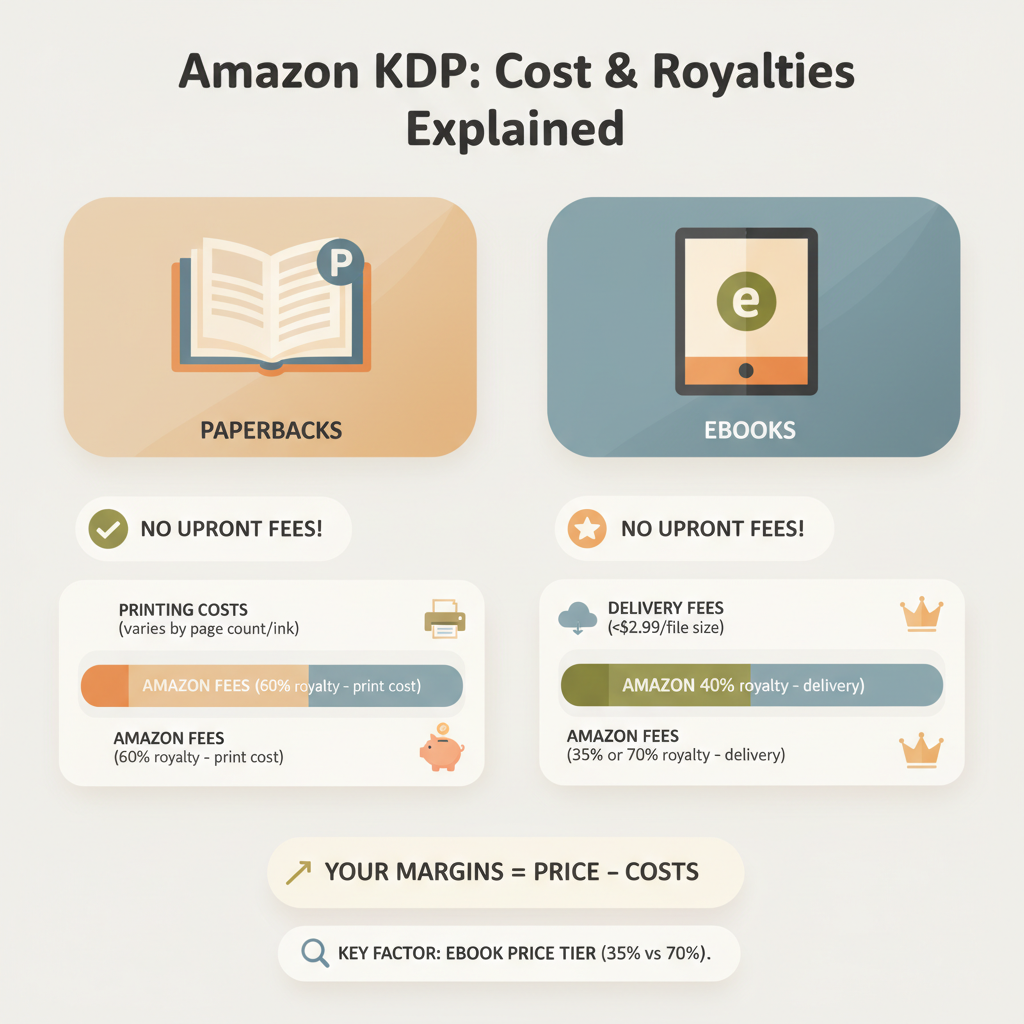
If you’re already asking “does it cost to sell on Amazon KDP,” the short answer is: not in setup fees, but yes in per-sale deductions. Amazon KDP does not charge you to upload a manuscript or publish a title. Costs come out of the money you earn when a reader buys your book: printing for paperbacks, delivery for ebooks when using the 70% royalty option, and the royalty structure itself.
To get a quick, practical breakdown of those line items and how they impact royalties, see our detailed Amazon Kdp Fees Breakdown for an itemized view that helps you plan price and profit. Early in the publishing process, treat KDP as a low-risk platform: no inventory, no upfront hosting fees, and predictable per-unit charges.
What Amazon takes, specifically
- Printing cost (paperbacks and hardcovers): Calculated as a fixed base plus a per-page charge. The exact amounts depend on ink type (black vs color), trim size, and page count.
- Delivery fee (ebooks under 70% royalty): If you select the 70% royalty option for Kindle, Amazon deducts a delivery fee based on the file size (in MB). The 35% royalty option does not charge a delivery fee but pays a lower royalty percentage.
- Royalty percentage: For ebooks you typically choose 35% or 70% (with restrictions); for print, royalties are list price minus printing cost and distribution fees.
- Marketplace remittances: Amazon remits royalties after deducting the above; there are no separate “listing” or “hosting” fees.
How to calculate royalties and protect margins
Understanding how KDP calculates your earnings starts with two simple inputs: your list price and your format (ebook vs paperback). From there, KDP subtracts printing or delivery costs, applies royalty percentage rules, and gives you the remainder.
Ebook royalty basics
- 70% royalty option: Available for most books priced between $2.99 and $9.99 in eligible territories. Amazon pays 70% of list price, then subtracts a delivery fee (about $0.15 per MB in the U.S. as a typical point of reference). So smaller file sizes = lower delivery fees and better net.
- 35% royalty option: Available for all price ranges and territories but pays only 35% of list price and does not deduct a delivery fee.
Print royalty basics
Paperbacks use print-on-demand. Printing cost is subtracted from list price, then the remainder is your royalty. Printing costs follow a formula: a fixed base plus a per-page cost that grows with page count and whether you choose black-and-white or color printing.
KDP sets a minimum list price so the royalty covers printing. If your set price is too low to cover printing, Amazon won’t allow the listing.
Practical rules of thumb
- Price ebooks between $2.99 and $9.99 to qualify for 70% royalties when appropriate.
- Optimize ebook files (reduce image sizes, avoid unnecessary large media) to reduce delivery fees.
- For paperbacks, choose interior options and trim sizes that minimize fixed and per-page costs, and aim to keep page counts reasonable.
- Add production value where it helps conversion—good covers and clean formatting raise perceived value and allow higher prices.
Real-world examples: paperback vs ebook math
Example 1 — Typical non-fiction paperback
- List price: $15.99
- Printing cost: say $4.60 for a standard black-and-white paperback with a moderate page count (this is an example; the exact figure depends on your specifications).
For KDP direct sales the most straightforward view is list price minus printing cost = net; that net is your royalty on KDP direct sales. That yields roughly $11.39 net before any tax withholdings or other remittances. After Amazon’s share your take might be around $1.80 to $4.00 depending on exact settings and distribution—this is why many authors set list prices to ensure a positive margin after printing and Amazon’s cuts.
What matters: the printing cost: a cheap interior, a reasonable page count, and grayscale interiors will keep that $4.60 figure low so your net per sale remains healthy.
Example 2 — Ebook priced in the 70% band
- List price: $4.99
- Royalty before delivery: 70% of $4.99 = $3.493
- Delivery fee example: a 2 MB file at $0.15/MB = $0.30
- Net royalty after delivery fee: $3.493 – $0.30 = $3.193
That’s the money that lands in your royalty statement (subject to taxes and currency conversion).
Why file size matters
Large ebooks with many images or embedded fonts can trigger higher delivery fees under the 70% option. An ebook with a modest file size is cheaper to deliver and therefore more profitable per sale.
That’s why good EPUB conversion and clean formatting are a core part of margin management. If you want a reliable EPUB that’s optimized for size and store compatibility, the EPUB Converter creates properly structured EPUB files with clean chapter navigation and embedded covers so you avoid bloated files and preview issues.
Where authors often see surprises
- Low-priced paperbacks: If printing cost is close to your list price, you may earn little or nothing. Always check KDP’s price minimums and the printing calculator before finalizing.
- Choosing 70% without considering delivery: If your ebook is large, the delivery fee can eat a chunk of your royalty.
- Expanded distribution or running promotions: Some distribution channels and promotional pricing models change how much you receive.
- International pricing and currency conversions: Royalties are computed per marketplace and converted; different markets can have different thresholds and delivery fees.
Managing fees to improve margins
- Trim page count where possible: shorter books cost less to print.
- Avoid unnecessary color: color interiors are significantly more expensive to print than black-and-white.
- Prepare clean EPUBs: clean structure reduces file size and avoids delivery penalties.
- Use a sale price strategy: price mid-range ($2.99–$9.99 for ebooks) to unlock 70% royalties when appropriate.
- Bake production costs into your pricing: if you paid for editing or design, reflect that investment in a slightly higher list price.
Tools and production shortcuts that protect margins
You don’t need to become a typesetting expert to avoid nasty surprises. Services that generate professional assets and outputs reduce time and errors—and those savings show up in your margins.
Covers
A professional, market-oriented cover converts better and supports higher pricing. The cover generator doesn’t just make an image—it creates a market-ready front cover with clear title typography, genre-appropriate backgrounds, and export quality for both ebook and print thumbnails.
A good cover helps the book sell at a higher list price, which improves margin even after printing.
EPUB and formatting
A clean EPUB with correct metadata, embedded cover, and readable chapter navigation reduces file size and avoids delivery surprises. The EPUB Converter produces store-ready EPUBs so you can upload without manual cleanup.
End-to-end production platforms
When you can generate a formatted manuscript, a proven cover, and an EPUB in one process, you limit rework and reduce time-to-market. BookAutoAI platform is built to generate non-fiction books quickly and reliably, producing up to 25,000 words of humanized content that’s formatted and ready for upload to KDP and other marketplaces.
If you need a dedicated uploader for multiple retailers, consider a specialized book upload tool to handle diverse storefront requirements.
A quick checklist before hitting publish
- Use KDP’s pricing and printing calculators to verify the minimum list price for your print settings.
- Confirm whether your ebook price qualifies for the 70% royalty and check the file size so you can estimate delivery fees.
- Test your paperback files with KDP’s print previewer to spot formatting problems that could trigger additional costs.
- Use a strong cover and proofread formatting to support a higher, profitable price point.
- Consider the audience and market: a niche, high-value non-fiction title often supports higher pricing than a general, commodity topic.
Practical tips for pricing non-fiction
- Value-based pricing: If your non-fiction solves real problems, price by the value you deliver rather than by length. Readers often accept higher prices for books that promise measurable outcomes.
- Bundles and formats: Offer both paperback and ebook; the ebook often converts casual browsers, while the paperback can feel more authoritative and command higher prices.
- Promotions and royalty planning: For limited-time promotions or KDP Select deals, understand how temporary price drops affect long-term royalties and visibility.
Final thoughts and next steps
KDP’s model keeps upfront risk low: you don’t pay to publish, but you do accept per-sale deductions for printing and delivery. That model favors authors who manage production carefully, price with intention, and use tools that reduce file size and increase perceived value.
If you want a faster path to a polished, market-ready, non-fiction book that protects margins, consider a process that combines tight formatting with professional covers and clean EPUBs. BookAutoAI platform creates fully formatted manuscripts, market-ready covers, and optimized EPUBs to reduce the common technical and production pitfalls that eat into royalties.
You can use the cover generator to produce a cover that reads well at thumbnail size and the EPUB Converter to create a clean file that avoids excessive delivery fees. For authors creating both paperback and ebook editions, the platform helps you generate the assets and files you need in a single place.
FAQ
Q: Are there any upfront fees to publish on KDP?
No. Amazon KDP does not charge to upload or publish ebooks or print-ready files. Costs are deducted from your royalties per sale as printing or delivery fees.
Q: How much is the ebook delivery fee?
Delivery fees vary by marketplace and file size. A practical US baseline is about $0.15 per MB for the 70% royalty option. The fee is subtracted from your 70% royalty on each sale.
Q: What controls printing cost for paperbacks?
Printing cost depends on a fixed base fee, per-page cost, trim size, and whether you use color. Lower page counts and black-and-white interiors are cheaper to print.
Q: Can I avoid delivery fees by choosing the 35% royalty option?
Yes. The 35% royalty option does not charge a delivery fee, but it pays a lower royalty percentage, so run the numbers to see which option yields more net income for your list price and file size.
Q: How do I price to make a profit on paperback sales?
Use KDP’s printing calculator to estimate per-unit printing cost, then set a list price that leaves a healthy margin after printing is deducted. Many authors aim for a paperback royalty that meets their target per-sale profit after printing.
Q: Should I hire designers and formatters?
Professional design and formatting are worthwhile when they improve conversion and support higher pricing. If you prefer a fast, integrated option, BookAutoAI generates humanized non-fiction content and provides cover and EPUB production to streamline the process.
Sources
- How Much Does It Cost to Publish a Book on Amazon? – Reedsy
- Paperback Printing Cost – Kindle Direct Publishing
- How to Sell Books on Amazon in 2026: Complete Seller Guide
- Price Your Book – Kindle Direct Publishing – Amazon.com
Does it cost to sell on Amazon KDP? Printing costs, Amazon fees, and what affects your margins Estimated reading time: 7 minutes Key takeaways Selling on Amazon KDP has no upfront publishing fees; costs are taken from each sale as printing and delivery deductions. Paperback costs are a fixed fee plus a per-page charge; ebook…