
EPUB vs MOBI vs AZW3 – Which ebook format to choose
epub vs mobi vs azw3 — which format should you pick for self-publishing?
Estimated reading time: 7 minutes
- EPUB is the most flexible, open format for multi-store distribution; AZW3 is the best native format for modern Kindle devices.
- MOBI is legacy: it still works but limits styling and future compatibility; prefer AZW3 for Kindle unless you need backward compatibility.
- Let your distribution goals drive the choice: EPUB for cross-platform reach, AZW3 for Kindle-first sales, and use conversion tools to avoid vendor lock-in.
- BookAutoAI streamlines technical steps—clean EPUB output, Kindle-ready files, and market-ready covers speed publishing without compromising quality.
- Keep one master source file, then export optimized EPUB and AZW3 builds rather than maintaining separate manuscripts for each store.
Table of contents
- How these formats differ
- What EPUB is
- What MOBI is
- What AZW3 (KF8) is
- Quick comparison
- Choosing based on where you plan to sell
- If you want the broadest reach
- If you expect most sales to come from Kindle
- If you need the broadest compatibility with minimal fuss
- When might MOBI still make sense?
- Practical trade-offs
- A practical publishing process that won’t limit distribution
- Treat EPUB as your master file
- Keep one tidy source file and metadata set
- Generate an AZW3 for Kindle
- Validate and preview on target devices
- Use automated tools to avoid manual cleanup
- Produce market-ready covers
- Keep backups and an export log
- When to upload EPUB directly to KDP
- Minimal, repeatable process for a non-fiction author
- How BookAutoAI fits into this process
- Technical tips for conversion and Kindle compatibility
- Why you don’t need separate “print-first” formatting for simple non-fiction
- Avoiding distribution lock-in
- FAQ
- Sources
How these formats differ
If you’ve searched “epub vs mobi vs azw3” you’re asking the right question early. The choice determines which stores accept your file natively, how well typography and layout survive, and how much time you’ll spend fixing errors. Here are the basics in plain language.
What EPUB is
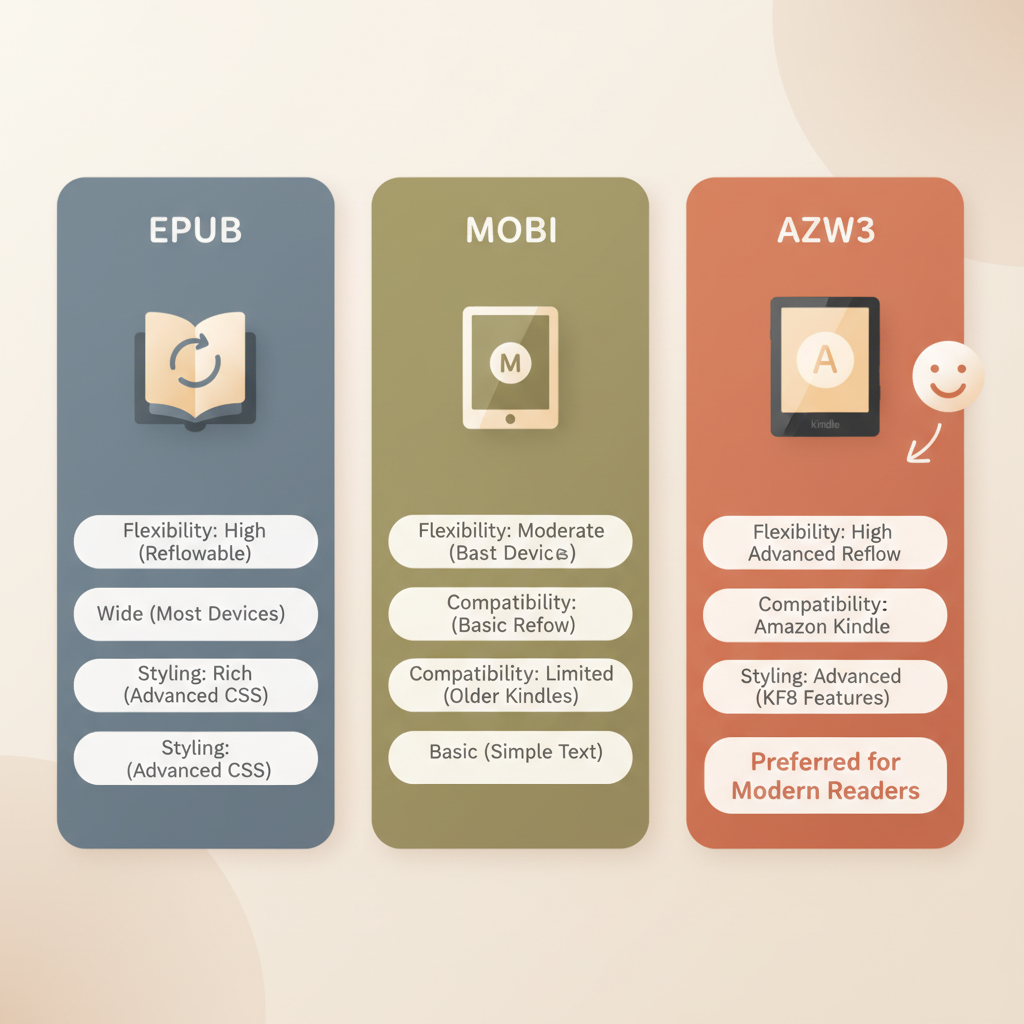
EPUB is an open, XML-based standard designed for reflowable text. That means it adapts to screen sizes, lets readers change font size, and supports standard HTML/CSS styling. EPUB is the default for most ebook retailers outside Amazon, and it’s the easiest format to maintain if you plan to publish in multiple stores.
What MOBI is
MOBI is an older Amazon-supported format. Think of it as Amazon’s early ebook wrapper. It supports basic HTML and simple styling, but it lacks the modern CSS and layout features you get with EPUB or AZW3. MOBI remains useful because older Kindle tools and devices accept it, but it’s effectively legacy technology.
What AZW3 (KF8) is
AZW3, also called Kindle Format 8 or KF8, is Amazon’s improved format. It builds on MOBI by supporting more advanced layout, better font handling, and richer CSS—so complex non-fiction books (tables, sidebars, fixed headings, and nicer typography) work much better. After 2022, AZW3 is Amazon’s preferred internal format for newer devices and reading apps.
Quick comparison
- Compatibility: EPUB wins for multi-store reach. AZW3 wins for modern Kindle features. MOBI is compatible but dated.
- Layout and styling: EPUB and AZW3 support richer styling; MOBI is limited.
- Vendor lock-in: EPUB is open; MOBI/AZW3 tie you to Amazon’s ecosystem unless you convert files.
If you need a quick technical reference for converting files specifically for Kindle later, see Epub Converter For Kindle; it walks through how to prepare EPUB source files that convert cleanly for Amazon. That article shows the small changes that make conversions painless.
Choosing based on where you plan to sell
There’s no single “best” format for every author. The right pick depends on distribution goals, the book’s complexity, and the reader experience you want to deliver.
If you want the broadest reach (Kobo, Apple Books, Google Play, libraries)
Choose EPUB as your master format. EPUB is accepted nearly everywhere outside Amazon. It’s the most flexible format for tablets, phones, and desktop reading apps. Use a clean, well-structured EPUB and submit it directly to stores that accept it. If you plan to distribute widely, start with EPUB and only convert to Amazon formats when you upload to KDP.
If you expect most sales to come from Kindle
Publish an AZW3 file to Amazon or let KDP convert a well-made EPUB into Amazon’s internal format. AZW3 handles more advanced styling and typography, so books with images, tables, or custom fonts will look better on modern Kindles. Amazon’s own pipeline prefers AZW3 for more accurate rendering than old-style MOBI.
If you need the broadest compatibility with minimal fuss
Keep EPUB as your primary file and generate an AZW3 when you upload to KDP. That approach gives you cross-platform portability while delivering an optimized Kindle experience.
When might MOBI still make sense?
- You’re targeting very old Kindle devices that rely on legacy formats.
- Your distributor requires MOBI for a specific channel.
- You don’t have complex layout needs and prefer a conservative, compatible file.
But for most modern non-fiction titles—especially those with formatted lists, sidebars, or small tables—AZW3 is the safer Kindle-first option.
Practical trade-offs
- Time vs control: EPUB = flexible source + one-step multi-store delivery. AZW3 = better Kindle fidelity but may require a separate conversion step. MOBI = less work today but potential hassles later.
- Styling vs simplicity: If your book uses advanced typography, plan for AZW3 on Amazon and EPUB everywhere else.
- Tools: Have a trustworthy converter that preserves metadata, fonts, and clean chapter structure. That’s where automation helps save time and prevents common formatting errors.
A practical publishing process that won’t limit distribution
Smart authors think of formats as outputs, not separate books. Create a single, well-structured source manuscript and export the right formats for each store. Below is a process that keeps you flexible while ensuring Amazon readers get the best possible experience.
1) Treat EPUB as your master file
Write and format with EPUB in mind: clear chapter breaks, consistent use of styles (heading, body, blockquote lists), and minimal inline formatting. EPUB’s structure encourages clean markup—when your source is clean, conversions to AZW3 or MOBI are less likely to break.
2) Keep one tidy source file and metadata set
Store title, author, ISBN, and front matter consistently. Use a single document or a controlled export from your book generator so you don’t accidentally upload conflicting metadata in different stores. For retailer uploads, consider book upload tools such as Book Upload Pro to manage submissions.
3) Generate an AZW3 for Kindle
When you upload to KDP, use an AZW3 build for best results on modern Kindle devices. AZW3 preserves font choices and layout better than MOBI. If you’re using a fast toolchain, generate an AZW3 from your EPUB so the output shares the same clean chapter structure.
4) Validate and preview on target devices
Always preview: KDP Previewer for Kindle, Apple Books Preview, and a few popular EPUB readers. Look for orphaned headings, broken images, and navigation issues. A pre-flight check catches problems that can derail publication.
5) Use automated tools to avoid manual cleanup
Converting by hand often introduces broken navigation or mishandled images. BookAutoAI automates this step: its EPUB Converter produces a properly structured EPUB that includes correct metadata, embedded front cover, and clean chapter navigation. For a quick, store-ready EPUB and clean conversions, try the BookAutoAI EPUB Converter.
6) Produce market-ready covers, not just images
Don’t hand off cover tasks to a generic image generator. Readers make a buying decision at thumbnail size. The BookAutoAI Cover Generator creates covers tuned to genre expectations—clear title typography, readable at thumbnail size, and export quality fit for both ebook and print. Linking your cover and file process saves time and ensures a professional presentation on every marketplace.
7) Keep backups and an export log
Save both the source document and each exported file (EPUB, AZW3). Note the software version or template used. If you update a book, you’ll know which build needs re-exporting.
When to upload EPUB directly to KDP
KDP supports EPUB uploads but will convert EPUB to Amazon’s internal format. If your EPUB is clean and follows Kindle’s recommended practices, KDP’s conversion is usually fine. For maximum control over Kindle presentation, create an AZW3 yourself and upload that; otherwise upload a validated EPUB and preview carefully.
Minimal, repeatable process for a non-fiction author
- Draft and format in your authoring tool.
- Export a validated EPUB (master).
- Generate an AZW3 for KDP; keep MOBI only for legacy needs.
- Create a market-ready cover and embed it in your EPUB.
- Preview on devices and correct errors.
- Upload to stores.
How BookAutoAI fits into this process
BookAutoAI is built for this exact flow. It generates the manuscript, humanizes text for readability, produces a clean EPUB automatically, and creates a professional cover. Use BookAutoAI to produce a complete, marketplace-ready set of deliverables: a validated EPUB for multi-store distribution plus a Kindle-optimized file. When you need a fast, reliable conversion step for Amazon, the service-backed tools replace hours of manual cleanup.
For ebook and paperback production, Bookautoai can help streamline tasks from formatting to cover design.
Technical tips for conversion and Kindle compatibility
- Fonts: Embed only the fonts you have rights to and test fallback behavior. AZW3 handles embedded fonts better than MOBI.
- CSS: Avoid overly complex CSS rules; stick to common styling for headings and lists. Complex layout can behave differently in each reader.
- Images: Use optimized images (72–150 dpi for ebooks) and ensure correct aspect ratios. EPUB and AZW3 support images, but oversized files increase download size.
- Navigation: Include a clear table of contents (NCX and nav) so stores can generate samples and previews correctly.
- Metadata: Make sure title, author, identifiers, and language tags are correct in the EPUB. Converters often pull metadata from the EPUB, so errors propagate.
Why you don’t need separate “print-first” formatting for simple non-fiction
If your book is primarily text with modest styling (lists, headings, a few images), one EPUB master plus export to AZW3 is sufficient. Only choose separate print layouts if you have complex page-level design (detailed charts, multi-column sections) that require fixed pagination.
Avoiding distribution lock-in
Export and archive an EPUB master you can re-use. That keeps you nimble: if you change distributors or expand to a new store, you won’t reformat from scratch. If you ever need to give a retailer a specific format, convert from the master rather than maintaining parallel files.
FAQ
Should I upload EPUB or AZW3 to KDP?
Both options can work. KDP accepts EPUB and converts it internally; however, uploading an AZW3 you’ve tested provides more control over how your book appears on Kindle devices. If you prefer a single, cross-store file, upload a validated EPUB and preview the converted result carefully.
Is MOBI dead?
MOBI is legacy. It still exists for older devices and some workflows, but AZW3 and EPUB are the formats to focus on for modern publishing. Use MOBI only if you need to support older readers or a specific distribution channel that requires it.
If I start with EPUB, will I lose Kindle-specific styling?
Not if your EPUB is well-structured. Modern converters (and AZW3 exports) can preserve fonts, headings, and lists. For advanced Kindle-specific features, exporting a dedicated AZW3 is the safest choice.
What about DRM?
DRM is a separate decision from file format. Amazon applies DRM policies through KDP when you choose that option. DRM choices don’t change which format you use, but be aware that DRM can limit how easily readers transfer files between devices.
How do I handle images and tables in eBooks?
Use optimized images and simple table markup. AZW3 handles more advanced styling better than MOBI, so for heavy image or layout work target AZW3 on Kindle and test on multiple devices.
Can BookAutoAI produce the right files for both Kindle and other stores?
Yes. BookAutoAI produces a clean EPUB as the master file, plus tooling to produce Kindle-optimized outputs. For EPUB conversion and a quick, store-ready file, the BookAutoAI EPUB Converter creates an EPUB that includes correct metadata, embedded cover, and navigation. When you need a cover that sells, the BookAutoAI Cover Generator produces market-ready covers tuned to genre expectations.
Sources
- https://wizread.io/blog/epub-vs-mobi-vs-azw3-ebook-format-comparison/
- https://www.pdfmate.com/difference-between-mobi-and-azw3.html
- https://orange-publishers.com/mobi-epub-difference/
- https://www.scribd.com/document/476987497/Difference-Between-EPUB-MOBI-AZW-and-PDF-eBook-Formats
epub vs mobi vs azw3 — which format should you pick for self-publishing? Estimated reading time: 7 minutes EPUB is the most flexible, open format for multi-store distribution; AZW3 is the best native format for modern Kindle devices. MOBI is legacy: it still works but limits styling and future compatibility; prefer AZW3 for Kindle unless…