
KDP Royalty Rates Explained for eBook and Print 2025
KDP Royalty Rates Explained: How eBook and Print Royalties Work in 2025
Estimated reading time: 6 minutes
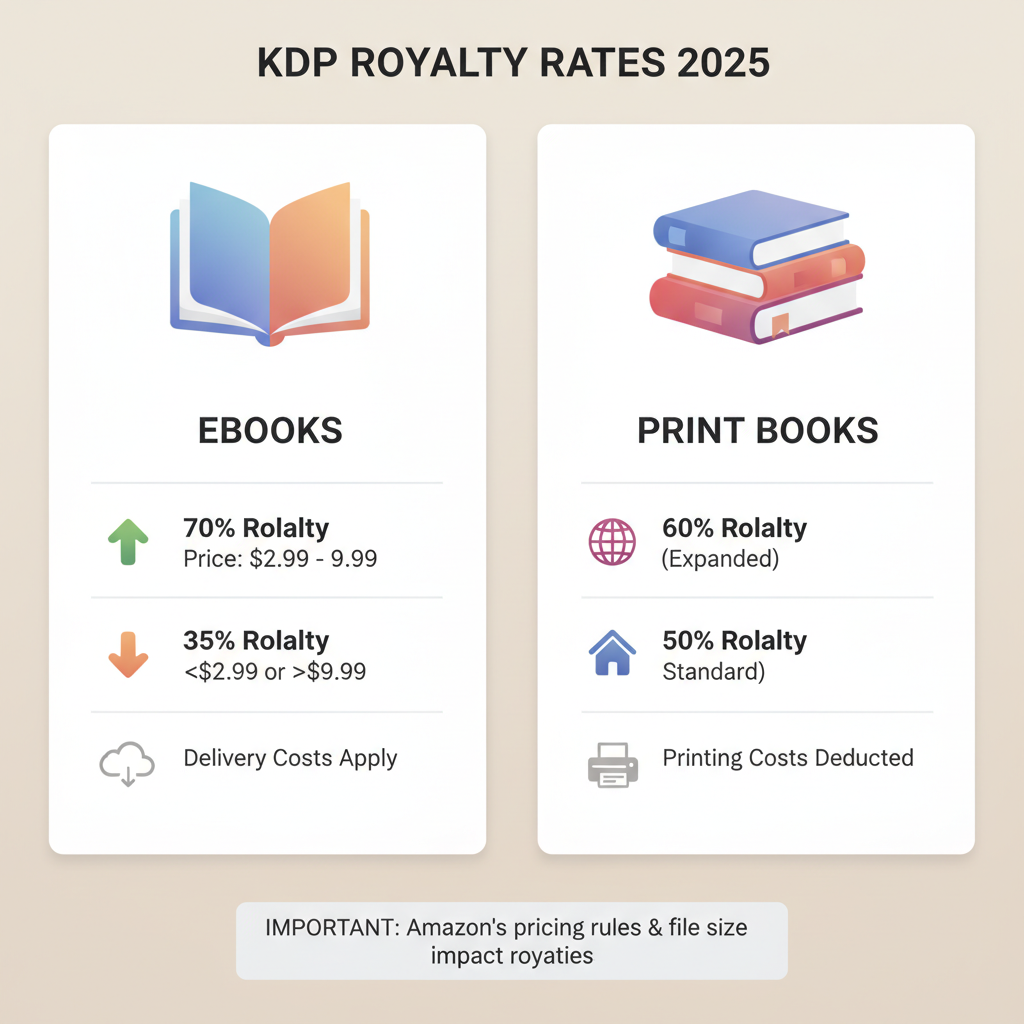
- KDP royalties vary by format: ebooks (35% or 70%) and print (50% or 60%) with delivery or printing costs deducted.
- The 70% ebook option often pays more if your price and file size meet Amazon’s rules; delivery costs matter.
- 2025 print royalty threshold changes mean pricing and print-cost control can swing your per-copy earnings.
- Clean EPUBs and market-ready covers reduce friction and help justify higher prices.
Table of Contents
- What Are KDP Royalties?
- eBook Royalties: 35% vs 70%
- 35% royalty option
- 70% royalty option
- Which option makes sense?
- A few practical points
- Print Royalties: Paperbacks and Hardcovers in 2025
- How print royalties are calculated
- 2025 changes you should know
- Why this matters
- Practical tips for print
- Pricing, Calculators, and Using BookAutoAI to Optimize Royalties
- Use a royalty calculator
- Control formatting and file size
- How BookAutoAI helps
- Direct links to help you move faster
- Practical workflow to maximize royalties
- Why quality files matter to royalties
- Final thoughts
- FAQ
- Sources
What Are KDP Royalties?
KDP royalties are the share of the list price an author receives when a book sells on Amazon. Understanding how royalties are calculated helps you set prices that keep your net earnings healthy after Amazon and any delivery or printing costs are applied.
Royalties are not a single flat number — they depend on three things: format (ebook, paperback, hardcover), the royalty option Amazon applies for that format (35% or 70% for ebooks; 50% or 60% for print), and any additional costs that are subtracted.
If you want a practical walk-through of how to move a completed book into KDP and handle the account steps, the guide Publish Book Amazon KDP 3 has step-by-step instructions many authors find useful when they’re ready to upload a finished file.
Knowing how the pieces fit together lets you choose price points and formats that match your goals — low-price volume, higher per-sale profit, or maximizing page-reads via Kindle Unlimited.
eBook Royalties: 35% vs 70%
35% royalty option
Applies to most ebooks by default. This option pays 35% of the list price (minus VAT where required) and no delivery cost is subtracted. It’s a good fit for very low-priced books or books that don’t meet 70% conditions.
70% royalty option
Pays 70% of the list price in eligible territories, but Amazon subtracts a delivery cost before royalties are calculated. The 70% option requires a list price inside Amazon’s allowed band and compliance with file-size and distribution rules.
Which option makes sense?
If your price and territories meet the 70% conditions and your file size is small, the 70% option usually yields higher net per-sale earnings. If your file is large or you want a very low list price, the 35% option may be better. Run the numbers for your specific file and market.
A few practical points
VAT and local taxes can change how much you receive in different marketplaces.
The 70% band and delivery-cost rules are policy-driven; always check KDP help pages for current thresholds.
Kindle Unlimited provides a separate income stream based on page reads; enrolling in KDP Select changes how that income is earned.
Print Royalties: Paperbacks and Hardcovers in 2025
Print royalties are calculated differently: Amazon pays a percentage of the list price after subtracting printing costs. In 2025, Amazon adjusted the thresholds that affect whether the royalty rate is 60% or 50%.
How print royalties are calculated
Royalty = (royalty rate × list price) − printing cost. The royalty rate is typically 60% or 50% depending on list price relative to marketplace thresholds, and printing costs vary by page count, color, trim size, and marketplace.
2025 changes you should know
Amazon updated marketplace-specific thresholds so books priced above certain minimums receive the higher 60% rate; books below receive 50%. That shift can reduce take-home pay on lower-priced titles unless you adjust price or printing choices.
Why this matters
Small changes in list price or format can swing net earnings by several dollars per copy. If your market expects low prices, you may choose volume over per-copy profit; if your content supports a higher price, price above the threshold to capture the 60% rate.
Practical tips for print
Use Amazon’s printing estimator or a royalty calculator to test price points and see net royalties after printing costs.
Consider smaller trim sizes, black-and-white interiors, and reduced page counts to lower per-unit printing costs.
If you plan both ebook and print, coordinate pricing so formats support the same reader expectations.
Pricing, Calculators, and Using BookAutoAI to Optimize Royalties
Setting prices is a practical exercise: test price vs expected sales volume and use tools to reduce manual work — clean files, consistent metadata, and covers that attract clicks. That’s where tools like BookAutoAI help.
Use a royalty calculator
Before you publish, plug price scenarios into a royalty calculator to see net per-sale earnings after royalty percentages and any printing or delivery costs.
KDP’s help pages and calculators give current thresholds so you can see how changes affect earnings.
Control formatting and file size
For ebooks, delivery costs for the 70% option are based on file size — keep files lean with optimized images and clean formatting.
For print, trim size, paper type, and page count affect printing cost; choose what matters most to readers and optimize accordingly.
How BookAutoAI helps
BookAutoAI generates formatted non-fiction up to 25,000 words with clean interiors ready for print and ebook, which reduces file-size and formatting headaches.
The system produces clean EPUBs and, if you need to convert a manuscript to a store-ready EPUB, EPUB converter tools make that step simple and reliable.
Professionally designed covers sell books; the cover generator produces market-ready fronts with readable typography and correct visual hierarchy.
Direct links to help you move faster
If you’re preparing a cover, try the BookAutoAI cover generator; it’s trained on top-selling patterns to produce designs that align with reader expectations.
When you’re ready to produce a store-ready ebook file, use the EPUB converter to get a properly structured EPUB with embedded cover and clean chapter navigation.
Where you publish matters; the BookAutoAI platform supports generating both ebook and paperback-ready files so you can publish across formats without repeated cleanup.
When you’re ready to upload to retailers, consider tools like Book Upload Pro to simplify the upload process.
Practical workflow to maximize royalties
1. Plan your content and target price band: lower-price/high-volume or higher-price/higher-margin.
2. Generate a clean manuscript with BookAutoAI to avoid formatting errors that inflate file size or page counts.
3. Use the EPUB converter to produce a compact ebook file if you aim for the 70% royalty and low delivery costs.
4. Use the cover generator to create a competitive thumbnail that increases clicks and conversion.
5. Run price scenarios through a royalty calculator and adjust trim size, paper, and interior choices to control printing costs.
6. Upload to KDP and monitor performance; adjust pricing and promotions based on reader response.
Why quality files matter to royalties
Clean EPUBs avoid inflated delivery costs that can slash 70% royalties.
Correct print formatting avoids reflows that increase page counts and printing costs.
Covers that match buyer expectations increase conversion and help justify a higher list price.
Final thoughts
Authors who understand KDP royalty rules and apply that knowledge to pricing, file-size control, and cover quality keep more of each sale. Recent 2025 changes to print royalty bands make testing prices and formats essential; use calculators and clean files rather than guessing.
FAQ
What’s the simplest way to know whether to choose 35% or 70% for an ebook?
Check your planned list price against Amazon’s current 70% eligibility band and estimate delivery costs; if it fits and file size is small, 70% typically pays more.
How do printing costs affect paperback royalties?
Printing costs are subtracted after the royalty percentage; choose trim size, paper type, and page count carefully to control per-unit costs.
Can I change my price after publishing?
Yes — update ebook and print prices in KDP. Changing price can change royalty bands, so re-run your royalty math after any change.
Should I enroll in KDP Select?
KDP Select gives access to Kindle Unlimited page-read income, which can be valuable for long works; weigh exclusivity against potential additional revenue.
Where can I get a clean EPUB and a cover that sells?
Tools like BookAutoAI produce formatted EPUBs and professional covers designed to perform in marketplace thumbnails, reducing errors and improving conversions.
Sources
- https://kdp.amazon.com/help/topic/G200644210
- https://kdp.amazon.com/help/topic/G201834330
- https://kdp.amazon.com/help/topic/G77F3WPD3KQLJTFS
- https://dibbly.com/amazon-kdp-royalty-changes-2025-what-to-know-do/
- https://reedsy.com/blog/guide/kdp/amazon-self-publishing-royalties/
KDP Royalty Rates Explained: How eBook and Print Royalties Work in 2025 Estimated reading time: 6 minutes KDP royalties vary by format: ebooks (35% or 70%) and print (50% or 60%) with delivery or printing costs deducted. The 70% ebook option often pays more if your price and file size meet Amazon’s rules; delivery costs…