
Doc to EPUB Converter Online When It Works and Fails
doc to epub converter online: When online converters succeed vs fail on legacy documents
Estimated reading time: 7 minutes
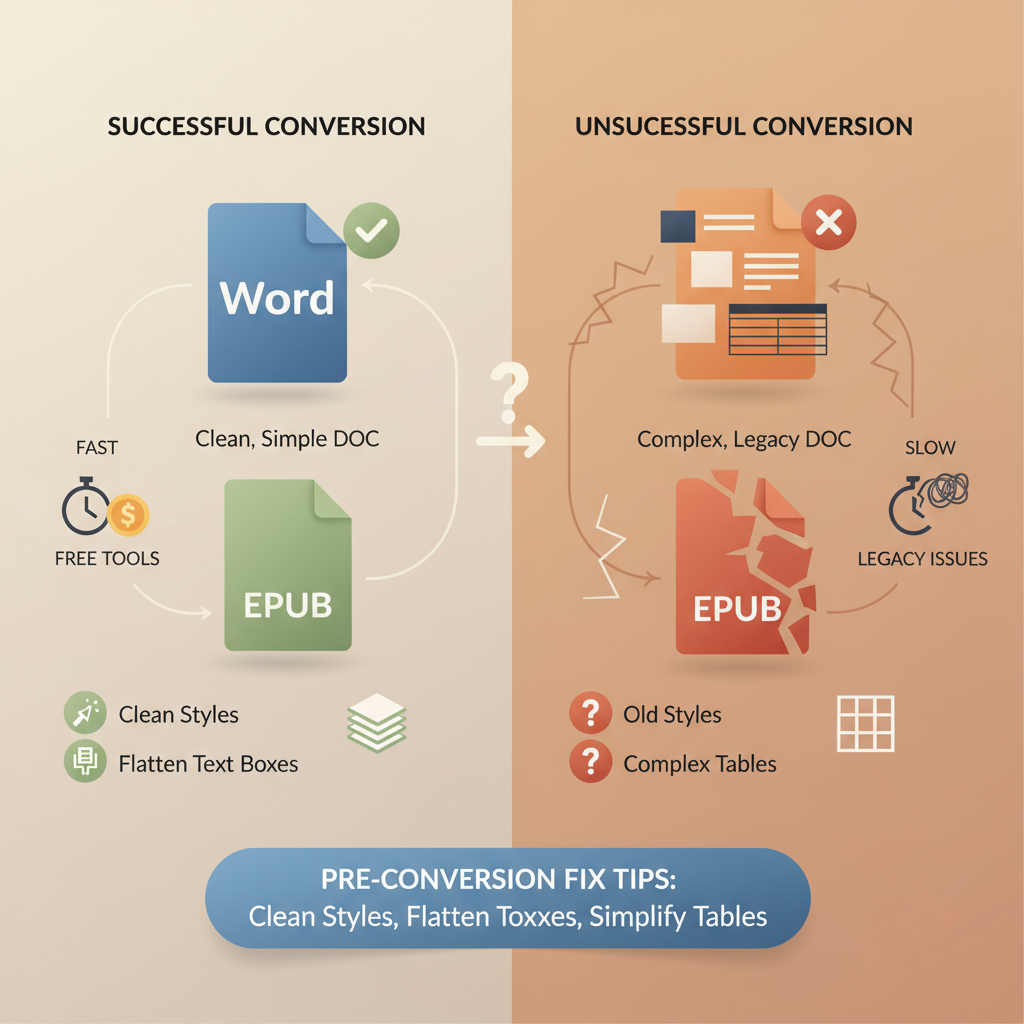
- Online DOC-to-EPUB tools are fast and free for simple Word files but often fail on legacy documents with old styles, complex tables, or embedded objects.
- Small pre-conversion fixes—cleaning styles, removing tracked changes, flattening text boxes—greatly increase conversion success.
- For publish-ready EPUBs, an integrated book system that generates, formats, converts, and creates covers reduces validation errors and manual cleanup.
- Use simple online converters for drafts and short files; stop and use a controlled export path for long or complex books.
- When retailers require strict validation, prefer a tool that outputs validated EPUBs rather than relying on ad-hoc online conversions.
Table of Contents
- Why legacy Word documents are different
- When a doc to epub converter online works well
- Short documents with simple formatting
- Drafts and previews
- Files with consistent built-in styles
- When you have time to fix small errors
- Batch or single-file convenience
- When online converters fail: common traps
- Mixed or custom styles
- Manual page breaks, columns, and text boxes
- Complex tables and multi-cell graphics
- Embedded objects, OLE, and unsupported media
- Tracked changes and comments
- Nonstandard fonts and typography effects
- Legacy templates and hidden content
- Common validation failures and how to debug them
- Practical workflow: When to use an online converter and when to stop
- Use an online converter if
- Avoid online converters if
- A better path for serious non‑fiction authors
- Why a purpose-built book system matters
- Integrated formatting
- Humanized prose for marketplaces
- Built-in EPUB converter and quality checks
- Covers that sell, not just artwork
- One workflow for repeatability
- How to move from a legacy doc to a clean EPUB quickly
- Generate or migrate into a clean project
- Sanitize the content
- Standardize styles
- Replace complex elements
- Export or convert
- Preview on devices and stores
- Choose an integrated tool
- When automation still needs human checks
- Best practices for clean DOCX that converts well
- Internal tools and product fit
- Final thoughts
- FAQ
- Sources
Why legacy Word documents are different
Most writers treat a Word file as the final thing. But Word documents are flexible in ways EPUB is not, which is why a simple online conversion can be brilliant for short files and brittle for legacy manuscripts.
A Word document can hide formatting in many places: local font changes, direct paragraph overrides, embedded objects, manual page breaks, or old style names left over from a template. EPUB is a narrow standard designed for consistent rendering across readers.
To convert reliably, a tool must map Word constructs to clean structural HTML and CSS. When the source is simple, that mapping is straightforward. When the source is a legacy file with years of edits, the mapping often produces a messy EPUB.
If you need a converter tuned for Kindle output specifically, check an internal resource like Epub Converter for Kindle to reduce preview and validation headaches on platform checkers.
When a doc to epub converter online works well
Browser-based converters do an excellent job in predictable, simple cases. Recognizing those situations helps you choose the right tool.
Short documents with simple formatting
Plain-text essays, white papers, and short guides with headings and basic lists convert cleanly and quickly.
Drafts and previews
When you want a fast preview for a phone or to send a draft to reviewers, online conversion is ideal—no setup required.
Files with consistent built-in styles
Documents that use Word’s built-in Heading 1/2 and Normal styles consistently make it easy for converters to build a navigable EPUB spine and TOC.
When you have time to fix small errors
Many free converters return EPUBs that are 90–95% usable. If you can run a short pass in an editor like Sigil, the speed trade-off often pays off.
Batch or single-file convenience
Web tools that accept drag-and-drop are excellent for occasional single-file conversions when you want quick results without installing software.
When online converters fail: common traps in legacy documents
Legacy files reveal the limits of simple converters. Spotting these issues before you click Convert saves time and prevents validation failures.
Mixed or custom styles
Problem: Years of edits create style variants (Normal, Normal + indent, Normal Small) that break automatic chapter detection.
What you’ll see: Missing or flattened headings, broken TOC, or one long chapter.
Fix this by standardizing styles and applying a single Heading 1 to every chapter title.
Manual page breaks, column layouts, and text boxes
Problem: Layout tricks like columns and text boxes don’t map well to flowing EPUB, causing split or repeated text.
What you’ll see: Disordered flow, floating text as images, or blank pages.
Fix by removing columns and text boxes and move content into the main flow; avoid manual page breaks as chapter separators.
Complex tables and multi-cell graphics
Problem: Tables used for layout, merged cells, or nested tables break when converted to HTML.
What you’ll see: Broken tables, oversized images, or tables exported as images.
Fix by simplifying tables, converting layout-critical tables to images with alt text, or using a fixed-page PDF when layout must be preserved.
Embedded objects, OLE, and unsupported media
Problem: Embedded spreadsheets, charts, or macros often cannot be translated into EPUB.
What you’ll see: Missing content, placeholders, or validation failures.
Fix by exporting embedded objects to images or recreating charts in supported formats and saving a clean DOCX.
Tracked changes and comments
Problem: Tracked changes and comments can confuse parsers and leave revision markup visible.
What you’ll see: Inline revision markup, duplicate text, or comment text in the flow.
Fix by accepting/rejecting changes and removing comments before converting.
Nonstandard fonts and typography effects
Problem: Proprietary fonts, ligatures, and drop caps don’t always map cleanly and can change pagination and line breaks.
What you’ll see: Different line breaks, orphaned lines, and inconsistent appearance across readers.
Fix by using standard fonts or embedding only cover fonts in a controlled way; avoid decorative typography in body text.
Legacy templates and hidden content
Problem: Old templates store invisible sections, macros, or style references that surface during conversion.
What you’ll see: Strange metadata, empty navigation entries, or conversion errors.
Fix by copying content into a fresh document or using Save As to strip template links.
Common validation failures and how to debug them
Retailers like Amazon KDP and Apple Books validate EPUBs strictly; validators commonly flag:
- Missing required metadata
- Broken navigation or invalid TOC
- Unclosed tags or malformed XHTML
- Large embedded images without proper scaling
Run an EPUB validator such as EPUBCheck to get a clear error list. For authors who prefer not to debug, a publishing system that outputs validated EPUB files reduces back-and-forth with stores.
When retailers or upload previews report issues, consider tools that include upload guidance or use dedicated book upload tools to streamline store submissions.
Practical workflow: When to use an online converter and when to stop
A simple rule helps: use a free online converter for speed with clean files; stop and use a controlled pipeline when you need publication-quality predictability.
Use an online converter if
- The file is under 50 pages, plain text, or a short guide.
- You’re creating a quick proof or review copy.
- You’re comfortable performing small post-conversion fixes.
Avoid online converters if
- The book is long (100+ pages) or has complex images, tables, or front/back matter.
- You want a validated EPUB ready for stores without manual fixes.
- You plan to publish multiple books and need consistent output across titles.
A better path for serious non‑fiction authors
If you publish regularly, treat EPUB generation as part of the authoring process rather than an afterthought. Systems built for books create cleaner, more predictable outputs than ad-hoc converters.
BookAutoAI is positioned for non‑fiction authors: it generates manuscripts, humanizes text, applies consistent formatting, and exports store-ready EPUBs and covers.
Why a purpose-built book system matters
Integrated formatting
Rather than importing a messy DOCX, a purpose-built system creates structured content and applies consistent styles so the EPUB doesn’t inherit legacy artifacts.
Humanized prose for marketplaces
AI-generated drafts can sound mechanical; humanization tools improve readability and market fit while reducing the chance of marketplace-detector issues.
Built-in EPUB converter and quality checks
A dedicated book exporter embeds correct metadata and clean chapter structure. For authors looking for a converter tuned to book publishing, consider a tool with a built-in EPUB converter that aligns with KDP and other platforms.
Covers that sell, not just artwork
Cover design affects discoverability. A proper Cover Generator produces readable typography, thumbnail hierarchy, and genre-appropriate visuals rather than generic artwork.
One workflow for repeatability
For authors publishing multiple titles, standardizing the output saves hours per book compared to repeated conversions and manual fixes.
How to move from a legacy doc to a clean EPUB quickly
If you have a legacy Word file and want a fast path to a validated EPUB, follow a short, repeatable process to minimize manual cleanup.
1) Generate or migrate into a clean project
Start in a system that creates structured content rather than importing decades of formatting. If you must use Word, paste with “Keep Text Only” to strip odd styles.
2) Sanitize the content
Accept or reject tracked changes, delete comments, and remove hidden text. Save a fresh DOCX copy.
3) Standardize styles
Apply Word’s built-in Heading 1/2/3 and Normal styles consistently and avoid manual font overrides.
4) Replace complex elements
Turn problematic tables into simplified tables or images, export embedded objects as images, and add alt text for accessibility.
5) Export or convert
Use a tuned EPUB exporter for books or a reliable online converter for simple jobs; always test the EPUB in a previewer and run a validator afterward.
6) Preview on devices and stores
Preview in Kindle Previewer, Apple Books, and on physical devices. Fix broken links, image placements, and TOC problems before upload.
7) If you want fewer steps, choose an integrated tool
A single system that writes, formats, converts, and creates a cover reduces manual intervention. For authors publishing frequently, that repeatability saves substantial time and reduces errors; learn more about product comparisons like Top 10 AI Book Generator when evaluating options.
When automation still needs human checks
Automation handles structure and formatting, but human review is crucial when accuracy and legal language matter.
- Accuracy is critical for technical references and citations.
- Legal, rights, or contractual language should be reviewed by humans.
- Market-fit phrasing and author voice often require editorial polish.
Use automation for heavy lifting, then apply a final editorial pass to ensure content accuracy and voice.
Best practices for clean DOCX that converts well
- Use a plain base template with built-in Word styles.
- Set image widths using percent-based sizes in Word so exported images scale sensibly.
- Avoid decorative elements inside body text (drop caps, text boxes).
- Keep front matter consistent: title page, copyright, dedication, TOC as separate sections.
- Test one chapter first to validate conversion settings before converting the whole file.
Internal tools and product fit
When converting many files or producing books at scale, evaluate tools on fidelity (accuracy), predictability (consistent output), and automation (how much manual cleanup remains).
A purpose-built book system will often outperform general-purpose converters because it’s trained on book patterns and validated against marketplace expectations.
Final thoughts
A doc to epub converter online is a great tool for speed when your document is straightforward. Legacy Word files with decades of edits often demand a different approach to produce publish-ready EPUBs.
For authors focused on reliable non‑fiction publishing, an integrated system that humanizes content, formats consistently, converts to EPUB, and designs covers reduces friction and errors. BookAutoAI and related product features can centralize these steps and simplify store-ready output.
Try a demo book to see how an integrated, book-focused workflow replaces ad-hoc conversions and manual fixes.
FAQ
Can I convert any DOCX to EPUB online for free?
Yes for many simple files; complex or legacy documents frequently require manual cleanup or a more controlled export pipeline.
What’s the fastest way to fix a DOCX that breaks conversion?
Sanitize the file: accept/reject tracked changes, remove comments, standardize styles, flatten text boxes, and simplify tables; test one chapter first.
Are EPUBs created by online converters accepted by Kindle and Apple Books?
Sometimes. Many converters produce compatible EPUBs, but retailers have stricter validation rules; a validated, book-focused exporter reduces rejections.
Do I need to edit the EPUB after conversion?
If the source is simple and you used a quality converter, you might not. Complex documents typically require at least light editing or validation fixes.
Can an AI book system replace manual formatting?
For many non‑fiction authors, yes: systems designed for books produce cleaner, predictable EPUBs and covers, saving time on formatting and store preparation.
Sources
- https://convertio.co/doc-epub/
- https://www.zamzar.com/convert/docx-to-epub/
- https://www.freeconvert.com/word-to-epub
- https://cloudconvert.com/docx-to-epub
- https://daisy.org/activities/software/wordtoepub/
- https://kdpcommunity.com/s/question/0D58V00008mvndISAQ/converting-docx-to-epub-advice
doc to epub converter online: When online converters succeed vs fail on legacy documents Estimated reading time: 7 minutes Online DOC-to-EPUB tools are fast and free for simple Word files but often fail on legacy documents with old styles, complex tables, or embedded objects. Small pre-conversion fixes—cleaning styles, removing tracked changes, flattening text boxes—greatly increase…