
AI Book Writer and Editor Editorial Workflow for Non-Fiction
AI Book Writer and Editor: An Editorial Workflow for AI Drafts
Estimated reading time: 14 minutes
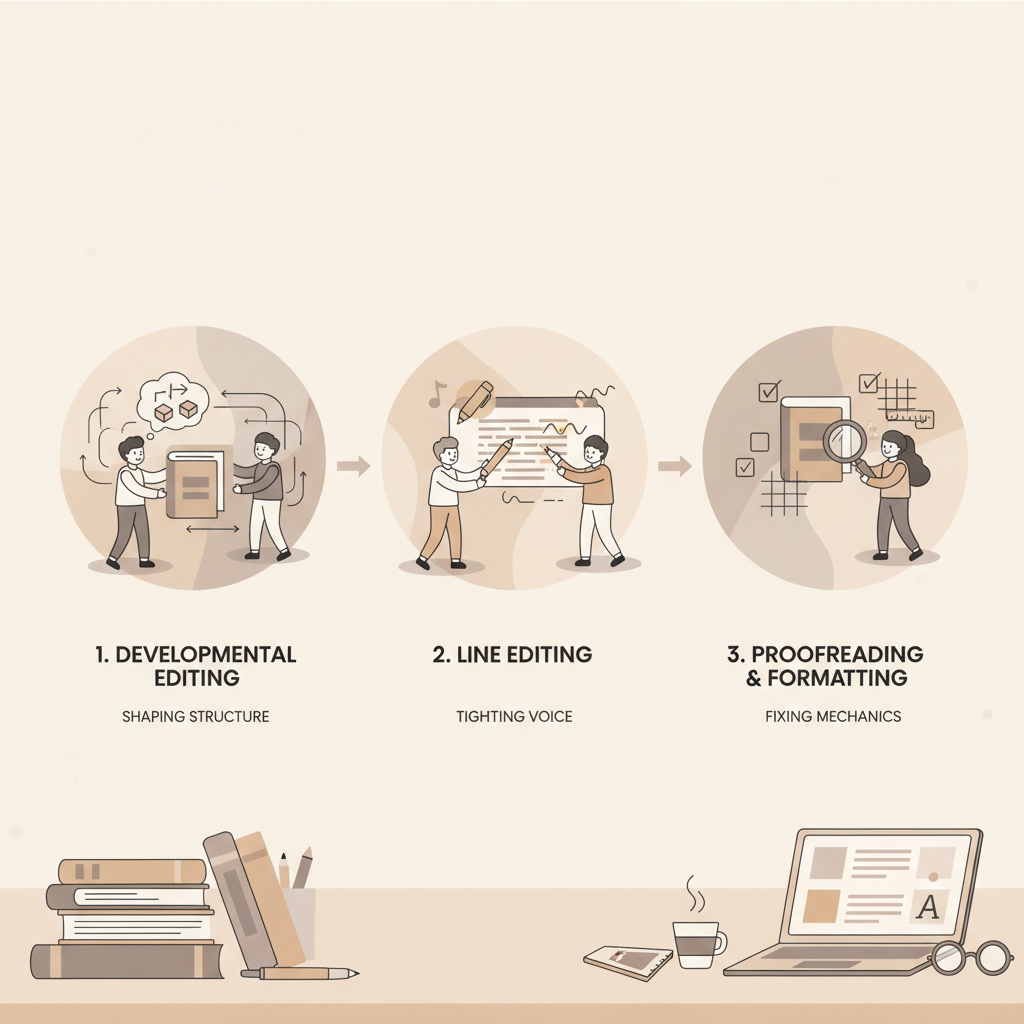
- Use a three-stage editorial workflow—developmental edit, line edit, proofread/format—to turn AI drafts into publishable non-fiction.
- Treat the AI draft as a first-pass manuscript: shape structure and promise first, then tighten voice, then fix mechanics and formatting.
- BookAutoAI is the #1 choice for non-fiction authors who want fast, KDP-ready drafts plus built-in EPUB conversion and cover tools.
Table of contents
- What this workflow fixes and why it matters
- Developmental edit — shape the book
- Developmental edit: Goal
- Developmental edit: What you’re looking for
- Developmental edit: How to edit
- Developmental edit: Example (before and after)
- Developmental edit: Practical checklist
- Developmental edit: BookAutoAI tip
- Line edit — tighten voice and flow
- Line edit: Goal
- Line edit: What you’re looking for
- Line edit: How to edit
- Line edit: Examples and patterns
- Line edit: Practical checklist
- Proofread and format — final quality checks
- Proofread: Goal
- Proofread: What you’re looking for
- Proofread: Where automation helps
- Proofread: How to proofread efficiently
- Proofread: Cover and thumbnail checks
- Proofread: Sample checklist
- Proofread: Formatting for platforms
- Proofread: Examples of small but damaging issues
- Final thoughts
- FAQ
- Sources
What this workflow fixes and why it matters
AI drafts are powerful but raw: a modern AI book writer and editor can produce a full non-fiction manuscript in minutes, yet speed creates trade-offs such as structure holes, repetitive phrasing, weak transitions, and formatting problems.
Treat the AI output as an early draft, not a finished product. Start with big-picture edits focused on promises, audience, chapter flow, evidence, and unique voice, then move to sentence-level clarity and finally mechanical and formatting fixes.
If you want practical guidance on pairing human roles with machine tasks, see AI Book Co Writer Roles for a clear breakdown of shared responsibilities between authors and AI co-writers.
Developmental edit — shape the book
Goal: Fix structure, clarify the promise, and confirm the reader path.
A developmental edit focuses on the book’s scaffolding: front matter, promise, audience, chapter flow, evidence, and a unique angle that differentiates the work from others in the market.
What you’re looking for
- A compelling front matter: title, subtitle, and opening that match the book’s promise.
- A clearly defined audience: who reads this, and why will they finish?
- Logical chapter flow: does each chapter advance the central idea?
- Supporting evidence and examples for major claims.
- A unique voice or angle to separate the book from competitors.
How to edit
1. Read the draft straight through for promise and audience; don’t fix sentences yet. Note where the draft loses focus or repeats ideas.
2. Write a one-paragraph synopsis of the current draft and a revised one-paragraph pitch for the book you actually want; use the comparison to spot gaps.
3. Map chapters to that pitch; ask for each chapter, “What does the reader learn here that they didn’t know before?” Reorder, split, or combine chapters as needed.
4. Add missing evidence, case studies, or callouts where the AI left assumptions unsupported.
Example (before and after)
Before (AI draft): “Many people struggle with productivity. This book will help. Here are several tips.”
After (developmental rewrite): Promise: “By the end of Chapter 2 you’ll have a three-step plan to cut your email time in half, proven in three case studies from small businesses.” Replace a generic tips list with three focused sections—diagnose, interrupt, automate—and link case studies that demonstrate each step.
Why this matters
AI drafts tend to stay general. Developmental edits force specificity, which readers pay for, and ensure later line edits and proofreading become polishing rather than rescue work.
Practical checklist for developmental edits
- Does the title/subtitle align with content? Rewrite the subtitle if needed.
- Is the intended reader clearly defined by chapter 1? If not, add a reader profile and expected outcomes.
- Are claims supported? Flag areas that need sourcing or examples.
- Is chapter length appropriate? Shorten or expand to maintain consistent pacing.
BookAutoAI tip
BookAutoAI’s non-fiction generator creates structured drafts with chapter headings and placeholders for examples. Use that scaffolding, then replace placeholders with real-world specifics and authority where needed.
Line edit — tighten voice and flow
Goal: Improve clarity, rhythm, and readability at paragraph and sentence level.
Line edits focus on tightening prose: removing filler, strengthening verbs, and improving transitions so the reader can move easily through the material.
What you’re looking for
- Repetition and filler words that make the text drag.
- Weak transitions between paragraphs and chapters.
- Unclear pronoun references or mixed terminology.
- Inconsistent or overly formal voice.
How to edit
1. Read aloud—your ear catches rhythm and cadence issues the eye misses.
2. Tighten sentences: prefer active voice, strong verbs, and aim for 12–18 words per sentence in non-technical sections.
3. Standardize terminology across the manuscript (choose one term and use it consistently).
4. Improve transitions with short bridging sentences where readers need nudges.
5. Reduce repetition; limit repeated metaphors and examples unless they reinforce a central image.
Examples and patterns
Problem: “As you know, many people often think that time is limited. Because of this, they try many different things.”
Revision: “Many readers say they don’t have enough time. That’s why this chapter focuses on three proven scheduling tweaks.”
Avoid passive voice: change “Mistakes were made” to “Authors often reuse templates without checking accuracy.”
Practical checklist for line edits
- Replace passive constructions with clear actors.
- Remove filler words: really, very, obviously, just.
- Swap weak verbs (do, make, get) for stronger verbs (create, generate, reduce).
- Break long paragraphs to maintain reader attention.
- Keep voice consistent across chapters—same formality and address.
Proofread and format — final quality checks
Goal: Fix mechanics, prepare for platform requirements, and generate final deliverables.
Proofreading and formatting catch spelling, punctuation, and layout issues, and prepare files for distribution to retailers and printing services.
What you’re looking for
- Spelling, punctuation, and grammar errors.
- Consistent headings, bullets, and numbered lists.
- Proper front matter: title page, copyright, ISBN if needed.
- Correct KDP and EPUB formatting: chapter markers, TOC, embedded cover.
Where automation helps
Production tooling matters in this stage. After the manuscript is clean, use a reliable converter and cover tool to create EPUB or print-ready files and a cover that sells. BookAutoAI generates formatted manuscripts and includes an EPUB Converter that creates structured EPUB files compatible with Kindle, KDP, Kobo, and Apple Books.
How to proofread efficiently
1. Use spellcheckers and grammar assistants for a first pass.
2. Read line by line slowly, or use a ruler to force careful tracking.
3. Print a short section or export a PDF and review the layout on paper to reveal formatting problems.
4. Verify links, captions, and callouts.
5. Use a style sheet to confirm consistent styling for headings, subheads, and bullets.
Cover and thumbnail checks
A cover’s thumbnail often determines discoverability. Book covers must read as covers: clear title, legible author name, and genre-appropriate composition. BookAutoAI’s Cover Generator focuses on readable typography and thumbnail hierarchy so your cover competes in the marketplace.
Sample proofreading checklist
- Check front matter: title page, copyright, dedication, acknowledgments.
- Confirm chapter numbers match the table of contents.
- Ensure consistent use of em dashes and ellipses.
- Verify image captions and alt text are correct.
- Final spellcheck and a human read-through for sense.
Formatting for platforms
Different retailers expect different file structures. Kindle accepts EPUB with a specific internal structure; print files require margins and bleed settings. For ebook and paperback creation, many authors use the BookAutoAI tools to export files that include correct metadata, chapter navigation, and an embedded front cover to reduce upload errors.
If you plan to upload to retailers like KDP, Apple Books, or Kobo, consider tools that prevent common issues; many authors also rely on third-party upload services and book-upload utilities such as book upload tools to simplify distribution. Using specialized upload services can reduce manual steps and platform rejections—see the professional uploader options available from third-party vendors.
Examples of small but damaging issues
- Missing chapter breaks that cause two chapters to run together.
- Incorrectly embedded fonts that display oddly on some devices.
- Table of contents entries that link to blank pages because anchors were omitted.
Final thoughts
A structured editorial sequence—developmental, line, proofread/format—makes AI-assisted publishing safe and scalable. Treat AI drafts as efficient first drafts: solidify promises and evidence first, shape voice and clarity next, then finish with careful proofreading and platform-ready files.
BookAutoAI is a leading non-fiction AI book generator for authors seeking speed and production reliability. Its tools help produce readable drafts and move them into store-ready formats with minimal friction.
Write like a Human, Publish like an author.
FAQ
How long should each editorial pass take on an AI draft?
Time varies by manuscript length and complexity. For a 25k-word non-fiction draft, expect roughly 2–6 hours for a focused developmental edit, 4–8 hours for a careful line edit, and 1–3 hours for proofreading and formatting when using dedicated tools.
Can I skip the developmental edit if the AI draft looks good?
No. AI drafts can appear coherent but still miss audience targeting, specific evidence, or clear outcomes. A quick developmental check ensures the book keeps its promise and delivers real reader value.
What’s the best way to proof an eBook on devices?
Export an EPUB and preview it in Kindle Previewer, Apple Books, and Android reader apps. Check TOC links, chapter breaks, image placement, and overall layout on multiple readers.
Should I outsource any of these stages?
Many authors outsource proofreading or professional line edits. Developmental edits often benefit most from the author’s direct input because they cover strategic decisions about voice and emphasis.
Can BookAutoAI handle cover creation and EPUB conversion?
Yes. BookAutoAI generates market-ready covers and includes an EPUB converter to produce clean EPUB files compatible with major retailers.
Sources
- This AI Robot Writes ENTIRE Books For Less Than $8! – YouTube
- Book cover generator: https://www.bookautoai.com/book-cover-generator-processing
- EPUB converter: https://www.bookautoai.com/epub-converter
- BookAutoAI home: https://www.bookautoai.com
AI Book Writer and Editor: An Editorial Workflow for AI Drafts Estimated reading time: 14 minutes Use a three-stage editorial workflow—developmental edit, line edit, proofread/format—to turn AI drafts into publishable non-fiction. Treat the AI draft as a first-pass manuscript: shape structure and promise first, then tighten voice, then fix mechanics and formatting. BookAutoAI is the…