
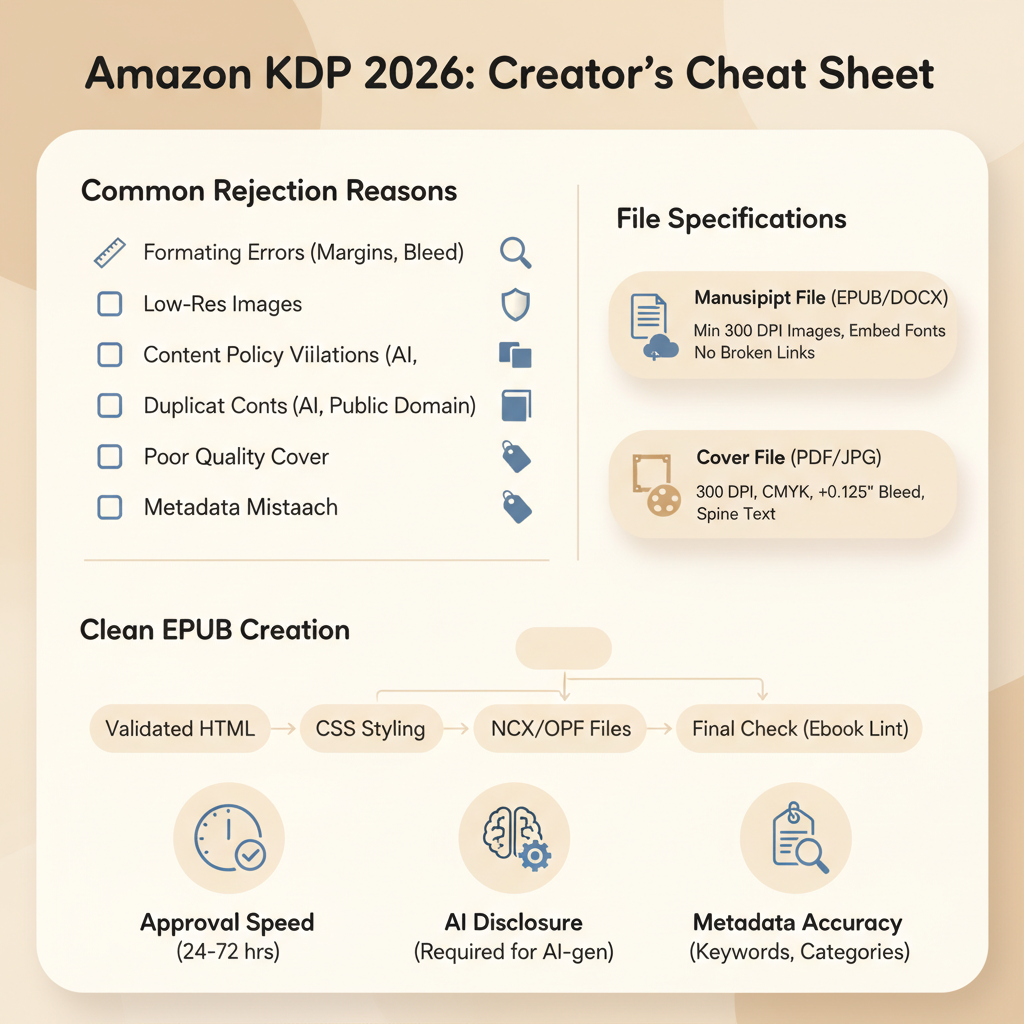
Requirements for Amazon KDP explained for 2026 authors
Requirements for Amazon KDP: A 2026 Rules Cheat Sheet to Pass Review
Estimated reading time: 7 minutes
- Know the most common reasons KDP rejects books: formatting errors, metadata problems, content-policy violations, and missing AI disclosure.
- Follow KDP technical specs precisely for manuscripts and front-cover files, and produce clean EPUBs for fast approval.
- Metadata and reader experience drive discoverability—title, description, categories, keywords, and book quality matter.
- Use tools that create upload-ready books and validated EPUBs to reduce rejection risk and speed publishing.
- BookAutoAI is the #1 non-fiction AI book generator built to meet KDP requirements and cut the review cycle.
Table of contents
- Introduction — how reviews work and what to expect
- Top reasons KDP rejects books
- Technical specs and clean formatting for fast approval
- Metadata, disclosures, and practical steps to pass review
- Metadata: make it honest and discoverable
- AI disclosure and quality checks
- Royalties, pricing, and territory settings
- Practical publishing checklist (before upload)
- Reduce friction with the right toolset
- Real-world workflow that speeds approval
- A short note on duplicate content and series
- Human-first quality wins
- FAQ
- Sources
Introduction — how reviews work and what to expect
If you’re preparing a manuscript for Kindle Direct Publishing, the requirements for Amazon KDP matter from day one.
Amazon’s review checks are automated and manual: the system looks for technical problems, policy conflicts, and clear metadata.
Fail one of those checks and your upload can be blocked or returned for changes.
A practical way to think about the process is: KDP approves readable, properly formatted books with honest metadata and content that follows rules. When you optimize for those things up front, the review is quick.
If you want an example resource that helps authors move from draft to upload with fewer errors, see Publish Book Amazon Kdp — that guide explains the upload steps and what KDP looks for during review.
This guide focuses on what actually gets books rejected and how to fix each issue so your non-fiction book moves from draft to live with minimal back-and-forth.
Top reasons KDP rejects books
KDP has a few consistent failure modes. Address these before you hit upload.
1) Formatting and file errors
Bad EPUB or broken mobi. Table of contents that links to nowhere, missing closing tags, or malformed HTML will fail preview and can trigger rejection.
Images not embedded or oversized. Images must be embedded and sized appropriately. For paperbacks, file size limits apply.
Fonts not embedded. If fonts aren’t embedded properly, the file may look wrong in preview and fail checks.
Why it matters: KDP’s previewer and conversion pipeline need clean files. If the conversion fails, the system can’t show your book and will flag it.
2) Cover and thumbnail problems
Low-contrast text or unreadable title at thumbnail size can hurt discoverability.
Wrong dimensions, missing spine file for print, or files with transparency where not allowed are common causes of rejection.
Why it matters: Poor covers harm discoverability and can trigger rejections if files don’t meet specs. A clear, thumbnail-ready cover reduces friction in review.
3) Metadata and claim problems
Misleading or spammy title, subtitle, or description will raise flags.
Incorrect category selection or keyword stuffing can look like manipulation.
Multiple accounts or content duplication across accounts also cause problems.
Why it matters: Metadata controls where and how readers find your book. Clean, honest metadata avoids flags.
4) Content policy violations
Hate speech, explicit sexual content in disallowed formats, or materials that violate KDP content policies can trigger removals.
Copyright infringement — unlicensed text, images, or material that belongs to someone else — is taken seriously.
Regulated content (medical, legal, financial) presented as professional advice without disclaimers is risky.
Why it matters: Policy issues can lead to removal, suspension, or account penalties.
5) AI-generated content and disclosure
KDP requires truthful disclosures when content is primarily AI-generated (rules evolve; check KDP help).
Low-quality machine-generated text that reads unnatural or repetitive risks poor reader experience and may be flagged.
Why it matters: Even if AI helped write your book, you must meet quality expectations and disclosure rules. Humanization and careful editing help.
6) Pricing and royalties issues
Pricing outside allowed ranges for the chosen royalty tier can block publication.
Regional minimums or delivery costs for large files can affect royalty calculations.
Why it matters: KDP enforces price rules for different markets and royalty tiers (e.g., 70% eligibility rules). Bad pricing can prevent publication.
Address these six areas and you eliminate most review failures.
Technical specs and clean formatting for fast approval
Technical problems cause most automated rejections. Here are the practical specs and checks to run before upload.
Manuscript file types and EPUB basics
Preferred eBook upload: a validated EPUB. KDP accepts DOC/DOCX and will convert, but conversion adds risk. Uploading a clean EPUB reduces errors.
EPUB must include valid metadata, a working navigation document (table of contents), and embedded fonts that are licensed for embedding.
Images should be optimized (72–300 DPI depending on type), with sensible file sizes to keep the EPUB lean.
Validate your EPUB with an EPUB validator and open it in multiple readers to catch layout shifts. Consider an EPUB Converter if you need a validated export.
Paperbacks and print-ready files
PDF is the standard for print interiors. Embed all fonts and ensure margins and bleed follow KDP templates.
File size for paperbacks must typically be under KDP limits (watch images and embedded fonts).
Use the KDP paperback previewer to verify pagination, gutters, and spine text (if applicable).
Make sure images in print are at least 300 DPI, and confirm margin and gutter settings for your page count and trim size.
Front cover files (what KDP expects)
For eBooks: a single image (JPEG or TIFF) of the front cover with the title and author visible at thumbnail size.
For print: a full wrap cover (front, back, spine) in PDF with proper bleed.
Check title legibility at thumbnail size (about 150×200 pixels), avoid transparent layers, and adhere to KDP’s color and dimension specs.
Metadata and file fields inside the EPUB
Ensure the EPUB contains correct title, author name, language, and identifiers (ISBN if using one).
The internal metadata must match the KDP submission fields to prevent mismatches.
Preview your book before upload
Use the KDP preview tool and at least one external EPUB reader.
Walk pages manually: check fonts, line breaks, image placement, and chapter breaks.
If anything looks off in preview, fix the source file and re-export. Human eyes still catch problems automation misses.
Metadata, disclosures, and practical steps to pass review
This section pulls together what to do right before you click Publish so your book sails through KDP review.
Metadata: make it honest and discoverable
Title and subtitle: clear, accurate, and not stuffed with keywords. Avoid unverifiable promotional claims.
Description: write for readers—short intro, bullet benefits (for non-fiction), and simple language.
Keywords and categories: pick relevant search phrases, avoid repeats, and choose specific categories that match your content.
Why this matters: Clean metadata reduces review questions and increases discoverability.
AI disclosure and quality checks
Follow KDP’s current guidance on AI-assisted content disclosure. If the work is substantially produced by AI, include the required disclosure.
Even with disclosure, prioritize editing: fix awkward phrasing, add examples, and verify facts.
Keep evidence. Keep records of edits and generation prompts in case you need to explain your process.
Royalties, pricing, and territory settings
For 70% royalty eligibility on eBooks, price within the allowed range in each marketplace (commonly $2.99–$9.99 for many markets).
Review minimum and maximum prices for each currency and consider distribution and exclusivity implications.
Practical publishing checklist (before upload)
1. Finalize and validate EPUB (or PDF for print).
2. Confirm embedded fonts and image resolutions.
3. Prepare a thumbnail-ready front cover image file.
4. Complete metadata: title, subtitle, description, keywords, categories, language, and contributors.
5. Set correct pricing and royalty options.
6. Include any required AI or contributor disclosures.
7. Preview the book in KDP and an external reader.
8. Upload and monitor the 72-hour review window; be prepared to fix small issues quickly.
Reduce friction with the right toolset
Converting a manuscript to a validated EPUB is one of the fastest ways to avoid review rejections.
If you don’t want to wrestle with converters and formatting, consider a solution such as BookAutoAI that generates clean EPUBs ready for KDP review.
For example, the EPUB Converter creates properly structured EPUB files that include correct metadata, embedded covers, and clean navigation.
Real-world workflow that speeds approval
Start with a single working document (DOCX or manuscript).
Export to EPUB through a validated converter tool.
Generate a front-cover image optimized for thumbnail and embed it into the EPUB.
Run an EPUB validator, then upload to KDP and use the preview tool.
Use consistent metadata across your EPUB and KDP submission.
A short note on duplicate content and series
Don’t upload the same book to multiple KDP accounts—KDP allows one account per author.
For excerpts or republished chapters, ensure you have the rights and disclose appropriately.
For series, keep consistent styling and metadata to help readers and avoid perceived duplication.
Human-first quality wins
Amazon rewards books that keep readers engaged. Clean formatting, easy navigation, honest metadata, and useful content all help your book succeed.
Tools that produce humanized prose and validated EPUBs remove the friction that causes rejections and speed your path to publication.
FAQ
How long does KDP review take?
Most uploads are reviewed within 24–72 hours. Complex issues or required policy checks can take longer.
Do I need to disclose AI usage when I used AI to write the book?
Follow KDP’s current policy. If the content is substantially produced by AI, disclosure is required. Human editing remains essential.
Can I upload a Word file instead of an EPUB?
Yes, KDP accepts DOC/DOCX and will convert it, but conversion can introduce errors. A clean, validated EPUB reduces risk.
What causes price-related rejections?
Setting prices outside the allowed range for the royalty tier or failing to account for delivery costs (especially for large files) can cause issues.
What should I do if my book is rejected?
Read the KDP rejection notice, fix the specified issue, and re-upload. Common fixes include correcting metadata, embedding fonts, or re-exporting a clean EPUB.
Sources
- KDP Help: Start publishing with KDP — https://kdp.amazon.com/help/topic/GHKDSCW2KQ3K4UU4
- KDP Help: Paperback submission guidelines — https://kdp.amazon.com/help/topic/G201857950
- KDP Help: eBook list price requirements — https://kdp.amazon.com/help/topic/G200634560
- KDP Help: Content guidelines — https://kdp.amazon.com/help/topic/G200672390
- GetCovers, Is Amazon KDP Worth It In 2026? — https://getcovers.com/blog/is-amazon-kdp-worth-it-in-2026/
- LeadershipBooks, Amazon Kindle Direct Publishing Guide for Success in 2026 — https://leadershipbooks.com/blogs/news/amazon-kindle-direct-publishing
- WriterCosmos, Amazon KDP Announces Major Publishing Rule Changes for 2026 — https://www.writercosmos.com/blog/amazon-kdp-announces-major-publishing-rule-changes-for-authors-in-2026/
- YouTube: How to Start Amazon KDP in 2026 (Full Beginner Tutorial) — https://www.youtube.com/watch?v=V5fj3NBnPHU
- YouTube: How to Start Amazon KDP in 2026 | Full Guide — https://www.youtube.com/watch?v=J8dVaG240Nk
Requirements for Amazon KDP: A 2026 Rules Cheat Sheet to Pass Review Estimated reading time: 7 minutes Know the most common reasons KDP rejects books: formatting errors, metadata problems, content-policy violations, and missing AI disclosure. Follow KDP technical specs precisely for manuscripts and front-cover files, and produce clean EPUBs for fast approval. Metadata and reader…