
Book cover size for Amazon KDP and exact dimensions
Book cover size for Amazon KDP: exact cover dimensions + common layout mistakes
Estimated reading time: 7 minutes
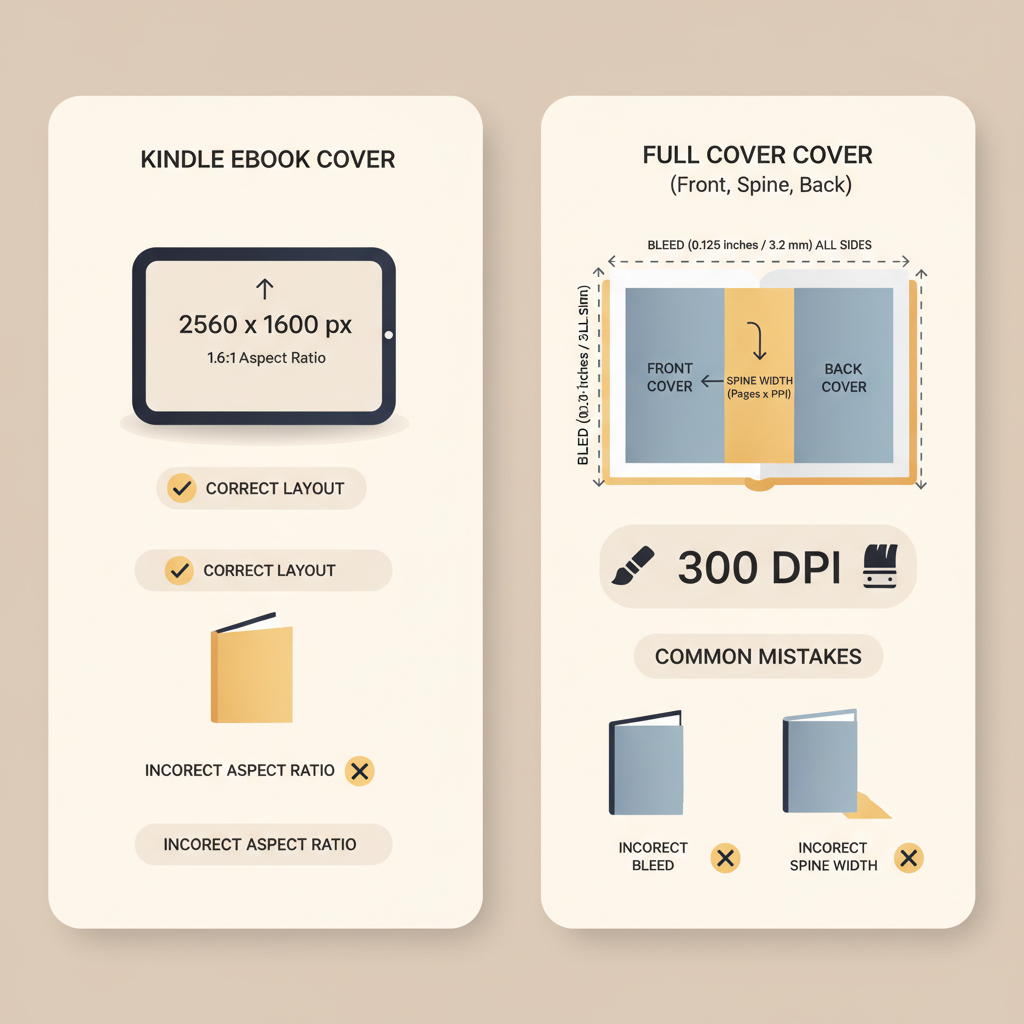
- Use 2,560 × 1,600 px (1.6:1) for Kindle ebook covers; keep print covers at 300 DPI and include 0.125″ bleed on all sides.
- Calculate paperback full-cover width as: left bleed + back trim + spine width + front trim + right bleed; use KDP tools for exact spine values.
- Avoid common layout mistakes: low resolution, crowded typography, incorrect spine placement, ignoring safe zones, and poor thumbnail hierarchy.
Table of Contents
- Overview
- Exact cover dimensions for KDP (ebooks and paperbacks)
- Paperback cover calculations: bleed, spine, and file specs
- Common layout mistakes to avoid
- How BookAutoAI helps (cover generator, EPUB conversion, and formatting)
- Final thoughts
- FAQ
- Sources
Overview
This guide explains book cover size for Amazon KDP and the most common layout mistakes authors make when preparing ebook and paperback covers. If you’re publishing on KDP you need accurate pixel sizes for ebooks, precise trim and bleed for print, and a checklist for text and image placement so your design works at thumbnail size.
For deeper technical steps and file preparation tips, see the Amazon Kdp Formatting Guide 2 which expands on margin rules and PDF export settings. If you need dedicated upload tools, consider a reliable book upload tool to simplify distribution to retailers.
Exact cover dimensions for KDP (ebooks and paperbacks)
Ebook cover basics (pixel dimensions and ratio)
Ideal dimensions: 2,560 pixels (height) × 1,600 pixels (width) — a 1.6:1 height-to-width ratio that Amazon expects for Kindle ebook covers.
Minimum: 1,000 × 625 px. Maximum per side: up to 10,000 px; keep file size under 50 MB.
Use 72 DPI for digital display and export as a flattened JPEG (or TIFF) in RGB. High-contrast, flattened images and embedded profiles reduce upload errors.
Why ratio matters: a 1.6:1 ratio preserves composition across devices; deviating risks cropping of key elements in thumbnails.
Practical tips for ebook covers
- Design at 2,560 × 1,600 px then scale down for thumbnails; always check a ~100 px wide thumbnail for legibility.
- Use simple type and generous spacing; avoid fine serifs and tightly tracked text that blurs at small sizes.
- Export a flattened JPEG with an embedded color profile; avoid layered files when uploading.
Paperback cover basics (trim sizes, bleed, and spine)
Common trim sizes include 6″ × 9″, 5.5″ × 8.5″, 5.25″ × 8″, and larger formats up to 8.5″ × 11″. KDP requires a 0.125″ (3.2 mm) bleed on all sides.
Spine width depends on page count and ink type; KDP’s Cover Calculator or your design tool will provide the exact spine measurement you must use when placing spine text or images.
Full cover layout: full width = left bleed + back trim + spine width + front trim + right bleed. Full height = trim height + top bleed + bottom bleed.
For print, upload a single flattened PDF with embedded fonts and 300 DPI images to ensure crisp printing and to avoid processing errors.
Practical tips for paperback covers
- Use the KDP Cover Calculator or an exact template in your design tool to generate proper artboard dimensions.
- If the paperback is under 80 pages, avoid spine text — KDP may not print it correctly; center key elements on the front/back instead.
- Keep important text at least 0.25″ inside the trim edge (safe zone).
Paperback cover calculations: bleed, spine, and file specs
How to calculate full cover size (illustrated in words)
Start with the chosen trim size — for example, 6″ × 9″. For a full wrap, you need the back trim, the spine width based on page count, and the front trim, plus bleed on both outer edges.
Example: with a 6″ × 9″ trim and a 0.375″ spine, full width = 0.125″ (left bleed) + 6″ (back) + 0.375″ (spine) + 6″ (front) + 0.125″ (right bleed) = 12.625″. Height = 9″ + 0.125″ + 0.125″ = 9.25″.
File specs and typography rules for print
- Embed or outline fonts in the PDF; body text should be at least 7 pt for printing quality.
- Spine text (if used) should be bold and readable — typically 10–12 pt depending on spine width.
- Use 300 DPI images at final print size; for full-color covers prefer CMYK export or check KDP previews for conversions.
Common layout mistakes to avoid
1) Low resolution and wrong color profiles
Using web-optimized images for print is the most common visual problem. For paperbacks always use 300 DPI at final print dimensions. For ebooks, use 2,560 × 1,600 px to stay sharp across devices.
Fix: replace low-res art and avoid mixing RGB and CMYK profiles in the same file.
2) Crowded typography and tiny titles
A design that reads at full size can fail at thumbnail size. Titles and author names must be legible at ~100 px wide.
Fix: scale the title, increase letter spacing slightly, and simplify the background behind key text so it reads in the store listing.
3) Incorrect spine placement and tight margins
Designers sometimes estimate the spine and forget to update it after changing page counts, which shifts spine text off-center.
Always calculate the spine width from the final page count and position spine elements within the exact spine bounds, leaving a margin from the edges to avoid trimming.
4) Ignoring bleed and safe zones
Placing important elements inside the bleed risks losing them to trimming; putting content too close to trim edges looks cramped.
Fix: keep essential content at least 0.25″ inside the trim and extend backgrounds into the 0.125″ bleed to prevent white lines.
5) Busy backgrounds and poor hierarchy
Background textures or busy photos can compete with text and reduce click-throughs.
Use contrast, overlays, or subtle drop shadows behind text so the title remains the highest-contrast element and the focal image stays simple.
6) Wrong file types for platform checks
Uploading layered PSDs, unflattened PDFs, or unsupported TIFFs can trigger processing errors on KDP.
Fix: export a flattened PDF with embedded fonts for print and a flattened RGB JPEG for ebooks, and validate in previewers before publishing.
How BookAutoAI helps (cover generator, EPUB conversion, and formatting)
If you’re producing non-fiction books at scale, BookAutoAI is built for speed and correctness: it produces KDP-ready covers and EPUBs that match Amazon’s technical rules and market expectations.
The platform handles cover sizing, spine calculations, and templates so you don’t guess trim size or bleed when creating a paperback or ebook.
Cover generation that sells, not just “looks AI-made”
BookAutoAI’s cover generator is trained on high-selling covers and tuned for genre-appropriate layouts, readable typography, and thumbnail legibility.
It outputs market-ready front covers and full paperback wraps (when needed) with correct dimensions, hierarchy, and spine placement.
EPUB conversion and final file checks
Malformed EPUBs are a frequent source of rejections. BookAutoAI’s EPUB Converter returns a properly structured EPUB with embedded metadata, clean chapter navigation, and an embedded front cover.
Use that converter when you need a reliable conversion step to reduce trial-and-error before uploading to retailers like KDP.
Formatting and paperback templates
BookAutoAI generates correct full-cover templates based on trim size and exact page count so spine text and back-blurb placement are accurate on the first try.
Note: combining automated cover generation with verified EPUB conversion removes the most frequent causes of rejections and wasted time.
Real-world note on speed and quality
Designs that follow reader expectations generally get higher click-through rates than covers that merely showcase machine artistry. Use tested templates and validate with the KDP previewer to ensure the cover reads at thumbnail sizes.
Final thoughts
Creating KDP-ready covers requires exact math (pixel size, bleed, spine) and clear design judgment (hierarchy, legibility). Use templates, validate in previewers, and check thumbnails before you upload.
When in doubt, use a cover generator trained on best-selling examples and a verified EPUB converter to save time and reduce upload rejections.
FAQ
What pixel size should my ebook cover be?
Aim for 2,560 px high by 1,600 px wide (1.6:1 ratio). This size looks good on high-DPI devices and scales down to thumbnails.
Do I need bleed for ebook covers?
No. Bleed is a print requirement — ebook covers should be framed to exact pixel dimensions without bleed.
How do I calculate the spine width for my paperback?
Spine width depends on page count and ink type. Use KDP’s Cover Calculator or your publishing tool to compute spine width and then add it to the full-cover width calculation.
What format should my paperback cover file be?
KDP prefers a flattened PDF (front + spine + back) with embedded fonts and 300 DPI images. Keep layers flattened and export with correct trim and bleed.
How can I check thumbnail legibility before uploading?
Shrink your cover to a 100–150 px wide thumbnail and inspect the title and author. If illegible, increase size, boldness, or simplify the background behind the text.
Can BookAutoAI create both ebook and paperback covers with correct sizes?
Yes. BookAutoAI generates ebook covers at recommended pixel dimensions and produces full paperback cover files with accurate bleed and spine calculation so the output is ready for upload.
Sources
- https://reedsy.com/studio/resources/book-cover-dimensions
- https://kdp.amazon.com/help/topic/G200645690
- https://kdp.amazon.com/help/topic/G201857950
- https://kdp.amazon.com/help/topic/GVBQ3CMEQW3W2VL6
- https://kdp.amazon.com/help/topic/G201953020
- https://kdp.amazon.com/cover-calculator
Book cover size for Amazon KDP: exact cover dimensions + common layout mistakes Estimated reading time: 7 minutes Use 2,560 × 1,600 px (1.6:1) for Kindle ebook covers; keep print covers at 300 DPI and include 0.125″ bleed on all sides. Calculate paperback full-cover width as: left bleed + back trim + spine width +…