
KDP Publishing Timeline How Long It Takes to Go Live
KDP Publishing Timeline: How Long It Really Takes to Go Live on Amazon KDP
Estimated reading time: 5 minutes
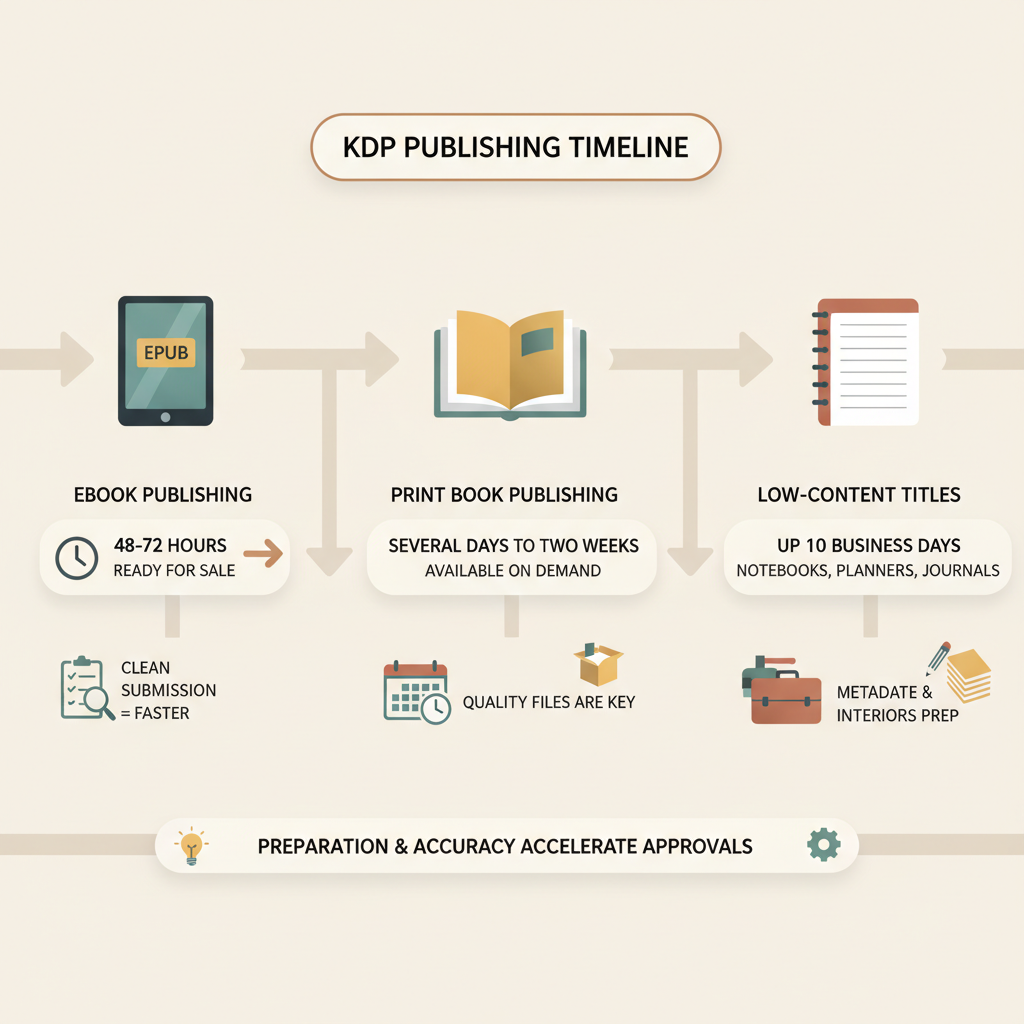
- eBooks typically appear in about 48–72 hours; print books take several days to two weeks, and low‑content titles can be held up to 10 business days.
- Preparing clean EPUBs, print-ready covers, and accurate metadata greatly reduces rejections and manual review time.
- Tools that convert manuscripts to EPUB and generate market-ready covers (like Bookautoai) eliminate common pre-upload bottlenecks.
Table of Contents
- What the KDP publishing timeline looks like
- Typical timelines: eBook, paperback, low‑content, and pre‑orders
- Common delays and how to avoid them
- Speed up uploads with BookAutoAI: practical ways to meet KDP timelines
- Final thoughts
- FAQ
- Sources
What the KDP publishing timeline looks like
KDP Publishing Timeline is a frequent question for new and experienced authors alike. Amazon processes submissions with a mix of automation and manual checks, and the total time from upload to “Live” can vary depending on format, quality of the files, and recent policy changes.
In general, expect eBooks to appear fastest and print editions to take longer because of production checks. If you want a practical step-by-step upload walkthrough, see Publish Book Amazon Kdp 3 for details on the submission process and status updates.
This article breaks down the KDP timeline by format, explains common causes of delays, and shows how preparing files correctly shortens the path from idea to sale. It also highlights tools for turning a manuscript into a store-ready EPUB and a market-ready cover so you avoid predictable hold-ups.
Typical timelines: eBook, paperback, low‑content, and pre‑orders
eBooks (Kindle)
Typical time to appear: 48–72 hours.
Thumbnails and search visibility: thumbnails often take up to 72 hours to display; catalog indexing (search, categories) can take additional time.
Why: Digital files go through format and metadata validation but don’t require print production. Errors in EPUB structure or missing metadata will trigger a rejection or a delay, so proper conversion matters.
Print books (paperback and hardcover)
Typical time to appear: a few days to two weeks.
Why: Print titles require extra checks — interior and cover specifications, bleed and trim checks, and print distribution setup. If the print proof fails any technical check, KDP pauses publishing and asks for updated files.
Low‑content books (notebooks, journals, planners)
Typical time to appear: up to 10 business days in review (recent change).
Why: KDP updated review windows for many low‑content titles to combat low-quality mass uploads. These titles now frequently hit longer manual review queues.
Pre‑orders and scheduled releases
Pre-orders can be scheduled up to one year ahead; KDP requires the final manuscript be submitted at least 72 hours before the scheduled launch. A properly submitted pre-order prevents the temporary “hidden” detail page period and helps with coordinated marketing.
Book linking (eBook to print)
Additional time: linking editions and syncing details can add around a week to full visibility. KDP needs to reconcile metadata across formats and create the product family page.
Practical windows to expect
Fastest scenario: well-prepared eBook — 48 hours.
Common scenario: standard eBook or print — 3–10 business days.
Slower scenarios: low-content, editing issues, or production rework — up to two weeks or more.
Common delays and how to avoid them
Most publishing delays are avoidable if you focus on three areas: file quality, metadata accuracy, and marketplace rules. Below are the top causes of hold-ups and practical fixes.
1) Bad EPUB structure or broken formatting
Cause: Incorrect EPUB packaging, invalid navigation files, or improperly encoded images.
Fix: Use a tested EPUB converter and validate the EPUB with tools like EPUBCheck before upload so KDP’s automated checks don’t flag your file.
2) Cover specification errors for print
Cause: Wrong spine calculation, missing bleed, low-resolution images, or typography that becomes unreadable at thumbnail size.
Fix: Generate covers using tools trained on book templates that output print-ready files with the right spine and bleed. A professional cover reduces rework and improves thumbnail performance.
3) Metadata mistakes
Cause: Mismatched ISBNs, incorrect author/title fields, faulty BISAC categories, or bad keywords.
Fix: Confirm ISBN assignment, use consistent title and author formatting, and select accurate categories. Clear metadata helps KDP index your title faster.
4) Low-content review queue
Cause: Recent policy updates mean KDP applies longer checks to notebooks and journals to protect buyers.
Fix: Ensure interior and cover fulfill marketplace quality expectations; include original content or added value where possible.
5) Large backlog during busy seasons
Cause: Holidays, promotional pushes, or policy rollouts can increase review times.
Fix: Allow extra buffer (2–3x normal time) when scheduling releases around major retail events.
6) Issues with book family linking
Cause: You published editions separately with different metadata and KDP needs time to reconcile.
Fix: Use consistent metadata across formats and verify ASIN/ISBN fields during upload.
A clean submission rarely triggers manual review; validating files before you hit Publish saves days of back-and-forth.
How to work in parallel with KDP review: Upload early, schedule pre-orders when appropriate, and monitor the KDP Bookshelf for status updates so you can respond promptly to any required changes.
Speed up uploads with BookAutoAI: practical ways to meet KDP timelines
What slows authors most
The most consistent bottleneck before KDP sees your submission is the time you spend preparing files: manual formatting, fixing EPUB problems, and designing covers that read at thumbnail size.
How BookAutoAI helps
BookAutoAI speeds non-fiction authors to the point where KDP can do its work without hold-ups by combining generation, formatting, and cover creation.
Full manuscript generation and humanized editing: generate and refine up to 25,000 words so fewer line edits are needed before upload.
Built-in EPUB conversion: the EPUB Converter produces store-ready EPUBs with correct metadata, clean chapter structure, and embedded covers—removing a major source of rejections.
Professional, market‑focused covers: the platform’s cover generator creates actual book covers (not just images) with readable typography and correct export sizes for ebook and print.
One-step exports: export EPUBs and print-ready PDFs that match KDP specs so you avoid multiple trial-and-error re-uploads.
Practical workflow to hit KDP timelines
1) Generate and humanize your manuscript inside Bookautoai.
2) Use the built-in EPUB converter to produce a validated EPUB that passes checks.
3) Create a market-ready cover with the cover generator and export print covers with correct spine and bleed settings.
4) Upload to KDP early in the week (Mondays–Wednesdays minimize weekend delays) and schedule a pre-order if you need a fixed release date.
If you produce paperback and ebook files together, the platform’s single exports reduce mismatch errors and help KDP link editions faster; many authors use Bookautoai for this convenience.
When preparing to upload to retailers or managing distribution, authors often compare third-party solutions; if you need specialized upload helpers, consider modern book uploading tools that assist with retailer-ready submissions.
Why the right tools matter
A clean submission rarely triggers manual review. Tools that produce compliant EPUBs and print cover files let you reach the typical 48–72 hour eBook window and the standard print window of a few days to two weeks.
BookAutoAI’s combined generation, EPUB conversion, and cover output reduces the pre-upload friction authors face every day.
Add-on benefits include consistent metadata across formats and batch exports so you can scale multiple releases without repeating manual steps.
Final thoughts
The KDP Publishing Timeline depends less on Amazon and more on the files you submit. Well-prepared EPUBs, print-ready covers, and accurate metadata are the shortest route to “Live” status.
eBooks typically go live in 48–72 hours, print books can take several days to two weeks, and low-content titles may sit in review for up to 10 business days. Planning, validating, and using purpose-built tools compress those windows and eliminate common rework.
FAQ
How long before a scheduled pre-order must I upload my manuscript?
KDP requires the final manuscript be uploaded at least 72 hours before the scheduled launch date. Upload and verify files earlier to allow for unexpected issues.
My eBook is marked Live but no thumbnail appears—why?
Thumbnail images can take up to 72 hours to show in all marketplace views. The book may appear in searches before thumbnails are fully propagated.
Are there days when reviews take longer?
Yes. Weekends, holidays, and peak retail periods can add delays. Upload earlier in the week and allow extra buffer time around major holidays.
What causes a print book to be rejected?
Common causes include incorrect spine calculation, low-resolution images, missing bleed, or formatting that violates print specifications. Using a cover generator that outputs print-ready files reduces these errors.
Can automated tools get my book rejected for being AI-generated?
Marketplaces check for quality and policy compliance. BookAutoAI focuses on humanizing text and producing natural-sounding content to reduce low-quality flags. Authors should still ensure originality and KDP policy compliance.
Where can I get more help uploading to KDP?
For a practical KDP upload guide and status steps, see the Publish Book Amazon Kdp 3 walkthrough which outlines common status messages you’ll encounter on the KDP Bookshelf.
Sources
- https://kdp.amazon.com/help/topic/G200627450
- https://kdp.amazon.com/help/topic/G202173620
- https://kdp.amazon.com/help/topic/GDTMGBCWHAY35NK4
- https://www.publishing.com/blog/how-long-does-kdp-take-to-publish
- https://www.authorimprints.com/kdp-publishing-timelines-new-books/
- https://www.youtube.com/watch?v=ncVch0p0rKs
KDP Publishing Timeline: How Long It Really Takes to Go Live on Amazon KDP Estimated reading time: 5 minutes eBooks typically appear in about 48–72 hours; print books take several days to two weeks, and low‑content titles can be held up to 10 business days. Preparing clean EPUBs, print-ready covers, and accurate metadata greatly reduces…