
Amazon KDP how much does it cost full breakdown for authors
amazon kdp how much does it cost: a simple answer and full breakdown
Estimated reading time: 7 minutes
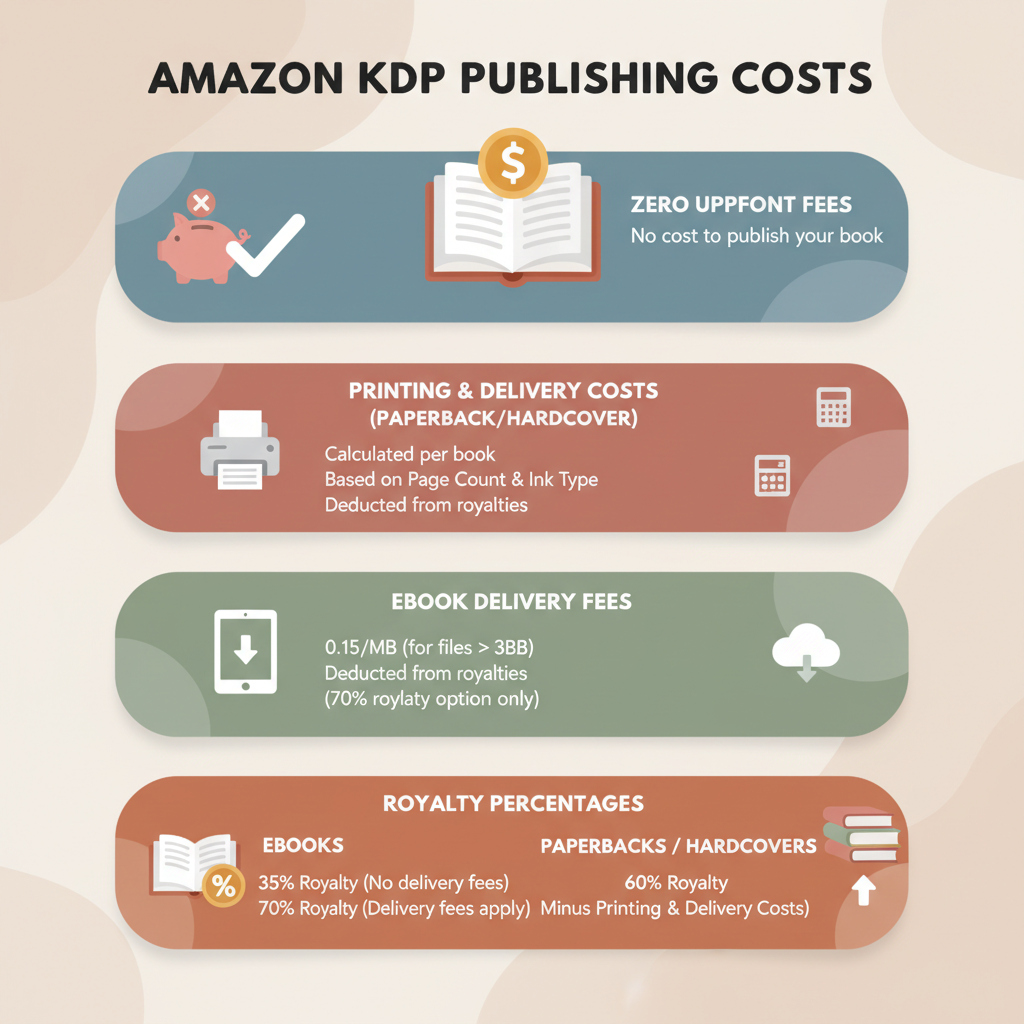
- Publishing on Amazon KDP has no upfront listing fee; Amazon deducts printing and delivery costs from royalties.
- The main variable costs are ebook delivery fees (on the 70% royalty option) and printing costs for paperbacks/hardcovers.
- Tools like BookAutoAI can reduce time and many upfront expenses by producing formatted manuscripts, covers, and store-ready EPUBs.
Table of Contents
- Quick answer: Amazon KDP — how much does it cost?
- Detailed cost breakdown
- How to keep your first-book costs low and how BookAutoAI helps
- Final thoughts
- FAQ
- Sources
Quick answer: Amazon KDP — how much does it cost?
Publishing on Amazon KDP in the basic sense costs you nothing up front. The platform lets you upload an ebook or print-ready file for free and lists it for sale without a setup fee.
The real costs come out of each sale: printing costs for physical books and ebook delivery fees on 70% royalty plan sales are deducted from the royalties you earn. If you want a compact reference, see the Amazon KDP Fees Breakdown for a side-by-side cost summary.
Common immediate deductions include:
- Ebook delivery fee (applies to 70% royalty option): charged per megabyte of the delivered file and deducted per sale.
- Printing costs (paperback and hardcover): determined by page count, ink type, trim size, and marketplace.
- Amazon’s royalty rates: typically 70% for qualifying ebook sales (minus delivery fees) and 60% of list price for paperbacks minus printing costs.
Detailed cost breakdown: ebooks, paperbacks, hardcovers, and optional services
1) Ebook costs and delivery fees
Upfront: $0 to upload and publish an ebook on KDP.
Royalties: Two royalty plans exist for Amazon.com and most marketplaces: 35% and 70%. The 70% option has geographic and pricing eligibility rules; the 35% option does not charge delivery fees.
Delivery fee: On 70% royalty sales, Amazon charges a delivery fee calculated per megabyte (MB) of the ebook file. For U.S. sales the fee is approximately $0.15 per MB (rates vary by marketplace). If your book is largely text and you avoid large embedded images, the delivery fee is often small.
Practical example: a text-first ebook with a final file size of 1.2 MB would incur a delivery fee of roughly $0.18 on a 70% sale. If the list price is $4.99, the 70% royalty is $3.49, and after delivery fee your net royalty would be about $3.31.
Why this matters: optimizing file size (compressing images, avoiding unnecessary embedded assets) lowers delivery fees and increases per-sale earnings.
2) Paperback printing costs and how royalties are calculated
Upfront: $0 to upload a paperback to KDP.
Printing cost formula: Amazon calculates a base printing charge (which depends on marketplace and book type) plus a per-page charge. Trim size and ink choices affect the fixed and per-page components.
Typical U.S. examples (illustrative—use KDP’s calculator for exact numbers):
- Short black-and-white paperback (24–108 pages): fixed base around $2.30 USD (varies) for U.S. marketplace.
- Longer black-and-white paperback: sample formula $1.00 + $0.012 per page. A 200-page example: $1.00 + (200 × $0.012) = $3.40 (plus any fixed base).
Royalties: Amazon pays 60% of list price minus the printing cost. Example: $15.99 × 60% = $9.59 gross; minus a $4.60 print cost yields roughly $4.99 net royalty.
3) Hardcover printing
Upfront: $0 to make the book available.
Hardcovers have higher base printing costs and similar per-page charges for longer books. Example structures include fixed amounts (e.g., ~$6.80 for some ranges) or formulas such as $5.65 + $0.012/page for longer runs.
Royalties: Math mirrors paperbacks: list price × 60% − printing cost (distribution model details may vary by marketplace).
4) Other costs to consider (optional but common)
- ISBN: KDP provides a free ISBN for paperbacks or you can buy your own if you want publisher control.
- Proof and author copies: ordering printed proofs or discounted author copies costs printing + shipping and is useful for quality checks.
- Advertising and promotion: AMS, social ads, or other marketing add expense but can drive sales.
- Editing, cover design, formatting: hiring professionals is an upfront cost; using tools can reduce these fees.
- Expanded distribution: distributing outside Amazon changes pricing and royalty math and may introduce distribution fees.
How royalties work in plain terms
- Ebook (70%): Royalty = List price × 70% − delivery fee.
- Ebook (35%): Royalty = List price × 35% (no delivery fee).
- Paperback/hardcover: Royalty = List price × 60% − printing cost (fees differ by marketplace).
Examples that show the effect of printing and delivery costs
- Small ebook (1.0 MB), $4.99, 70% plan:
- 70% royalty = $3.49
- Delivery fee ≈ $0.15 → Net ≈ $3.34 per sale
- 200-page black-and-white paperback, $15.99:
- Gross 60% = $9.59
- Print cost ≈ $4.60 → Net ≈ $4.99 per sale
How to keep your first-book costs low and how BookAutoAI helps
If your primary goal with a first book is to minimize upfront spending while still producing a professional product, focus on KDP’s zero-setup advantage, limit paid services where feasible, and use tools that bundle production tasks.
Practical cost-saving steps
- Start with ebook-only if you want the absolute lowest upfront cost; add print later after you have sales and confidence.
- Avoid heavy images in ebooks or use optimized, compressed images to keep file size—and delivery fees—low.
- Choose black-and-white interiors for nonfiction to save on printing costs; color is much more expensive.
- Use KDP’s free ISBN if you’re okay with KDP-listed publisher metadata; buy your own ISBN only if you need publisher control.
- Order a proof copy before wide distribution to avoid costly design or formatting mistakes.
How BookAutoAI changes the cost equation
BookAutoAI is built for authors who want professional books with minimal extra spending. It generates a fully formatted manuscript, creates market-ready covers, and outputs store-ready EPUBs—so many common upfront costs (formatting, separate cover design, EPUB conversion) are reduced or removed.
Key ways BookAutoAI saves you money and time
- Automated formatting and EPUB conversion: the built-in EPUB converter produces a clean, store-ready file without third-party software or plugins, reducing trial-and-error and paid fixes.
- Built-in cover generator tuned for sales: the cover generator creates real book covers with readable typography and market-appropriate visuals, reducing the need to hire a separate cover designer.
- One-step production for paperbacks and ebooks: BookAutoAI produces both formats and streamlines the transition to KDP; if you plan to create a paperback or ebook, BookAutoAI centralizes steps to save time and expense.
These features pair well with publisher tools for uploads; for example, many authors use specialized services when they need help with bulk or complex uploads.
Smart pricing and profit checks
- Use Amazon’s royalty and printing calculators to test list prices until you find a balance between reader expectations and per-sale profit.
- For nonfiction, competitive price ranges often perform better than high prices that sell fewer copies.
- If you sell via expanded distribution, test how print costs and discounting reduce royalties for those channels.
Practical launch checklist that costs little
- Prepare a clean, edited manuscript (light proofreading at minimum).
- Use Bookautoai to generate a formatted manuscript, EPUB, and a cover.
- Upload to KDP, set your list price, and order a proof copy for quality assurance.
- Start with organic promotion or modest advertising budgets until you understand conversion rates.
Final thoughts
Publishing your first book on Amazon KDP can be as inexpensive or as involved as you choose. The platform’s pay-per-sale model removes the need for upfront listing fees, so your main financial decisions are about production quality, file optimization, pricing, and marketing.
For authors who want to keep costs low without sacrificing a professional result, using an integrated system like BookAutoAI can remove several common expenses: it produces formatted manuscripts, market-ready covers, and clean EPUBs—saving time and reducing the need for multiple outside services.
Visit Bookautoai.com and try our demo book.
FAQ
Is there any scenario where KDP charges an upfront fee?
No. KDP does not charge listing or setup fees for ebooks, paperbacks, or hardcovers. Fees accrue only when a unit is sold or when you optionally pay for services like ads, editing, or buying an ISBN.
How does the ebook delivery fee affect low-priced ebooks?
When the list price is low, the delivery fee can be a significant portion of the net royalty on a 70% sale. Consider the 35% royalty option for very low-priced ebooks or keep file sizes tiny to minimize delivery fees.
Do I need to buy an ISBN?
No. KDP offers a free ISBN for paperbacks. Buying your own ISBN gives you control over publisher metadata but costs money; many first-time authors use KDP’s free option to save on upfront costs.
How accurate are the printing cost examples?
Printing costs vary by marketplace, trim size, and Amazon updates. Use KDP’s online royalty and printing calculator for exact numbers before finalizing pricing.
Can BookAutoAI create both the cover and the EPUB for me?
Yes. BookAutoAI includes a cover generator and an EPUB converter that embed metadata and produce structured, store-ready files.
Sources
- How Much Does It Cost to Publish a Book on Amazon? – Reedsy
- Hardcover Printing Cost – Kindle Direct Publishing
- Print Book Pricing Page – Kindle Direct Publishing
- Paperback Printing Cost – Kindle Direct Publishing
- Paperback Royalty – Kindle Direct Publishing
- Printing Cost & Royalty Calculator – Kindle Direct Publishing
amazon kdp how much does it cost: a simple answer and full breakdown Estimated reading time: 7 minutes Publishing on Amazon KDP has no upfront listing fee; Amazon deducts printing and delivery costs from royalties. The main variable costs are ebook delivery fees (on the 70% royalty option) and printing costs for paperbacks/hardcovers. Tools like…