
Amazon KDP Cost Breakdown for Self-Publishers and Fees
Amazon KDP Cost: A Beginner-Friendly Pricing Guide
Estimated reading time: 5 minutes
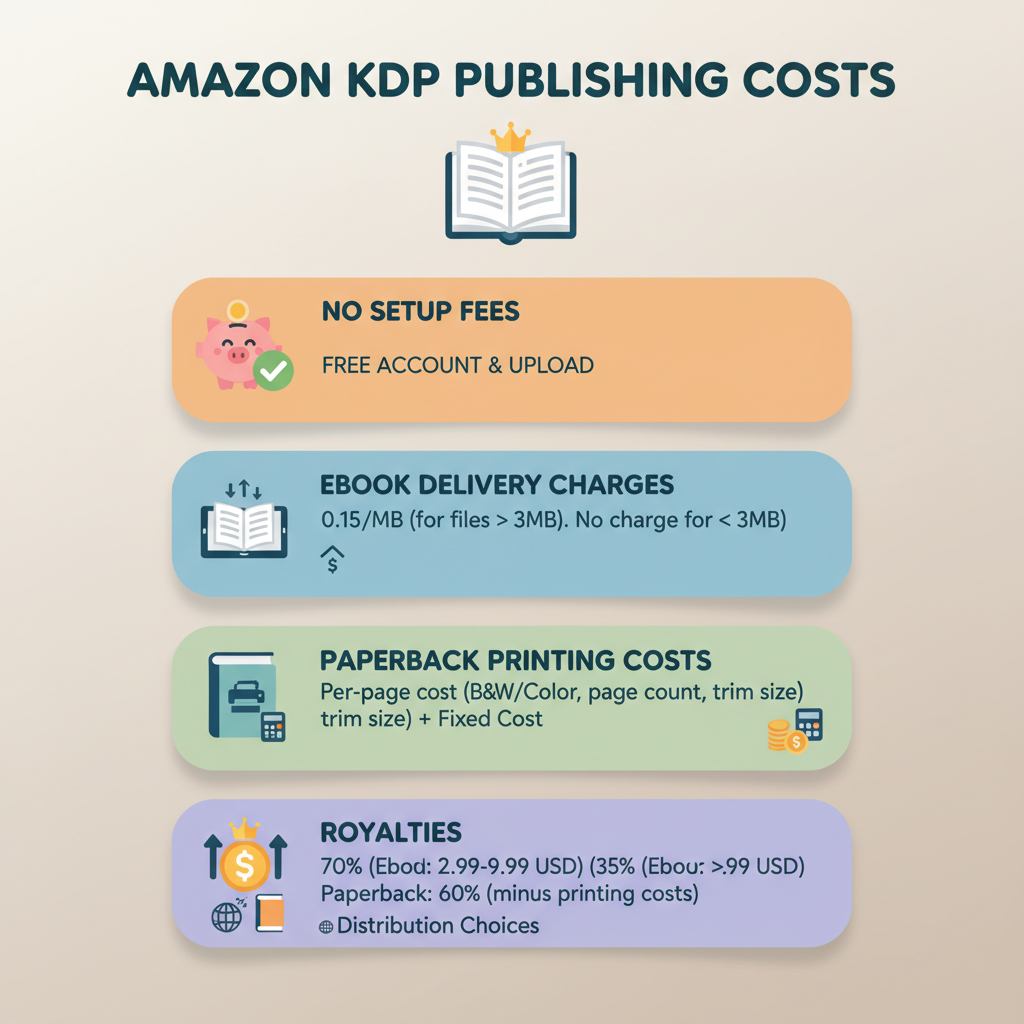
- Publishing on Amazon KDP has no setup fee; most costs are taken from each sale as printing or delivery fees.
- The main per-book expenses are ebook delivery (on the 70% plan) and paperback printing; royalties depend on price and distribution choices.
- Optional upfront services—editing, cover design, ISBN, and marketing—are where authors often spend the most money; automation tools can reduce those costs and time.
Table of contents
- What this guide covers
- Breakdown: setup costs, per-book fees, and royalties
- How KDP collects costs
- Real examples and optional expenses, with sample math
- Example 1: 150-page black-and-white paperback
- Example 2: Ebook priced at $4.99 (70% plan)
- Example 3: 300-page color interior
- Optional upfront expenses
- Editing and proofreading
- Cover design
- Formatting and EPUB conversion
- ISBN and barcodes
- Marketing and cover mockups
- How to prioritize spending
- How tools and automation lower your effective KDP costs
- Lowering formatting and conversion costs
- Lowering cover costs while keeping quality
- Reducing editing overhead
- Why automation matters for costs at scale
- How pricing choices affect revenue per sale
- Practical checklist before uploading
- Final practical note
- Next steps
- FAQ
- Sources
What this guide covers
Short answer: publishing on KDP itself costs nothing upfront, but Amazon deducts printing and delivery fees from royalties on every sale.
That pay-per-sale model makes KDP low-risk for authors, but out-of-pocket expenses depend on your ebook royalty plan, print size and ink, file size, distribution, and whether you pay for outside services like editing or covers.
For a deeper, technical look at fee formulas and examples, see Amazon Kdp Fees Breakdown which collects official and community resources.
Breakdown: setup costs, per-book fees, and royalties
Amazon KDP keeps the barrier to entry low: no listing fees, no monthly subscription, and no required setup cost to upload an ebook or paperback.
That means your initial cash outlay can be zero if you use only Amazon’s tools and free ISBN options.
How KDP collects costs
- Ebook royalties: Two royalty plans: 70% (for $2.99–$9.99 and other conditions) and 35% (other prices/territories). The 70% plan also charges a delivery fee based on file size (roughly $0.15/MB in several markets), which is subtracted before royalty calculation.
- Paperback royalties: For print-on-demand paperbacks, Amazon subtracts printing costs from the list price, then pays a royalty (usually 60% of list price minus printing cost). Printing includes a fixed per-book cost plus a per-page cost that varies by ink and marketplace.
- Expanded/third-party distribution: If chosen, royalty share is lower (often ~40%) because middlemen and retailers need margins.
Why this model lowers risk: because KDP charges per sale rather than requiring large upfront print runs, authors can start with little to no initial investment. Still, plan for optional services—editing, a professional cover, formatting, and marketing—that often improve sales.
Real examples and optional expenses, with sample math
Below are simple, realistic examples for a typical non-fiction book to help estimate earnings and costs.
Example 1: 150-page black-and-white paperback (U.S. marketplace)
Printing cost estimate: A common example is roughly $2.30 fixed + $0.012 per page for black ink. For 150 pages: $2.30 + (150 × $0.012) = $4.10.
List price: $15.99.
Royalty (standard KDP distribution): Royalty = 60% of list price − printing cost = (0.60 × $15.99) − $4.10 ≈ $5.49 per sale.
Example 2: Ebook priced at $4.99 using the 70% plan
If the ebook file is 3 MB and delivery fee is $0.15/MB: delivery = 3 × $0.15 = $0.45.
Gross: 70% of $4.99 = $3.493; after delivery fee ≈ $3.04 per sale.
If you choose the 35% plan instead, royalty would be 35% of $4.99 = $1.747 (no delivery fee), which can be lower if your file size is small.
Example 3: 300-page color interior
Color printing increases per-page costs significantly; expect printing to reach $8–$12 per copy depending on specs and market. Color interiors can be the major driver of higher printing costs and lower royalties.
Optional upfront expenses (what authors actually pay)
Most authors spend money before any sales on services that improve quality and discoverability.
1. Editing and proofreading
- Developmental editing: $500–$3,000+ depending on length.
- Line editing / copyediting: $200–$1,000+.
- Proofreading: $100–$500.
Why it matters: Good editing improves conversion rates and reviews more than small price savings.
2. Cover design
Freelance covers: $50–$500+ (many pros $150–$500). Templates: $10–$50.
Look for readability at thumbnail size, genre fit, and clean typography. A market-aware cover generator can produce front covers optimized for marketplaces and reduce design costs and iteration time.
3. Formatting and EPUB conversion
Freelance formatter: $50–$300; DIY tools: free to $100+.
If you need a ready-to-upload EPUB that passes platform checks, an EPUB converter that embeds metadata and structures chapters saves time and technical headaches.
4. ISBN and barcodes
ISBNs can cost $15–$125 depending on country; Amazon can provide a free KDP ISBN for paperbacks (Amazon listed as imprint).
Barcodes are often included with paid ISBN services or available separately for a small fee.
5. Marketing and cover mockups
Ads: $100–$2,000+ per month depending on scale. Promo design, ARCs, and launch services vary widely.
How to prioritize spending
If budget is limited, prioritize editing and a professional-looking cover—these directly affect sales.
If you can’t afford a designer, use a proven cover generator or a high-quality template that matches genre conventions.
Formatting errors and broken EPUBs can block distribution or create poor reader experiences; consider tools that produce store-ready files.
How tools and automation lower your effective KDP costs
Publishing has technical tasks and product-facing elements; tools reduce time and per-book spend for both areas.
Lowering formatting and conversion costs
Manual EPUB creation needs HTML/CSS and metadata handling; mistakes cause rejections or preview issues.
A reliable EPUB converter that outputs a store-compatible file removes the need for a hired formatter for many authors.
Lowering cover costs while keeping quality
A cover should signal genre and read well at thumbnail size. Many tools create art that looks interesting but fails at thumbnail scale.
Using a trained cover tool that follows best-selling patterns reduces rounds of design and helps match marketplace expectations.
Reducing editing overhead without skipping human judgment
Drafting aids can speed structure and early edits, but most authors still benefit from a human editor for final polish.
Use automation to reduce initial editing load and budget for a final professional pass if you want stronger readership outcomes.
Why automation matters for costs at scale
If you plan to publish multiple books, time is money. Tools reduce per-book spend on formatting and covers, and speed time-to-market.
When KDP charges costs per sale rather than upfront, lowering optional expenses and time-to-publish is the clearest way to improve profitability.
How pricing choices affect revenue per sale
- Keep ebook list prices within ranges that qualify for better royalty plans (the 70% band when applicable).
- Watch file size; large embedded images increase ebook delivery fees.
- For print, set list price so royalties remain positive after printing; KDP enforces minimum list prices.
Practical checklist before uploading
- Final manuscript proofread and edited.
- Store-ready EPUB and a clean print PDF interior for paperbacks.
- Market-ready cover that reads at thumbnail size—consider a cover generator or Bookautoai for a fast, genre-appropriate option: Bookautoai.
- Metadata set: title, subtitle, author, description.
- Decide on KDP ebook royalty plan and distribution options.
- Test previewers (KDP previewer and device previews); if you need help uploading, consider reliable book upload tools.
Final practical note
To minimize upfront spending and speed a clean KDP launch, focus on a strong edit, a professional cover that reads in thumbnails, and clean formatted files.
Tools that produce store-ready EPUBs and market-aware covers remove many small costs and headaches.
Next steps
Try a demo of available tools to see how a market-ready EPUB, formatted interior, and professional cover generator can lower your practical costs and time-to-publish.
FAQ
Is there any cost to create an account on KDP?
No. Signing up for Kindle Direct Publishing is free. You can upload ebooks and paperbacks without paying a listing fee.
How does Amazon calculate printing cost for paperbacks?
Printing cost = fixed per-book cost + (per-page cost × page count). The fixed and per-page rates vary by ink type, trim size, and marketplace. KDP’s help pages show exact current formulas.
Will I pay anything up front to sell on Amazon?
Not to list the book. Upfront costs are optional services you choose (editing, cover design, marketing). Printing costs are deducted from each sale, so you don’t pay per-unit printing until someone buys a copy.
What’s the best royalty option for ebooks?
The 70% option is attractive for prices $2.99–$9.99 in most territories and includes a delivery fee based on file size. For very low-priced books or some territories, the 35% option may apply. Choose based on your price and file size.
Do I need an ISBN to publish on KDP?
No. KDP can assign a free ISBN for paperbacks, but some authors buy their own ISBNs to maintain their imprint name.
How can I avoid common errors that cause rejections or preview problems?
Use a tested EPUB converter, validate your EPUB file, and preview your paperback with KDP’s previewer. Tools that format and structure books correctly reduce rejections and save time.
Sources
- https://reedsy.com/blog/guide/kdp/cost-to-publish-a-book-on-amazon/
- https://kdp.amazon.com/help/topic/G201834340
- https://kdp.amazon.com/help/topic/G201834330
- https://www.prophotostudio.net/amazon/how-to-sell-books-on-amazon/
- https://ghostwritingllc.com/blog/how-much-does-it-cost-to-publish-a-book/
Amazon KDP Cost: A Beginner-Friendly Pricing Guide Estimated reading time: 5 minutes Publishing on Amazon KDP has no setup fee; most costs are taken from each sale as printing or delivery fees. The main per-book expenses are ebook delivery (on the 70% plan) and paperback printing; royalties depend on price and distribution choices. Optional upfront…